ThinkPad TrackPoint
Three Ways to Rub a TrackPoint
As a semi-loyal ThinkPad fan, my love for the TrackPoint is no less than my love for Ms. Atsumi Tanezaki. So whether on the X230 or the X250, the TrackPoint has become my go-to pointing device. Sometimes even with a Bluetooth mouse connected, I’ll find myself using it for a while and then tossing the mouse aside to go back to the TrackPoint.
So here’s the thing: my X230 has been in use for almost two years now, and its TrackPoint is battered—gray and no longer bright, and it seems a bit shiny too. So I figured I’d find a new one to swap in. I knew Taobao had them… but I didn’t know there were actually three kinds of TrackPoint:
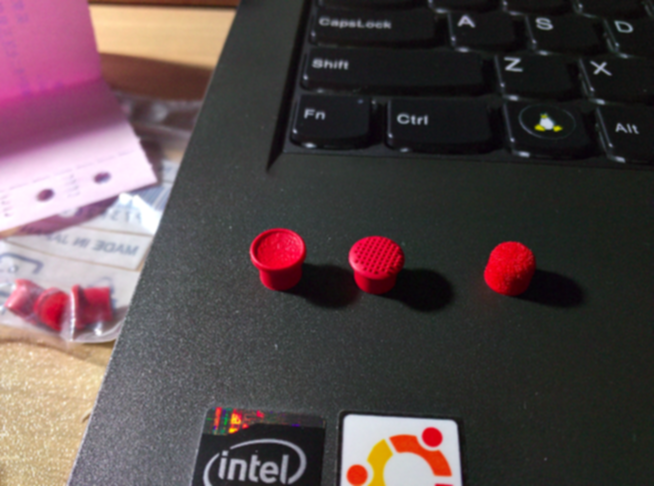
As shown, one is a concave pit shape, one is the current mainstream standard with anti-slip bumps, and the last one is a bizarre fuzzy thing like a nipple.
Not expensive—9 yuan a set on Taobao, the seller even covers shipping and throws in P/N codes to prove it’s genuine. Honestly, how fake could this thing even be?
Since the X230 is at work and I didn’t bring it home, I could only test with the X250 at home. After testing, I found the best-feeling one is actually that fuzzy nipple-like TrackPoint, and the worst is naturally the concave one—after all, this thing needs to protrude to be controlled properly. Making it concave just makes it harder to control, doesn’t it?
Anyway, I strongly recommend the nipple-shaped version, but if you’re an X240 or X250 user, I think I need to give you some bad news: be careful with the Taobao TrackPoint versions.
Why? Because the heights are different:
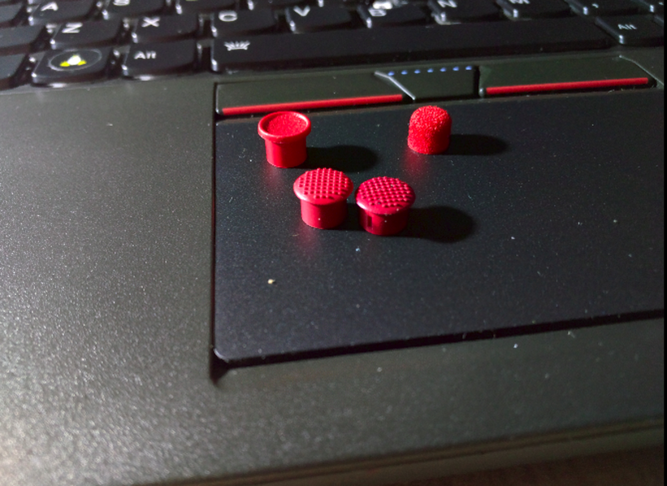
The one on the right in front is the standard X250 TrackPoint, and it looks shorter. Honestly, the X250’s default TrackPoint doesn’t feel as good as the X230’s, and that’s also because it’s not tall enough. But there’s really no way around it—to reduce body thickness, the X250’s keyboard travel has already been shortened, and the TrackPoint height has been reduced too.
You might think a slightly taller TrackPoint is no big deal, but after testing, the height of this TrackPoint when installed will make contact with the screen when you close the lid…
Just contact—I’m not sure if it actually presses hard. I just sprayed a little water on the TrackPoint, closed the lid, and found a water mark on the screen.
So… X240 and X250 users should be careful. If you have the touchscreen version, you should be even more careful—the glass surface will probably keep your lid from closing at all.
Of course, if you’re an X230 or earlier user, use whatever you want.
Comments are hosted on the Chinese main site. This mirror is read-only.