Flashing OpenWRT on the LinkSys WRT1900AC and Some Simple Mods
I’ve been using this LinkSys WRT1900AC for ages, no idea how many years now. The router itself works fine, stability is basically unstoppable, it just doesn’t do much.
LinkSys officially announced OpenWRT support for it, and the OpenWRT wiki has always said so, but the wiki also says the open-source firmware has a weak 5G signal, so I never bothered.
Time passes though, OpenWRT is LEDE now, and I still hadn’t flashed it on the WRT1900AC. Recently I wanted to set up some magic internet access, and after looking around I found the firmware for the WRT1900AC has matured a lot, so I decided to give it a shot.
Flashing itself isn’t a hassle. There are people maintaining firmware for the WRT1900AC right now, download links here:
http://firmware.koolshare.cn/linksys_wrt_series/linksys_wrt1900ac_lede_sadog/lede-V1.9-Update14/
If you can find the Telegram group where it’s discussed, there are even newer builds in there.
When flashing, if you see “factory” in the filename, you can flash straight from the official firmware. What you need to confirm is your router’s model, AC1900V1 or AC1900V2. I totally misread mine, I always thought it was V1, flashed it, then found out it’s actually V2. Even if you flash the wrong one you have a chance to recover, because the WRT1900AC has a dual-firmware design — one firmware dies, you can switch to the other, I think by pressing the switch repeatedly.
If you’re on the latest version after flashing, the built-in features work right away, but this firmware has issues…
First, the overlay space for read/write on the firmware itself is tiny, only a few hundred KB. Looks like it’s just there to save config, and once you’ve saved you’re screwed…
Second, the built-in magic internet access component doesn’t have the V2 suite. You can find similar ipk downloads online, but… there’s no space, so good luck installing anything.
So to fix this, sure, you could compile your own firmware, but that’s too much hassle. We can only expand the router’s root directory. The method is simple: a USB drive.
Get a USB drive, anything over 8G is fine, format it as ext4, plug it in and see if the router mounts it. If OK, you can continue.
We need to copy the router’s original root files to the USB drive, then mount the USB drive as the new root.
mkdir -p /tmp/introot
mkdir -p /tmp/extroot
mount --bind / /tmp/introot
mount /dev/sda1 /tmp/extroot
tar -C /tmp/introot -cvf - . | tar -C /tmp/extroot -xf -
umount /tmp/introot
umount /tmp/extroot
Check the USB drive’s UUID in the router, then edit /etc/config/fstab
config 'mount'
option target '/'
option uuid 'your USB drive UUID'
option enabled '1'
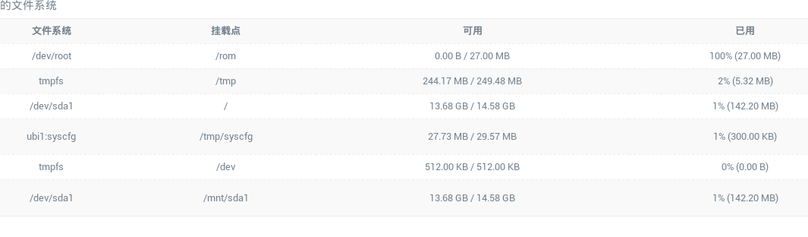
Save, reboot, and you’ll see the expansion.
After that it’s easy, whether it’s opkg update or opkg install, no problem.
But this router has another new problem: it runs too hot.
The fix is simple: buy a USB cooling fan on eBay (or Taobao if you’re in China). There are tons of router cooling fans around. I don’t recommend the 1900 RPM ones, too loud. 1200 RPM is basically inaudible and still cools effectively.
Finally, router is done, magic internet access works, and it’s got years of life left in it.
References: https://onlyke.com/html/938.html
Comments are hosted on the Chinese main site. This mirror is read-only.