Fixing OMV's Bizarre Failure to Mount Raid
The OMV NAS at work suddenly started acting up, telling me it couldn’t mount /dev/md0.
That knocked out both Plex and Syncthing on the NAS, and the error message itself was weird as hell:
mount: /dev/md0: more filesystems detected. This should not happen, use -t to explicitly specify the filesystem type or use wipefs(8) to clean up the device.
Multiple filesystems? What the hell is that supposed to mean? Was the Raid on this piece-of-junk office NAS about to die on me again?
And the strange part is, /dev/md0 actually mounts fine, Samba shares work normally too — it’s just OMV that can’t mount it, claiming multiple filesystems…
I figured the Raid probably wasn’t broken, and this was just a bug. Even dumber: /dev/md0 refused to umount, saying the device was busy.
So I decided to follow the hint first and took a look at the Raid’s state:
wipefs /dev/md0
The result was unexpected:
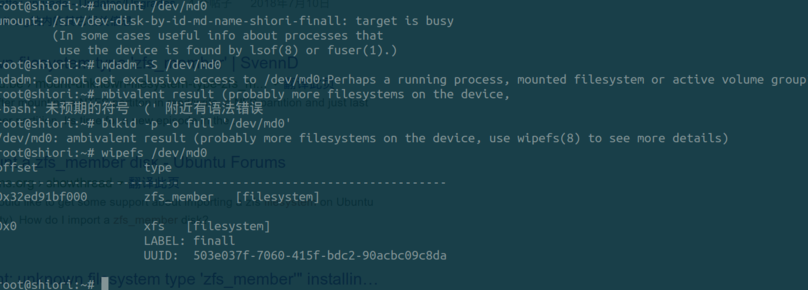
What the hell is this dumb “zfs_member” thing? I’ve never used anything zfs in my life.
After digging around, I found you can remove this zfs_member label with a command — again, wipefs.
wipefs -b -o 0x2ed91bf000 /dev/md0
But since my /dev/md0 kept saying “device busy” and wouldn’t let me modify it, I decided to edit /etc/fstab first, comment out the auto-mount, reboot, then clear the labels.
Deletion went smoothly. I figured after that there’d be no zfs_member label left…
But nope — still there!
And it had swapped to a different label, with a different value.
Fortunately I found someone else online who’d hit the same problem, and the labels keep coming back one after another — but it’s not infinite. After deleting 40-something of them, they finally vanished.
So I just kept deleting too, and around the 20-something mark, they were gone.
Restored /etc/fstab, rebooted, problem solved.
I still have no idea what this bizarre issue actually was, but anyway, it’s fixed.
Comments are hosted on the Chinese main site. This mirror is read-only.