Hackintosh Install Notes
I was using Linux, but I recently needed to do some video work, so I figured I’d just install a Hackintosh. Looked at the specs and it seemed like my setup would be pretty easy to get working, so I gave it a shot — and in the end it actually turned out perfect…
CPU is an E3 1230 V2, motherboard is a Gigabyte GA-B75-D3V
GPU is an ASUS GTX 460 V2
I tried a Clover install, but it felt like there were a lot of problems and too little documentation, so I’ll switch over to Clover later if I get the chance.
The install method was manually making a UniBeast USB installer and booting straight from it. The GPU was detected automatically (occasionally it wouldn’t be, but a reboot with -v fixed it).
Everything was fine after installation. Once in the system I installed drivers with MultiBeast — mine is the latest version, 5.3.0
Checked the boxes as below (mostly the driver-related ones; you all know how to handle the bootloader)
For the model, remember to pick macmini 6.2 — this affects CPU frequency scaling.
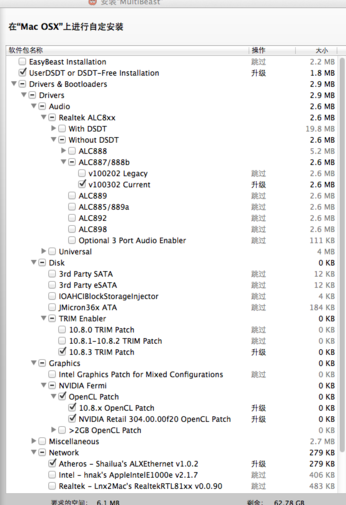
Reboot after installation, and the NIC, sound card, and GPU should all be fine.
Next, use the tool ssdtPRGen version 6.X to idiot-proof generate your own SSDT, copy it to E/, then set DropSSDT to yes and the other C and P options to No
Reboot, and CPU frequency scaling works normally…
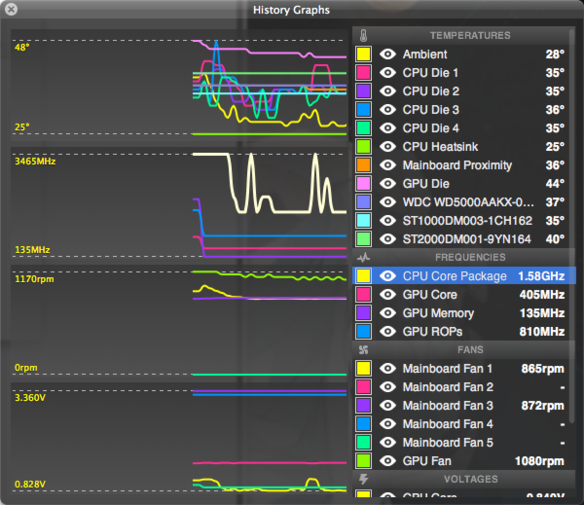
Test results:
Sleep works, benchmark scores are normal, USB 3.0 works, SSD speeds are normal, the GPU has a freeze problem (solvable with VLC), and as for the ripple effect, no need to mention it — it’s fine
That’s it.
Comments are hosted on the Chinese main site. This mirror is read-only.