How to Get Fcitx 5 Working on Ubuntu 20.04 Right Now
This article is outdated. For the current method of installing the stable Fcitx5 release on Ubuntu 20.04, go here: /archives/12285/
I went back and forth on whether to put Ubuntu in the title. Decided it was necessary, because right now only Arch Linux (and Debian) have the full Fcitx 5 suite — thanks to nepotism and cold-shoulder vibes respectively — and every single Fcitx 5 install guide online is written for Arch or Debian. All of them copied from each other. Basically zero Ubuntu. I spent a long time poking at Ubuntu’s packages before I noticed Ubuntu 20.04 can already install it.
1. Packages to install
On Ubuntu, I suggest just grabbing the whole suite in one go.
sudo apt-get install fcitx5 fcitx5-*
Why? Because you’ll also uninstall the whole suite in one go anyway. If you’re just trying it out, the version in the repo is fine. If you actually plan to use it, you’ll want a newer version, so add this PPA and update.
sudo add-apt-repository ppa:hosxy/fcitx5
sudo apt-get update
Config tool: kcm-fcitx5 (which bundles fcitx5-config-qt). Ubuntu doesn’t have it. That package belongs to the noble Arch.
Also, on Ubuntu 20.04 it can coexist with Fcitx 4, and you can even switch between them. (If you install the PPA version, coexistence is gone.)
2. Environment variables and startup
Same as Fcitx 4’s setup. Open Application, find the input-method settings, and you’ll see both Fcitx and Fcitx 5 listed. Pick 5.
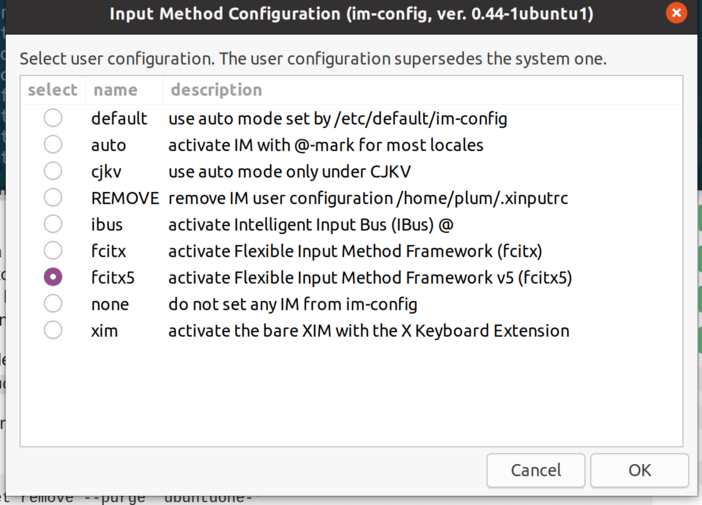
After that, log out and log back in and your Fcitx 5 input method should be live. One catch: Fcitx5 doesn’t autostart a process. You can open a terminal and run Fcitx5 manually to see if the icon shows up.
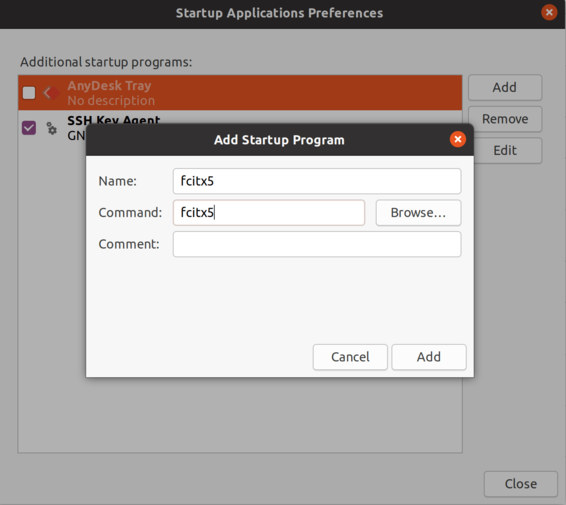
If you’re actually committing to Fcitx 5, remember to add an autostart entry.
3. Configuration
Running Fcitx 5 under Gnome shell, there’s no config tool by default, and no obvious way to configure tables. You can only edit the config file:
vim ~/.config/fcitx5/profile
[Groups/0]
# Group Name
Name=Default
# Layout
Default Layout=us
# Default Input Method
DefaultIM=pinyin

[Groups/0/Items/0]
# Name
Name=keyboard-us
# Layout
Layout=

[Groups/0/Items/1]
# Name
Name=pinyin
# Layout
Layout=

[GroupOrder]
0=Default
You must save the config file while Fcitx 5 is not running, or it’ll get overwritten. Restart Fcitx 5 and you can toggle the input method with Ctrl+space. That’s pinyin only, of course.
There’s currently no migration tool for pinyin or table data — you have to retrain from scratch, though it should already be decent. Pinyin bugs (if any) should be fewer than table bugs.
If you use other input methods that don’t change the library, their data is basically portable as-is. The paths differ — in Fcitx 5 they become the more standard ~/.local/share/fcitx5, with config still mainly in ~/.config/fcitx5.
By default no other input methods get added after startup; you add them through the config tool. If you’re not on KDE or Arch, you can only edit the config file, and there’s no documentation explaining it. For example, nobody tells you how to add candidate selection, how to set buttons. The Arch Linux Fcitx 5 config tutorials online are all plagiarized from each other, the config files are all identical — it’s just a post saying “I’m on Fcitx 5 now” followed by a full copy of someone else’s tutorial. Exactly like this one.
4. Features
Keyboard layout works quite differently. System keyboard layout is now bound to a new concept of “groups” — layouts within a group are simulated directly through xkbcommon rather than by modifying the system layout. So ~/.Xmodmap support is gone. For common tweaks (say, swapping Ctrl and Esc), use xkb options instead.
Pinyin has a bunch of new features compared to the old “built-in pinyin” — multiple dictionaries, emoji, etc. You can browse them in the config tool.
5. Notes for Gnome-shell users
As everyone knows, the people hyping Fcitx 5 online are mostly Arch Linux users, and they all run KDE. Nobody tells you what to do about Gnome-shell. Fortunately, the great 囧脸’s (Jiongface) Gnome shell extension supports Fcitx 5 — it’s all Kimpanel underneath, which means with this Gnome-shell extension installed, both Fcitx 4 and Fcitx 5 work. Praise 囧脸!
But the version on Gnome’s official Extension site has some issues:
- Some content doesn’t render fully when typing fast
- The candidate box spans across monitors in multi-display setups
- Two indicators appear after unlocking the screen
All three have been fixed by 囧脸. Praise 囧脸!
For installation, I recommend the git version since the official one hasn’t been updated:
https://github.com/wengxt/gnome-shell-extension-kimpanel
Install the gettext and cmake dependencies, then just run ./install.sh in the directory. Remember to delete the old extension before installing.
Oh, right — one last issue, kind of awkward: looks like 囧脸 only fixed the Fcitx 4 version and not the Fcitx 5 one. For Fcitx 4 it’s simple though — just disable the dbus addon in settings to turn off the built-in indicator. No need to compile the new version yourself.
6. Summary
In short, Fcitx 5 is currently worth trying for these users:
- People who only use Arch Linux, or Manjaro, the distro that got kicked out of the house by the Archers. Debian and Ubuntu’s packages update very slowly, and almost never get updated (unless a new release drops). Ubuntu, as the bottom of the distro鄙视链 (contempt hierarchy), doesn’t even have a PPA, so you can’t test any of the new Fcitx 5 features.
- People who only use pinyin input, since fcitx5-mocz isn’t packaged on Ubuntu and doesn’t seem to work well on Arch either.
- People who only use KDE, since Gnome has no graphical config tool and many config parameters are undocumented, leaving you with no idea what to do.
Also, Fcitx 5 currently has issues in practice. The main one is that mixed Chinese/English input makes punctuation flip between half-width and full-width randomly, plus weird input lag (“not keeping up”). I’m not a great KDE user after all — just a Gnome-shell dog — so I really couldn’t keep using it. I switched back to Fcitx 4 in the end.
If I have time, I might consider setting up an Fcitx 5 PPA so more Ubuntu users can join the fcitx5 testing crew. Even though Ubuntu users were long ago expelled from the open source community, at least they should get to sniff Arch Linux’s exhaust fumes.
This article shamelessly pays tribute to 囧脸’s official announcement: https://www.csslayer.info/wordpress/fcitx-dev/%e5%a6%82%e4%bd%95%e7%8e%b0%e5%9c%a8%e5%b0%b1%e5%9c%a8-arch-linux-%e7%94%a8%e4%b8%8a-fcitx-5/
Finally, shout it three times: Praise 囧脸! Praise 囧脸! Praise 囧脸!
Comments are hosted on the Chinese main site. This mirror is read-only.