Fixing Crackling Audio on a USB DAC Connected Through a Thunderbolt Dock on a ThinkPad X1 Carbon
I had a really weird problem, and it haunted me for about a year.
At home my laptop sits in a Thunderbolt 3 dock, and on that dock I plugged in a USB DAC to make sure my desk has a headphone output, plus that USB DAC also feeds two speakers.
Short version: I don’t use the dock’s built-in audio. I added a separate USB DAC on top.
Starting last year, that DAC began acting up in a strange way: whenever I played music or video, the sound would crackle. At first I blamed the dock, but plugging the DAC straight into the laptop’s USB port made the problem disappear. It only happened when it was plugged into the dock, which pointed to a power-delivery issue.
Crackling usually means insufficient power, so I figured it was the undervolt I’d applied to the laptop. I tried disabling it, and things got somewhat better, but the crackling still came back at random.
Then I thought it might be TLP’s power-saving mode. I set TLP to Performance, and there was still no real improvement.
Finally I found the fix.
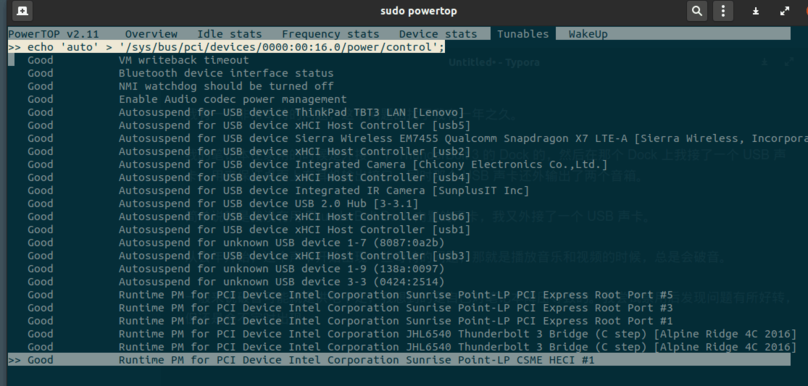
First, connect the laptop to the Thunderbolt dock, enable the USB DAC, start a video, and make sure sound is actually coming out of the speakers.
Then run PowerTop and toggle each entry in the power column between Good and Bad to see whether the audio changes. That’s when I found a PCI device that, once set to power-saving mode, caused the crackling.
Next I looked up the device’s ID with lspci and found it was 00:16.0.
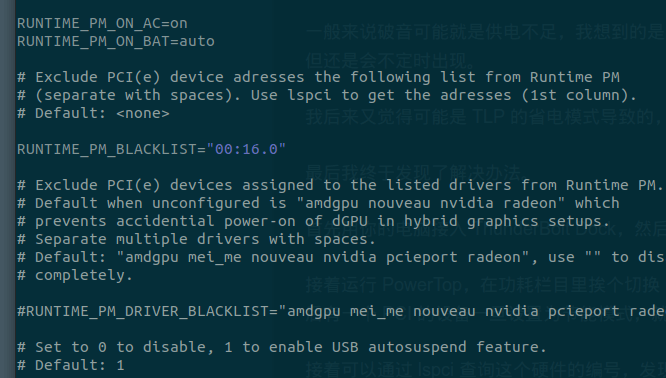
From there it was easy: open TLP’s config file, add that ID to the blacklist so power-saving mode won’t touch it, then reboot and the problem is gone.
Anyway, if you run into something similar, try this approach.
Update:
That method didn’t actually solve the problem, but I did eventually find the real fix. /archives/11853/
Comments are hosted on the Chinese main site. This mirror is read-only.