Turning an "old PC" into a router
The old router at work has been feeling its age lately. It’s been solid for a long time, honestly, but I’ve decided it’s washed.
So I grabbed an “old and busted” PC to build a new soft router. Specs below:
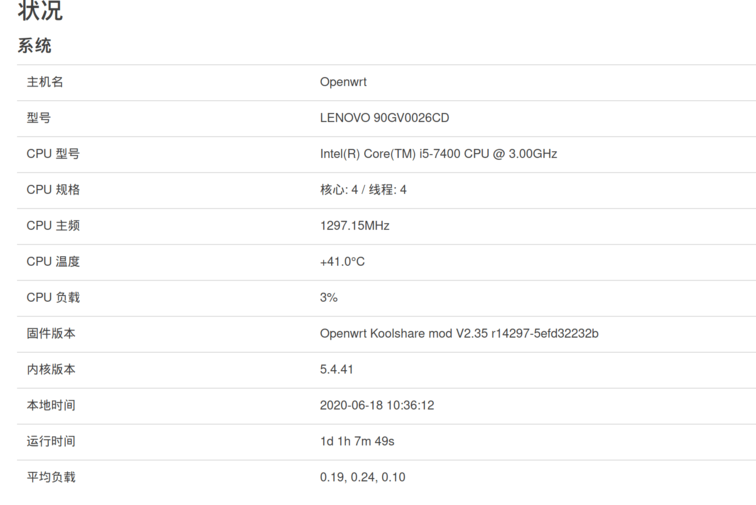
After almost two weeks of messing with it, it finally feels stable. I’ve got “load balancing,” “circumventing the GFW,” “ad filtering” and the like running on this thing, but I hit a ton of pitfalls. Here’s the summary.
Building and configuring the soft router
Setting up a soft router is actually pretty simple: find a PC, install the appropriate OpenWRT system on it. The main options right now are Lean and LEDE X64 and such. Personally I’d recommend LEDE X64. It’s got plenty of small bugs, but the big features work fine.
http://firmware.koolshare.cn/LEDE_X64_fw867/
Installation is just downloading the image and writing it straight to the disk. I recommend using an Ubuntu Live CD to write it, it’s faster.
Once it boots after writing, the soft router is basically good to go.
Of course, mine was meant to have “3 WAN” ports, and a desktop’s stock NIC definitely isn’t enough. So I threw in two NICs: a PCIe 16x 4-port card, a PCIe single-port card, plus the onboard NIC, for six ports total. Normally LEDE X64 will detect your ports after boot, they’re just not enabled by default.
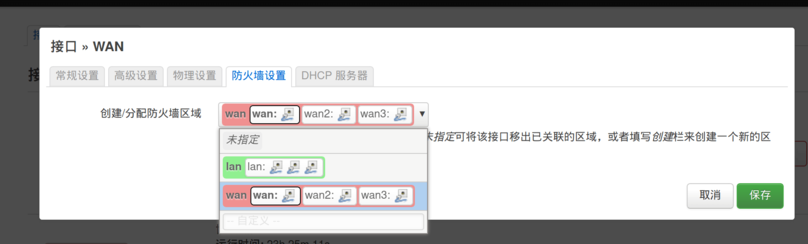
You can manually add WAN ports under “Interfaces” and set the firewall zone to the WAN group. Done.
Naturally, this “auto-detect ports” relies on the Linux system recognizing them; no special drivers needed, since Linux uses in-kernel drivers. If your NIC brand is too weird, though, it won’t be detected. Overall I recommend Intel.
Load balancing
The stock LEDE X64 can do load balancing. First you need to set the connection type for the three WAN ports; ours is static IP allocation, and if you’re doing multi-dial you need to set that up too.
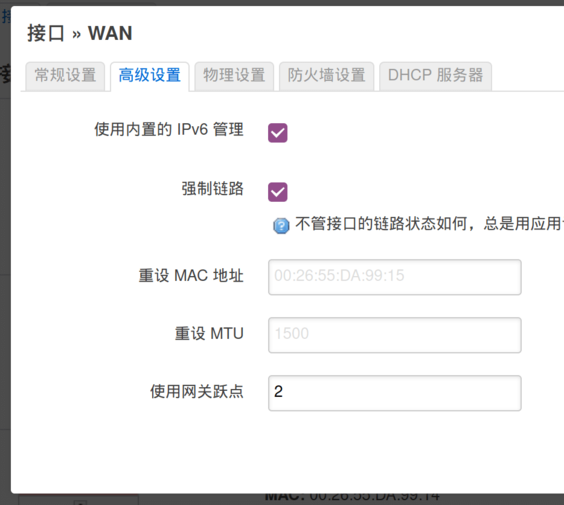
One more thing: you absolutely must set the “gateway metric.” Think of it as numbering your WAN ports. If you don’t set it, load balancing will very likely break.
Next, install “policy-based load balancing” from the Koolshare software center and set it up in a perfunctory way. I say perfunctory because the settings themselves are useless; what we actually need is the routing table this plugin generates.

Then you can go into LEDE X64’s built-in mwan3 load balancing and configure it. There are many ways to set it up, but ultimately the policy is up to you. For my setup, three WAN ports correspond to three lines: Unicom, Mobile, and Telecom. So I just pick based on the routing table generated by that half-assed plugin and split traffic across the three lines.
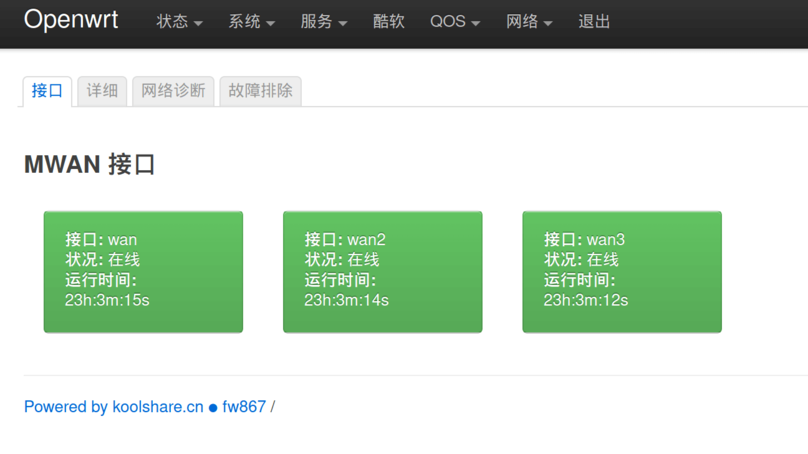
Once the split’s done, things are basically fine. But a lot of people complain that mwan3 has bugs and that WAN ports randomly drop. With a single WAN it’s fine, but multiple WANs cause weird trouble.
I looked into this too, and the cause doesn’t seem to be mwan3 itself but its “port online detection”: pings too frequent, requirements too strict.
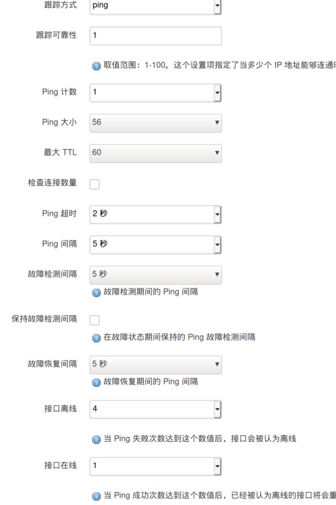
Just loosen the Ping requirements for port detection. For example, ping once a minute, and only declare the port offline after 10 timeouts. Then it’s basically rock solid.
GFW-circumvention stuff
There are tons of guides online for circumventing the GFW on LEDE X64, but the current plugin is way too buggy and needs manual fixes. I’d already hacked the scripts inside to suit my needs. There are also bugs like DNS not forwarding and so on; you’ll have to search for solutions yourself, I won’t ramble about it here.

The latest Koolshare version also blocks the circumvention installer package, but judging from the commit history on GitHub, you just need to delete the keyword detection from the script.
When circumventing, you’ll often hit the problem where domestic sites resolve to overseas IPs. Most of these are big CDN sites like JD, Taobao, Baidu, Weibo and so on. You can add the corresponding domains to the DNS whitelist. Remember to add
*.baidu.com
rather than
baidu.com
The former is what works. You can also add:
*.xunyou.mobi
because adding this prevents you from disconnecting in Honor of Kings.
All in all, I’m pretty satisfied with this soft router adventure. At least the config is in place, and I’ve got three-WAN load balancing working. One more requirement for a soft router: remember to set “restore on AC power loss” in the BIOS so it boots automatically when power comes back, avoiding the awkward situation of having to manually power on the router after an unexpected outage.
Comments are hosted on the Chinese main site. This mirror is read-only.