Fixing Sound Card Crackling Once and for All
Advertisement
Preface:
I ran into a sound card crackling issue a while back and wrote a post about it:
Advertisement
Fixing crackling from an external USB sound card on a ThinkPad X1 Carbon via Thunderbolt Dock
Tried that method, and it turned out to be pretty much useless. Basically, every time I plug in the Thunderbolt 3 dock, TLP just doesn’t apply the “power-saving exclusion” setting to the corresponding device.
Later, after some discussion with the TLP author, he gave me a much better solution that killed the problem for good:
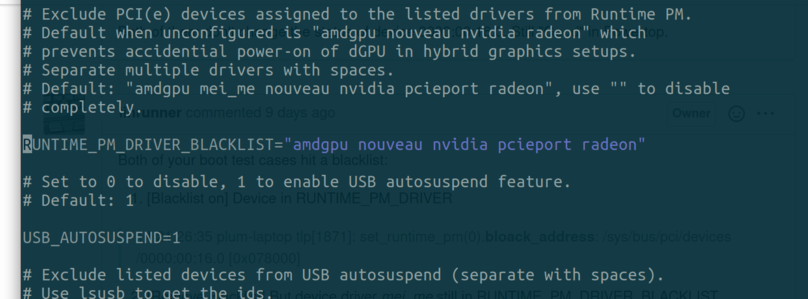
Edit the tlp.conf file, find RUNTIME_PM_DRIVER_BLACKLIST, enable that line, and delete the preset mei_me entry from it.
After that, the corresponding USB device stopped being forced into power-saving mode.
Comments are hosted on the Chinese main site. This mirror is read-only.