Fixing Ubuntu 20.04's Broken Lock Screen
Lately I noticed I couldn’t lock the screen on Ubuntu 20.04.
Specifically:
- Two 1080p monitors connected through a Thunderbolt 3 dock
- Hit Super+L after booting up
- The lock fails, GNOME Shell crashes and restarts, and then nothing happens
The logs weren’t much help. All they said was that gnome-shell had crashed, nothing else. So I figured it was probably an extension and started disabling them one by one. Turned out to be Unite:
https://github.com/hardpixel/unite-shell
But I’ll die without the Unite extension!
So I got in touch with the author, who suggested I “enable each Unite feature one by one and see which one is acting up.”
Good advice. Eventually I found the culprit:
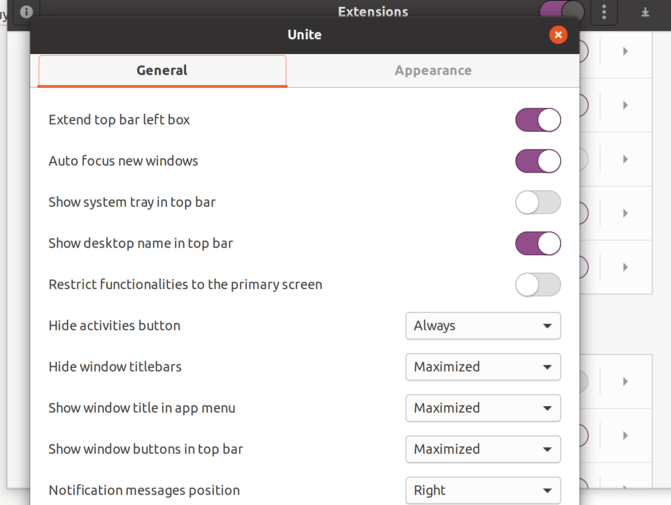
“Restrict functionalities to the primary screen”
Disable that and everything works fine. Granted, it’s a feature that matters a lot to dual-monitor users, but I had to turn it off for now.
Then a while later, Ubuntu 20.04 updated to the gnome-shell 3.36.3 stack and the problem vanished. I re-enabled the feature and it still didn’t come back — probably some bug got fixed.
Comments are hosted on the Chinese main site. This mirror is read-only.