Fixing Incomplete Clipboard Issues Caused by Gpaste
For the longest time, on both Ubuntu and Fedora, I kept running into incomplete clipboard behavior.
Basically: I’d cut or copy two files in Nautilus, paste them somewhere, and only one would show up. Sometimes copy-paste even required a “double-click” like on a garbage Mac OS just to make sure the file was actually “copied.”
I always assumed it was a Gnome bug, but later found out that wasn’t the case, because I searched the Gnome bug list and nobody else seemed to have this problem…
I tried copying two files in Nautilus and pasting into Gedit, no problem at all — it really was the contents of both files. But pasting in Nautilus would lose one.
What the hell!
Eventually I narrowed it down to the Gpaste extension, since I use it on both Fedora and Ubuntu, and it’s directly related to the clipboard.
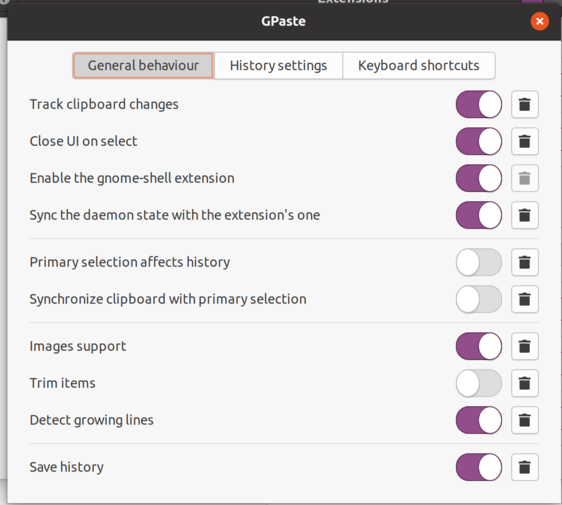
Then I found I had enabled a feature called ‘‘Trim item’’ — “trim contents”, presumably — which probably operates on the clipboard. After disabling it, the problem vanished.
Comments are hosted on the Chinese main site. This mirror is read-only.