Installing the XanMod Kernel on Ubuntu 20.04 to Boost Your Performance
Got bored recently and started messing around with Linux kernels. Ubuntu 20.04 still ships 5.4 by default, and even if you install the OEM kernel you’re only at 5.6 — meanwhile mainline is already at 5.9, which is pretty underwhelming if you like being on the newest thing. And some of the new features baked into recent kernels genuinely do improve performance. Canonical’s Daniel Van Vugt was recently digging into why gnome-shell performs so badly at 4K, and it turned out to be a kernel scheduling problem with Intel integrated graphics creating the bottleneck. That issue seems to be largely alleviated on 5.8.
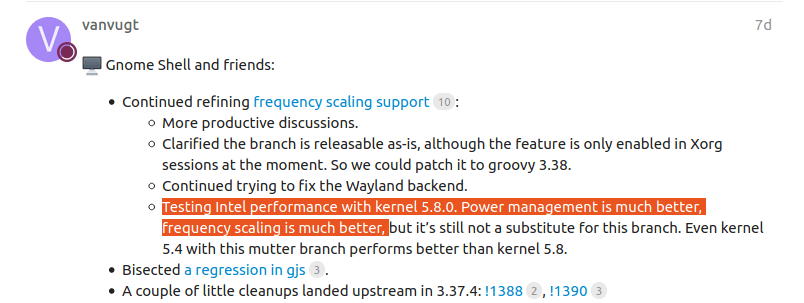
(Ignore the second half of that sentence — Canonical people keep submitting patches to GNOME and the Red Hat crowd will keep stalling them anyway.)
Anyway, bumping the kernel version really can improve performance. Most guides tell you to grab a new kernel from Ubuntu’s Mainline PPA, but those kernels are too vanilla and sometimes end up doing more harm than good. My laptop actually booted slower after installing one, which is when I found a third-party kernel called XanMod. Searched around for opinions and they all seemed positive, plus XanMod is actively maintained and has its own repo, so I decided to give it a shot.
You can check the XanMod site for install instructions:
As you can see, their kernels are split into several branches. Personally I figure just going with edge is fine.
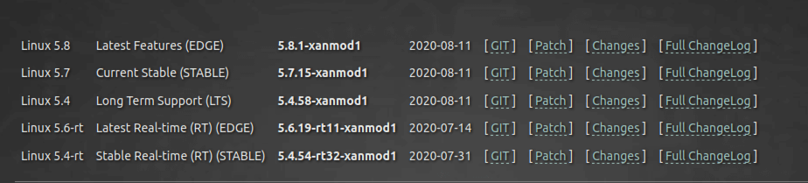
XanMod’s features are documented all over the place, including officially, but most of it comes down to:
- Improved CPU scheduling
- Improved I/O scheduling
- Extra performance-related third-party patches
- Compiled with the latest GCC
- Uses the latest microcode
And according to Phoronix’s article the gains are fairly noticeable:
https://www.phoronix.com/scan.php?page=article&item=xanmod-2020-kernel&num=1
Installation is straightforward — add the repo, update, install:
echo 'deb http://deb.xanmod.org releases main' | sudo tee /etc/apt/sources.list.d/xanmod-kernel.list && wget -qO - https://dl.xanmod.org/gpg.key | sudo apt-key add -
Then install. I went with the latest 5.8.1 edge:
sudo apt update && sudo apt install linux-xanmod-edge
After that you can also install the latest microcode:
sudo apt update && sudo apt install linux-xanmod
If you’re on team AMD Yes, install this one:
sudo apt install amd64-microcode
XanMod kernels enable the new CAKE scheduler, which you can turn on too if you care about network performance:
echo 'net.core.default_qdisc = cake' | sudo tee /etc/sysctl.d/90-override.conf
Then just reboot.
Impressions:
After using it for a while, the performance gains are honestly just OK — at least it doesn’t drag things down like the stock Mainline kernel did. The only issue is that occasionally when using my ThunderBolt3 Dock things get a bit sluggish, not sure if that’s the kernel’s fault.
If you just want the newest kernel like me but don’t like Mainline builds, XanMod is a solid choice.
And if you want to get rid of it, just remove it with apt and reboot.
Comments are hosted on the Chinese main site. This mirror is read-only.