Fixing GNOME Logs Only Showing the Current Boot
My laptop keeps freezing for no clear reason lately. After it locks up I usually force a shutdown and then go digging through the logs. My go-to tool for that is GNOME Logs. But recently something weird happened:
Every time I open GNOME Logs, all I see is the current boot. Everything from before is gone.
That’s not how it’s supposed to work, right? I used to see plenty of past runs in there.
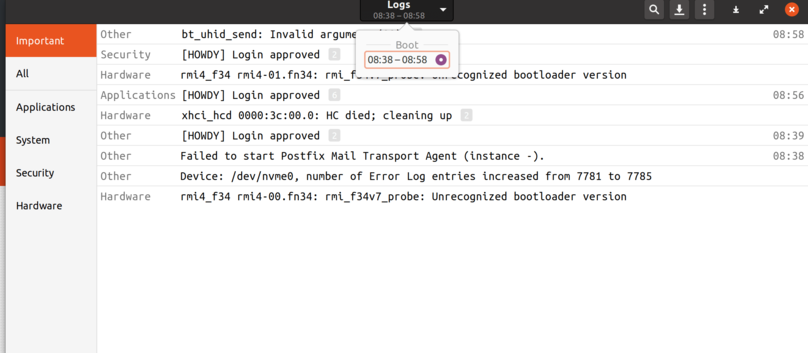
A bit of Googling later, I found out that GNOME Logs is really just reading the systemd journal.
You can check the journal with this command:
journalctl --list-boots
Sure enough, only one boot showed up. So all I had to do was fix the journal’s inability to keep past entries. These three commands force the setting:
sudo mkdir -p /var/log/journal
sudo systemd-tmpfiles --create --prefix /var/log/journal
After that it should be fine.
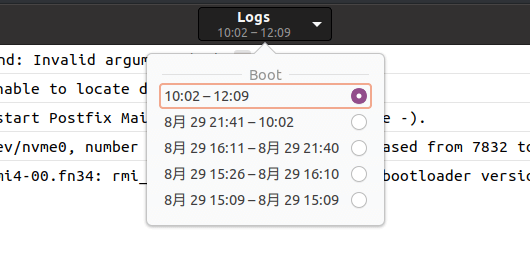
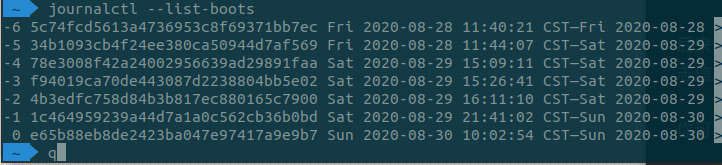
I’m pretty sure the cause was a tool called Stracer that I used earlier to clean up old logs. That piece of shit deleted the /var/log/journal directory.
Links: https://askubuntu.com/questions/1002524/why-does-journalctl-list-boots-only-show-the-current-boot
Comments are hosted on the Chinese main site. This mirror is read-only.