How to Use Fcitx 5.0.2 on Ubuntu 20.04 Right Now
The great Weng-face finally shipped the stable release of Fcitx 5. He didn’t bother writing a proper release announcement — just sent a message to his own mailing list, so I’d guess most people have no idea this happened.
Doesn’t matter!
Fcitx 5 stable is out, and in the time it takes to jerk off once, it’s already at 5.0.2!
Arch users, blessed as they are, already have it working. The rest of us are stuck: build the package yourself, beg one of those smug packagers to do it, or compile from source.
And compiling doesn’t even guarantee you can install it, because Fcitx requires Qt >= 5.15, and most people on Ubuntu 20.04.1 are still sitting on Qt 5.12.
But the great Weng-face gave us a way out: install the latest Fcitx 5.0.2 via Flatpak. It works pretty much perfectly and stays in sync with upstream.
This was the first time I learned you can install an input method with Flatpak, of all things. Weng-face really is goated.
This guide uses Ubuntu 20.04.1 as an example; other distros can follow along.
1. Install Fcitx 4/5 first
The Flatpak build of Fcitx 5 still needs the host’s im module, so I’d suggest installing an older Fcitx on the machine first — 4 or 5, either works.
My advice: get Fcitx installed on your machine and confirm it works, that’s all you need.
You’ll also need Flatpak support on your system. On Ubuntu, see here: /archives/11951/
2. Install the Flatpak build of Fcitx 5
# 添加 flathub 到用户级
flatpak remote-add --user --if-not-exists flathub https://dl.flathub.org/repo/flathub.flatpakrepo
# 添加 fcitx5-unstable 到用户级配置
flatpak remote-add --user --if-not-exists fcitx5-unstable https://flatpak.fcitx-im.org/unstable-repo/fcitx5-unstable.flatpakrepo
flatpak install org.fcitx.Fcitx5
flatpak install org.fcitx.Fcitx5.Addon.ChineseAddons
# 例如需要 Rime: flatpak install org.fcitx.Fcitx5.Addon.Rime
# 可以用 flatpak remote-ls fcitx5-unstable 查看有哪些包
If you need a Japanese input method, you can also install:
flatpak install org.fcitx.Fcitx5.Addon.mozc
This repo is slow as hell. At first I thought it was my VPN, but then even proxychains was just as slow… though around early morning it gets fast.
If you absolutely can’t update the repo or the download is too slow, two suggestions:
- Find a faster way to get around the Great Firewall
- Get up at 2 AM and try — maybe a miracle happens
3. Configure the input method
Once installed, we can use it. After confirming your old Fcitx works, all we need to do is change the startup entry.
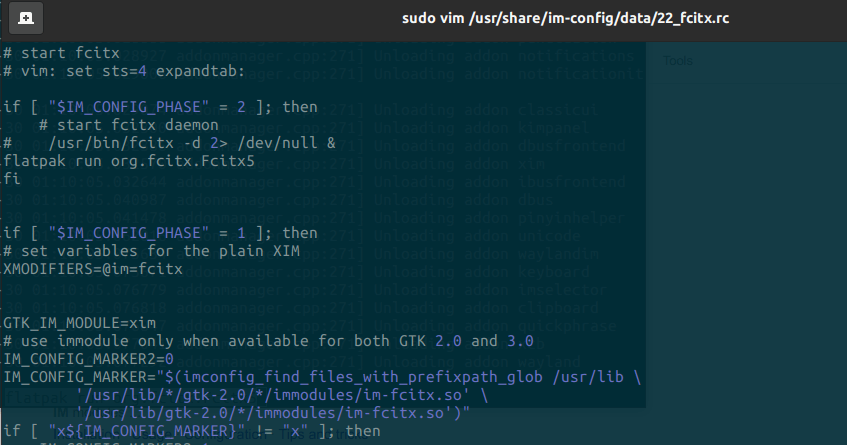
On Ubuntu 20.04, edit:
sudo vim /usr/share/im-config/data/22_fcitx.rc
Comment out:
/usr/bin/fcitx -d 2> /dev/null &
Add:
flatpak run org.fcitx.Fcitx5 -d 2> /dev/null&
(Ignore the text in the screenshot, it’s incomplete.)
After rebooting, the input method should be running fine — you’re now on the latest Fcitx 5.0.2.
Complaints:
I’ve been using it for a while now and there are no major problems — it works in most situations — but there are a few small issues worth listing:
- I’m on GNOME Shell, and when using the Kimpanel extension, switching input methods occasionally leaves the “pinyin”/“mozc” popup rendered incorrectly. Switching again makes it disappear. Haven’t found a pattern for reproducing it yet; I’ll file a bug when I do.
- The input method won’t activate in WPS. I tried both the Flatpak and deb builds of WPS, and tried exporting QT_IM_MODULE in the launch script — neither fcitx nor fcitx5 worked. Switching back to the old Fcitx 4 works fine. Looks like this is an old issue, but there’s a quick and dirty fix here.
- The Flatpak build of Fcitx seems to be able to use online dictionaries the normal way.
- The mozc icon is broken.
- The auto-emoji-after-pinyin feature doesn’t work for me. Not sure if it’s missing from the Flatpak build or just broken.
- In Telegram, the input method follows not the last cursor position but the “tail of the last completed sentence”.
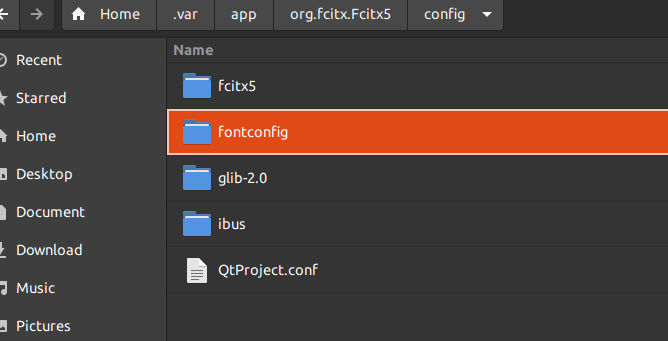
- If you’re not using GNOME Shell’s Kimpanel extension, you can use all sorts of skins, but the font rendering in them may look ugly. You can copy the config files from /etc/fonts/ into ~/.var/app/org.fcitx.Fcitx5/config/fontconfig (symlinks work too) to fix the font rendering.
Anyway, if you run into problems, go report bugs to Weng-face.
https://github.com/fcitx/flatpak-fcitx5/
Weng-face’s official announcement:
https://www.csslayer.info/wordpress/fcitx-dev/fcitx5-on-flatpak/
Comments are hosted on the Chinese main site. This mirror is read-only.