Trying Out PipeWire on Fedora 33
Heard Fedora 34 is going to replace PulseAudio wholesale with PipeWire. Plenty of people are popping champagne over it, and the vibe feels exactly like the Wayland cheerleading back in the day.
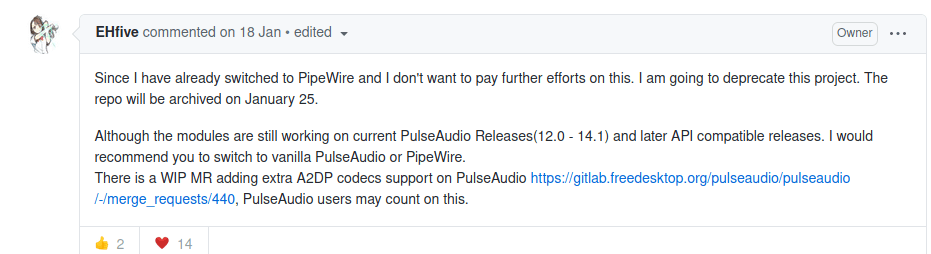
That’s not why we’d switch, though. The better reason is support for Bluetooth codecs like LDAC and APTX. Even the guy who wrote the PulseAudio patches said he doesn’t want to keep developing it, because PipeWire has more of a future.
So let’s just flip it over and see. Maybe it’s actually better?
Going by the method Fedora officially documents, switching to PipeWire produces all sorts of problems — no sound after a reboot, volume control breaking on Bluetooth connections, that kind of thing. Given how actively PipeWire itself is being developed, I’d just grab the nightly build from the COPR. Fixes land faster that way.
Remember to add the repo: https://copr.fedorainfracloud.org/coprs/mfrey/pipewire-nightly/
Enable it
sudo dnf copr enable mfrey/pipewire-nightly
Install the Pulse modules, and after that you can move from PulseAudio to PipeWire without any drama.
sudo dnf install --best --allowerasing pipewire-pulseaudio
If conflicts come up, this handles them. Didn’t run into any myself.
sudo rpm -e --nodeps pulseaudio
If you also run Jack and Alsa, same procedure:
sudo dnf install --best --allowerasing pipewire-jack-audio-connection-kit
sudo rpm -e --nodeps jack-audio-connection-kit
sudo dnf install --best --allowerasing pipewire-alsa
Next you enable the pipewire services. This is where a lot of the trouble shows up:
systemctl --user enable pipewire-pulse.services # 我忘了到底是 socket 还是 services 了,有什么你启用什么罢,反正就是一服务
systemctl --user enable pipewire-pulse.socket
systemctl --user enable pipewire-media-session.service
The big one: the newer pipewire needs this pipewire-media-session.service enabled.
If you had an older pipewire installed before, you need to replace the config with the new version — copy the contents of /etc/pipewire/pipewire.conf.rpmnew over /etc/pipewire/pipewire.conf, or it’ll complain it can’t find an audio output device.
Then don’t forget to edit the bottom of /etc/pipewire/pipewire.conf and add bluez5 support:
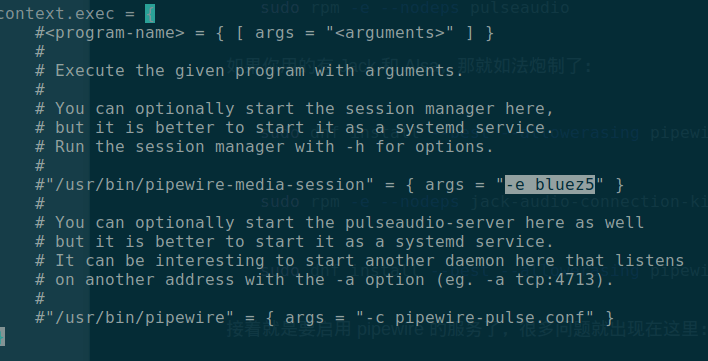
Add ‘-e bluez5’. Uncomment it too, obviously. Though I found it works without it as well — no idea what the difference is.
After a reboot it should just work. If you have special requirements on the Bluetooth side, fine-tune them in the config:
sudo vim /etc/pipewire/media-session.d/bluez-monitor.conf
So far I haven’t hit any problems. Seems a bit more stable than PulseAudio was, and the old Bluetooth profile-switching failures are gone too. Are things actually about to get good this time?
Comments are hosted on the Chinese main site. This mirror is read-only.