Hands-on: GPD Pocket 2 Max
For the whole of last year my eroge machine was the Chuwi Minibook. It’s got plenty of small problems, but I thought it was fine — good enough for playing games.
Then at the start of this year I lost my laptop bag, and the Chuwi Minibook went with it, so I started thinking about getting a new machine.
My requirements were pretty clear by then:
- A good screen. The Chuwi Minibook uses PWM dimming, which is a pain over long sessions.
- Good battery life. A galgame machine doesn’t need much power, but the battery has to be biiiig.
- Enough cooling. The Chuwi Minibook got scorching hot when I ran it, and the fan sounded like a plane taking off.
- Expandable storage, at least NVMe.
- 16GB of RAM. I like leaving a ton of stuff open in the background.
- USB-C for docks and charging.
After shopping around, the only thing that fit was the GPD P2 MAX, so I grabbed one on Taobao.
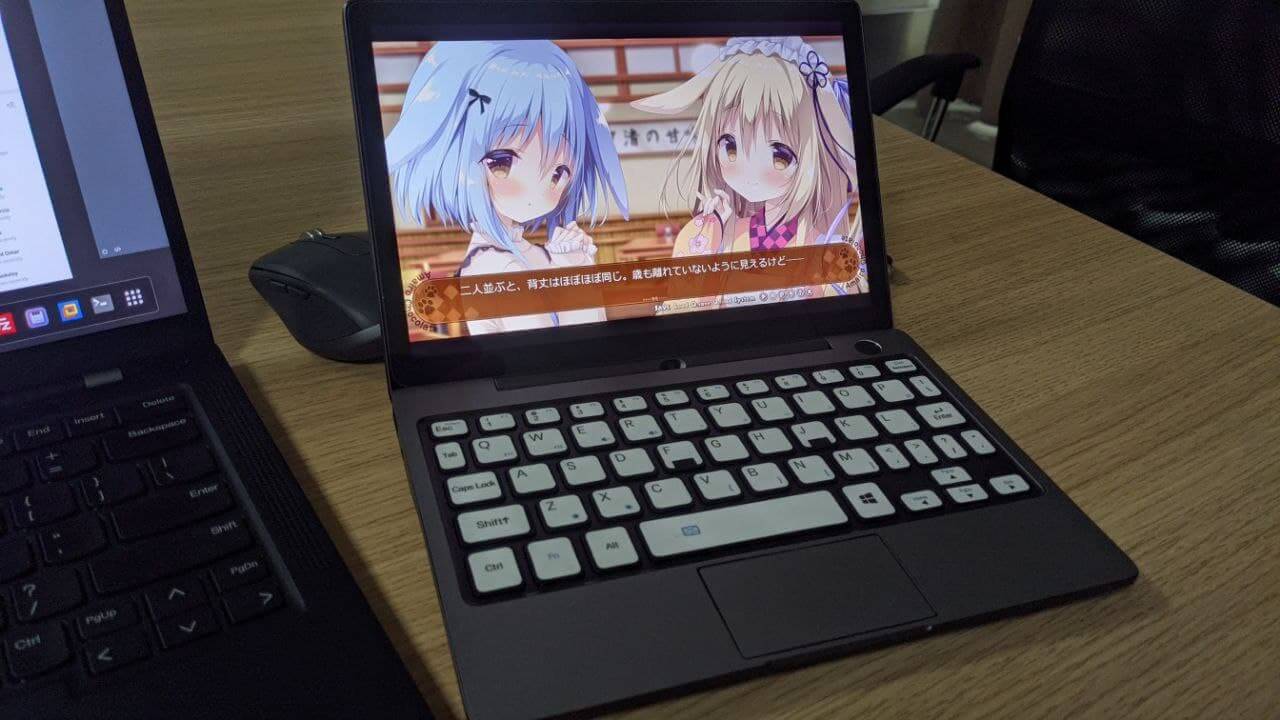
It’s been about half a year now. Discussion of this thing is all over the internet already, so I’ll just talk about the stuff I ran into personally that nobody online mentions.
1. The screen is good, but it’s not calibrated
The GPD P2MAX has a high-res JDI panel, you can run it at 200% scaling out of the box, and it’s a good deal better than those other 1920x1200 tablet screens. No PWM dimming. The color gamut is solid, but the screen isn’t calibrated by default, which means you have to calibrate it yourself before the colors look right. Out of the box it’s cold as hell.
Oh, right — besides the lack of calibration, the P2MAX, like the Chuwi Minibook, has no oleophobic coating on the screen, so fingerprints show up badly. I really don’t get skimping on that to save a few cents. A shanzhai factory to the core.
2. Performance is fine, and there are very few small bugs
Performance is the usual M3 8100Y, 16GB of RAM, and you can install your own NVMe drive. Read/write is decent. What surprised me is how few small bugs this thing has — far fewer than the Chuwi, at least. First, USB-C outputs a full DP signal; the Chuwi just gives you a black screen. Second, it supports deep sleep during long standby, like a Surface: after however many hours it drops into deep sleep to save power. The Chuwi can’t do this at all — it wakes up instead, and Chuwi hasn’t fixed it. More importantly, the P2MAX’s battery doesn’t have the Chuwi Minibook’s “battery percentage is wrong” bullshit. Those small bugs being gone makes the whole experience a lot better.
3. The keyboard is a bit odd, and awkward for two-handed use
Having covered the P2MAX’s strengths, let’s talk about where it loses to the Chuwi Minibook. First, the keyboard: no backlight, and the feel and layout are both worse than the Chuwi’s. Especially the position of the Win key and ALT — I have no idea what they were thinking when they designed it. Still, it’s way better than the first-gen GPD Pocket I used, and you get used to it. There’s no optical pointer like the Chuwi’s, so using the touchpad makes two-handed control awkward for me. I like lying in bed playing games and typing snark at the same time, and I think an optical pointer is better for that.
As a fix for the missing backlight, GPD’s solution is a “glow-in-the-dark keyboard sticker.” All I can say is that the glow is very limited, but it does help at night — the white at least lets you see where the keys are… easier to make out than black.
But at the end of the day, it’s not as good as the Chuwi Minibook.
Oh, and one more thing: the GPD P2 MAX uses the same fingerprint module as the Chuwi Minibook, so that can’t-unlock-the-screen bug is present here too.
4. Cooling is good, battery life is no surprise
Even though the specs are the same, the GPD P2MAX’s fan is genuinely quiet. Even at high RPM it’s quiet — you have to put your ear right up to it to hear the whoosh. At least they bought fans from a decent OEM. You can adjust the power limits in the BIOS yourself, but Balance is usually better.
Battery life: even though the P2MAX’s battery is much bigger than the Chuwi Minibook’s, there’s no surprise — gaming gets you about 4 hours. Probably because the screen resolution is so high; with demanding galgames the power draw actually goes up. Since the vents are on the back, the body doesn’t get very hot, but you can still feel the warmth.
5. I actually bought two GPD P2MAX units
I bought my GPD P2MAX in January this year, and around April the one I bought got water inside…
Probably through the USB port. I figured I’d send it in for paid repair, so I did, and GPD told me the repair would be 3600 yuan. Bear in mind I paid 4000 for the machine on installments. That price is basically a new machine. I gave up on the repair, sold the corpse on Xianyu, and picked up a like-new unit on Xianyu for 3200 yuan.
Pretty ironic, really: 3600 to repair, 3200 to get a like-new one on Xianyu.
Anyway, if you’re interested in this machine, I’d recommend camping on Xianyu.
6. What accessories to get
Personally I’d get a set of protective stickers and a lighter case. The official one is too bulky, even if the materials are genuine.
For a screen protector, Taobao has “glass films” — definitely get the “glass film.” Even without an oleophobic coating, a glass film beats those soft films. There’s a 20-yuan one on Taobao, just buy that.
Other accessories, I think, are nothing special. No need to buy them.
7. Is the GPD P2 MAX a proper galgame machine?
I think so, at least for these reasons:
- Enough performance
- A gorgeous screen
- Good battery life
- Not too hot
- The keyboard is OK — if you know the shortcuts, you can play and snark at the same time like I do
But a lot of people might prefer something like the GPD Win3 for gaming. If you don’t have my need to “type snark while playing,” that kind of machine can do the job. Even if you’re buying a pure handheld, though, go for the Aya Neo or the 2K-resolution handheld from Tencent and One-Netbook for the suckers with money — the GPD Win3’s resolution is too low. These days eroge basically all support 1080P, except for those idiots at HOOKSOFT, and at 720P your 2D waifu looks painful. Why put yourself through that?
Summary:
Simply put, “you get what you pay for.” The GPD P2MAX costs more than the Chuwi, and naturally has far fewer problems. My only complaints are the keyboard backlight, the feel, and the missing optical pointer — those make two-handed use a bit awkward for me. Everything else is praise. Especially now that you can pick up a like-new unit cheap on Xianyu.
That said, I’m still looking forward to the GPD Pocket 3 series. At least give me Thunderbolt 4, and then one dock can handle everything.
Comments are hosted on the Chinese main site. This mirror is read-only.