Xiaodu WiFi on Windows and Linux
Short version: I bought a Xiaodu WiFi for 9 yuan, using a JD free-shipping coupon.
Even so, the kaomoji on my keychain cost more than this thing…
So, according to the official site, you’re supposed to install Baidu’s software, which bundles a one-click idiot-proof driver. One button and your current network is shared out.
It’s really just a wireless adapter in hotspot mode. Which means there has to be a way to use the Xiaodu WiFi as a plain wireless adapter, because that’s what it is.
Some digging turned up that it uses a Ralink MT7601 chip, so a quick Google finds someone who already posted the Windows driver.
I’m a Linux user, so can this thing work under Linux too? Or even plug-and-play?
Nope, dream on… There is a driver, but you have to compile it yourself, at least on Ubuntu Linux LTS 14.04.2.
Plug it in and run lsusb to see the hardware ID:
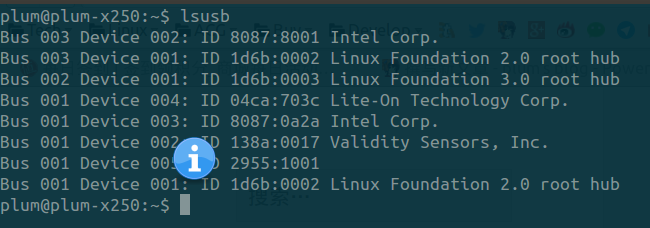
That 2955:1001 is the Xiaodu WiFi, so we need to go download the Linux driver from the official site.
Edit common/rtusb_dev_id.c and, below
{USB_DEVICE(0x148f,0x7601)}, /* MT 6370 */
add
{USB_DEVICE(0x2955,0x1001)}, /* XiaoDu Wifi */
If your hardware ID differs you can add your own; apparently the 360 WiFi can be handled the same way.
{USB_DEVICE(0x2955,0x0001)}, /* XiaoDu Wifi */
{USB_DEVICE(0x148f,0x760b)}, /* 360 Wifi */
Compile with make, then run make install.
Reboot, and the Xiaodu WiFi should work under Linux.
I recently found an article saying this driver can also be compiled for the Raspberry Pi, so there’s room to play with it later. 9 yuan well spent after all.
Comments are hosted on the Chinese main site. This mirror is read-only.