Gracefully Nuking the Entire Windows Family and Migrating Data...
First, a quick rundown of my previous drive situation:
240G SSD + 2T HDD + 1T HDD + 500GB HDD
The 240G SSD was split into 80G and 120G, with the 80G given to Windows as the C drive and the 120G as the root for the Linux system. GPT + UEFI dual boot.
The 2T Seagate drive belonged entirely to Linux, EXT4 formatted, used for storage, with a few symlinks inside pointing to Home/User/ to replace the default Download, Document, Picture and other directories.
The remaining 1T + 500GB HDDs were for the Windows environment.
So now the problem is this: I bought a Seagate 4T 128MB cache drive, and I plan to nuke the dual-boot Windows currently on the disks, uninstall the 1T and 500GB drives, and replace the existing 2T with the 4T.
Uninstalling the 1T and 500GB is easy enough — just open up the case and pull the drives.
First, without damaging the disk data, I need to nuke the extra partitions on the SSD and consolidate them, which means using an Ubuntu Live CD.
After booting from the Live CD, just open Dash and run Gparted, the partition tool — you control it like PQMagic. Select the SSD, delete the Windows partition, and expand the partition holding the Linux / root.
One thing to watch here: check whether the disk’s UUID has changed. If it has, you need to manually edit the UUIDs mounted in /etc/fstab under your disk / partition.
Likewise, for the 2T to 4T migration, first copy the data, then modify the UUID entries in /etc/fstab, using the 4T drive’s UUID in place of the original 2T drive’s, then reboot, and you’ll find the data has been migrated.
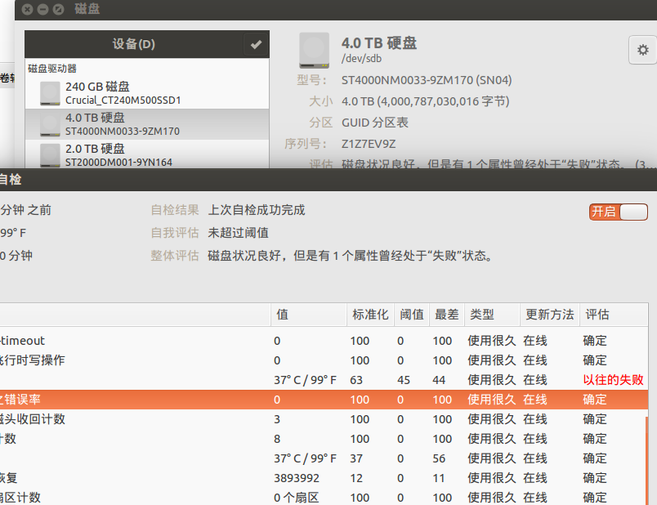
Fine as the 4T drive is, when backing up data with an external drive dock, be careful of overheating and leaving yourself a black mark…
And with that, the desktop has had the entire Windows family nuked, and the data migration is done. As for why I nuked Windows — I think it’s because I realized the last time I ran it was nearly 2 years ago?
Comments are hosted on the Chinese main site. This mirror is read-only.