A Few Days with Huawei Qingyun L410
Riding Against the Wind: The Huawei Qingyun L410 Laptop
Getting older, I still like looking at the pretty and the hot stuff for the eye candy, but I also like messing around with e-waste. The regular stuff just doesn’t excite me anymore.
And the hottest e-waste lately is all the Linux-based “xinchuang” (信创) gear. “Xinchuang” is basically the mainland’s push for domestic everything—replacing the “Western” and “open source” stuff with fully Chinese products so nobody can strangle you with supply chain sanctions.
Whether that’s realistic, whether it’s feasible, how far along it actually is—let’s set all that aside. At the very least, the xinchuang scene does enough work with and on top of Linux to satisfy a Linux guy’s urge to tinker with junk. I’d wanted a Loongson laptop for a while, but that batch of RMS-endorsed 198-yuan group-buy machines is now stupidly expensive, and the specs and pricing are just absurd. Newer Loongson laptops are also pricey, out of my league, so I just watched from the sidelines.
Then a kind soul reached out a hand. With help from a certain big shot, I somehow got my hands on a “xinchuang laptop.” Carrying that person’s earnest warnings, I started my own xinchuang journey.
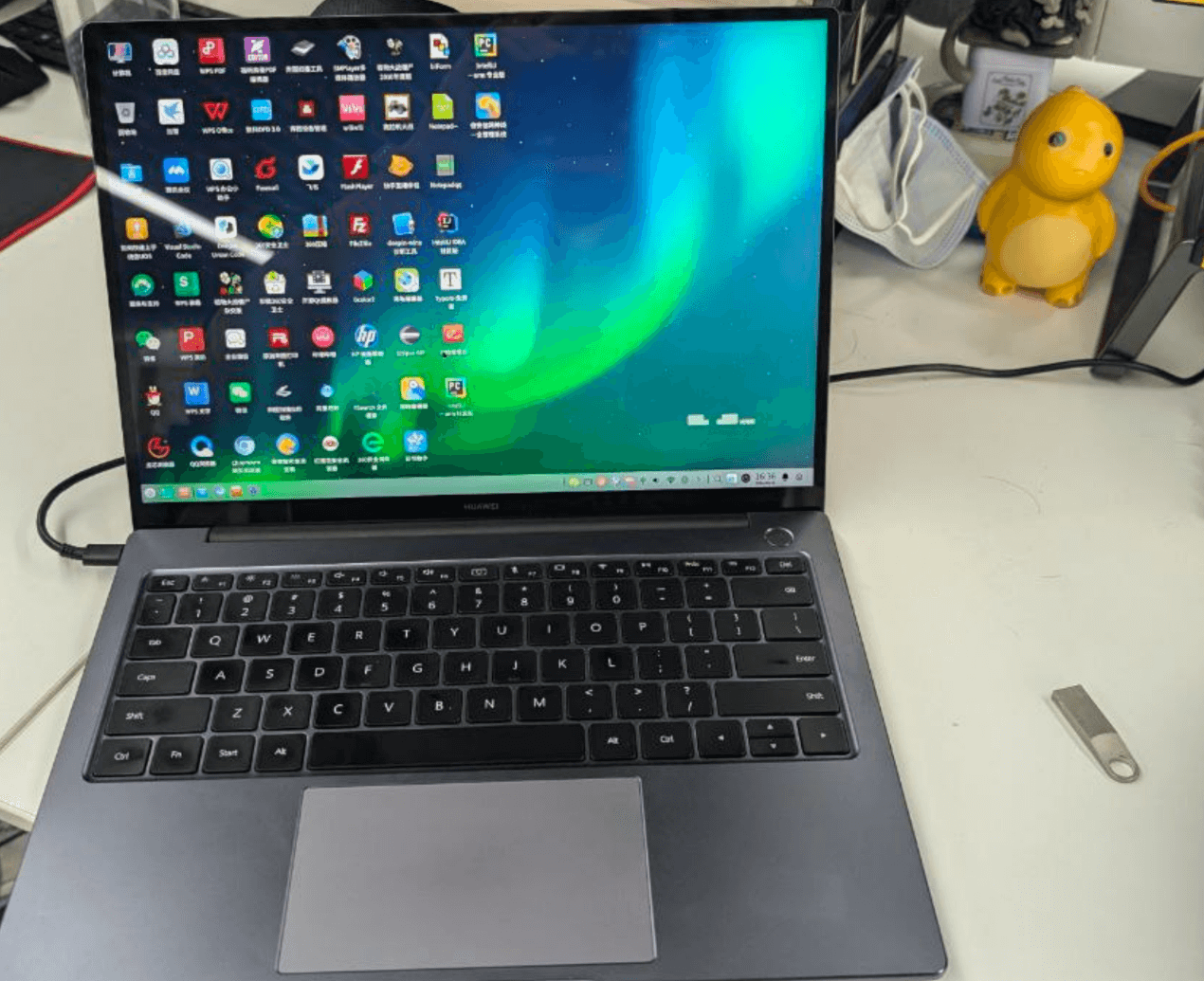
The laptop he gave me is a Huawei Qingyun L410, a xinchuang notebook with a Kirin 990 as the processor. It’s an engineering sample: 8 GB RAM, 256 GB storage.
Before handing it over, he gave me the following instructions:
- Don’t update the BIOS
- Don’t casually update the system
- Don’t try random updates
- Once you upgrade or mess with updates, the machine is bricked, and you can only beg Huawei’s people (find your own connections)
- It’s less a laptop and more a giant phone; the BIOS/EFI lives on the hard drive as its own partition
When it arrived, I found it’s probably using the mold of some Huawei MateBook—the model where the camera hides under a keyboard key that you press. The screen is unchanged too, a 2K high-color-gamut panel. Nice.
The preinstalled system is UnionTech UOS, naturally unactivated, and activation isn’t cheap. From my previous experience with UOS, without activation and an account login you can’t even get Root. The only thing you can do is install software from the official store—though the store has most of the common stuff, and honestly more than you’d expect.
So I started installing the usual software and getting a feel for this “purely domestic” system. At first it was fine. Then within a week it broke: I don’t remember whether it auto-updated something or the hardware died, but the result was it wouldn’t boot into the system anymore. I could see grub and the BIOS, but couldn’t get into the OS.
I started trying to fix it:
First, following advice online, I edited Grub and tried to get into single-user mode. No luck—it froze after booting.
Next I found a matching ISO, made an install image, and reinstalled. Because of this machine’s particular nature, finding an image was a hassle but not hopeless. There are plenty of images that work with L410 + Kirin 990, especially UOS ones.
Some people say you must use UOS’s official tool to make the boot USB. My testing says the official UOS USB-burner plugin does produce different contents than other methods. But even so, a USB made by any normal method can boot… so you’re not locked into one tool.
After booting, I could see the installer’s Grub, but still couldn’t reach the install screen—it froze.
I finally tried editing the Grub entries to find a way in. It could see the disk, partitions were normal, but it wouldn’t boot. I thought about pulling the drive out and writing a system onto it manually—and then discovered something even more explosive: the drive is UFS, soldered to the motherboard.
So is there no way to flash the drive separately? Of course there is. Legend has it Huawei has a tool that lets this laptop connect to another PC like a phone and get its firmware flashed…
But a normal person will never have that tool, and this is an engineering sample on top of it.
And that’s where the repair stopped. There was nothing left to try except going to Huawei or UnionTech.
Eventually, thanks to some work connections, I went through several acquaintances and found someone with Huawei ties who claimed he could fix the laptop. He took a look and gave his solution…
- First, the BIOS needs to be updated to the latest version. He asked around at Huawei and nobody had seen the current version.
- The UFS might be physically damaged; I’d have to find someone to replace the chips myself.
- Since the UFS might be damaged, and the BIOS/EFI itself is written on the UFS, he still recommended replacing the UFS.
The UFS is soldered to the motherboard, for fuck’s sake. Who the hell am I supposed to get to replace it? Isn’t that phone repair work? In the end I could only resort to Xianyu and look for someone with that repair capability who was also willing to replace the UFS on an L410. Eventually I found a result.
Anyway, after all that messing around, here’s what came out of it:
- The UFS was indeed bad after testing, and was replaced—even upgraded to 512 GB
- I found a Huawei acquaintance and handed it to him to get the latest official BIOS flashed directly
- So this “engineering sample” ended up in a deformed state: official BIOS software running on test-version hardware
- In that deformed state, the battery isn’t recognized (but works), the speakers don’t work (but headphones do)
- The upside: the official BIOS supports installing all the mainstream systems (which is really just two—UOS and Kylin)
In the end the laptop came back to me, and this time it could boot and be used.
With the new BIOS I could easily install the latest UOS, avoiding the torture of that ancient stock system. Under the new UOS I can even use the UOS AI feature, and it seems pretty smooth—which tells you that feature has basically no compute requirements.
To me UOS feels like a “severely castrated” Deepin. It’s not bad, it’s just that there’s too little software and too little freedom. Sometimes I think that for government and enterprise workers, this system is already enough for daily work; other times I think even government and enterprise workers shouldn’t have to suffer like this.
Whether it’s UOS or Kylin, what you can install is firmly controlled by the app store. Think of it as iOS-level ecosystem management. It has plenty of common stuff, but a lot of it is redundant—you can install more than one Chromium skin browser, more than one so-called “security management center.” It looks like a lot, but pick one from each category and there isn’t much left. You can do daily office work; if your device happens to be supported, you can also print, scan, even do biometrics. Beyond that, you can’t really do anything.
Oh right, games too. I can run emulators and Plants vs. Zombies on it. It plays, but the overall experience is just okay. Two main problems:
- The Kirin 990’s performance doesn’t seem to cut it. Under UOS, which uses newer GPU runtime libraries, even the mouse cursor lags.
- Probably because it’s an engineering sample, this L410 drops and doubles keystrokes while I type. That directly killed my idea of using it as a “document machine.”
I spent about half a year messing with this so-called “xinchuang” laptop, and I have a lot of feelings about it. First, after years of development, the “fully domestic xinchuang” concept has genuinely reached the “usable” level. With a fully domestic system you can edit and write everyday documents, and if it’s domestic software developed specifically for Linux, using it isn’t hard—there are even versions of WeChat, DingTalk, WeCom, Discord and the like.
But what I don’t understand is the attitude behind xinchuang’s development right now. There are “barriers” everywhere, all the time. A platform that desperately needs development and more users should keep an open mind, welcome users, attract more people—especially students—to join in, so everyone improves the ecosystem together. That’s how you get a better environment and easier adoption.
But xinchuang’s approach is just bizarre. First, the pricing is basically astronomical. Loongson products are okay-ish, but Huawei’s lineup takes off. Loongson has released some cheap “99 Pi”-type products over the years, but the performance is too weak—it can’t even beat the cheapest Raspberry Pi—and the docs, specs, and technical support are just weird. It’s more like a toy for university students to study.
Then there’s the system itself. UOS or Kylin, both require a license fee, and both are expensive—hundreds of yuan at a pop. Apart from communities like AOSC pushing hard, and Deepin participating somewhat, most users enthusiastic about the xinchuang environment have a bad experience. They’re stuck in a bind: hardware hard to buy, software hard to use, problems hard to solve, environments not standardized. Some do it well—Huawei’s line of software-hardware integrated products, for example—but the cost is a higher price and sales aimed at enterprises rather than individuals, which discourages most people who want to try xinchuang.
So why not use something like subsidies, or a more open approach, to attract more people? Or is xinchuang’s essence not about building a “community” at all, but about some kind of “business”?
So what kind of person can actually make xinchuang work in China? First you need money. Then you need to thoroughly understand foreign advanced technology, plus all the “pits” in existing domestic tech and the gap between it and foreign tech. And despite that gap, you must have firm faith in the design philosophy of xinchuang. Finally you need to find the right community and keep pouring in money and enthusiasm, and be ready to get your warm face pressed against a cold ass. Maybe then you’ll get some fun out of building xinchuang.
Do such people exist? Of course. Are there many? Definitely not—they’re rare as hen’s teeth. Just one point: people interested in computers who have a bit of money have long since gone straight for cutting-edge tech. Why would they come back to mess with something that requires faith? Besides, the people promoting xinchuang don’t necessarily believe in it themselves. Being a “xinchuang enthusiast” is like being a horse running against the wind on a racetrack—full of obstacles and difficulties, and on the day you actually achieve something, nobody will care about your situation or that you existed.
Comments are hosted on the Chinese main site. This mirror is read-only.