Cool-Pi CM5 Laptop: First Thoughts
Probably the best Chinese-made laptop out there: Cool-Pi CM5 Laptop
Around May last year I was thinking about replacing the laptop I’d been using for over three years. Unfortunately, the only new stuff out at the time was either a Ryzen 7840HS with mediocre Linux support, or the new Intel Meteor Lake ThinkPads.
Even though going from an 11th-gen chip to Meteor Lake would have been a big jump, Meteor Lake barely improved over the previous generation — it even regressed in places — so I decided to wait it out.
While waiting, I stumbled onto this “Chinese-made laptop,” the Cool-Pi CM5 Laptop. ARM architecture, RK3588, native Linux support, 32GB of RAM, hard drive expansion, and interest-free installments on the Tmall store. I thought about it and figured I’d play with it for a bit. Ended up buying one.
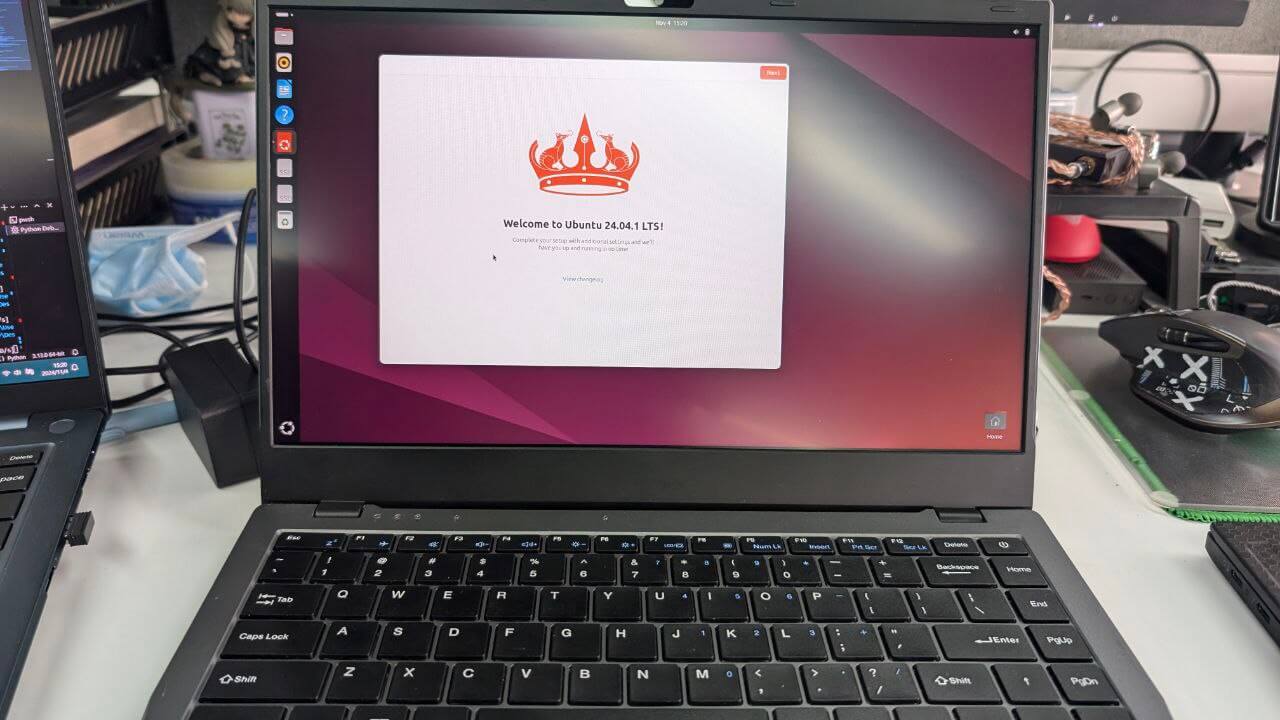
The machine was a pleasant surprise when it arrived. Sure, it’s noticeably heavier and thicker than other 14-inch laptops, but the build quality doesn’t feel obviously shoddy — actually, it’s better than expected.
The chassis is plastic, without question, but it’s spray-painted to look like metal. I personally like plastic: it’s not as heavy and it has some flex. As it turns out, this machine uses the Chuwi GemiBook Pro mold — even the screen is the same. Just a different set of internals.
It came with Ubuntu preinstalled. After using it for a week, I have some impressions, mostly positive:
- The system experience is very smooth. RK3588 seems to have the performance for a desktop-class OS, and GPU acceleration can be enabled.
- The machine comes standard with a glass touchpad and supports Type-C charging. Surprisingly comfortable to use.
- It’s one of the rare ARM Linux machines with “true suspend” — the kind of standby experience you get on a traditional laptop. Close the lid, leave it overnight, and it drains less than 1%.
- The motherboard supports an NVMe drive, so there’s enough room to expand.
- Fully passive cooling, no fan, absolutely silent.
The machine has its shortcomings too:
- The battery is tiny. Hard to imagine a 14-inch laptop with only a 38Wh battery. RK3588 at full tilt draws a fair bit of power, so under heavy load you might get 2 hours of battery life. Under light load it can drop quite low, often around 8W (which isn’t all that low either), so battery life isn’t terrible, but with a battery this small it’s never good either. Either way, you don’t see any of ARM’s battery-life advantage.
- Probably because the mold is on the cheap side, if you type fast you get obvious double-presses and dropped keys. At first I thought it was a quality issue. Official after-sales sent me a new one — same problem. The keyboard has no backlight either.
- The default screen’s color gamut is terrible. A 1080p panel paired with the classic 45% NTSC, miserable viewing angles, and the colors are painful to look at.
- The machine can’t boot the system straight from NVMe. It has to go through USB or EMMC first.
- The kernel has to be based on the BSP kernels RK3588 officially provides. Mainline kernel support is incomplete.
So I did a series of upgrades and “struggles” to make this machine more usable. Here’s a quick rundown of what I did and how far I got.
1. Swapping in a higher-gamut screen
The default machine uses a 30-pin eDP cable for the screen, and the panel itself can indeed be pried off from the B side and replaced. The manufacturer’s engineer even threw in a 40-pin eDP cable when I bought the laptop — with that you can put in a 4K screen.
At first I worried the screen firmware might be written into the kernel or some dtb file, and that a random swap wouldn’t light up. But the official word was no such thing: as long as it fits and the pins match, it works.
So I hunted around and found an upgrade panel that would physically replace the original.
The stock panel is CSOT’s MNF140BS2-3. You can look up its dimensions on Panelook. What you’re after is anything matching the ThinkPad T480 upgrade spec — the best-known being the NV140FHM-N66: IPS, 100% sRGB, DC dimming, easy on the eyes, matte. Its only downside is that it isn’t very bright, but for this thing it’s plenty.
Once the panel arrived, I pried open the B side, took out the old panel, and put in the new one. Careful with the double-sided tape on the back — re-stick it and you’re done.
In theory, with the 40-pin cable the manufacturer gave me, I could go 4K. But the 4K panels available right now are pretty meh: either too power-hungry or PWM dimming. After thinking it over, there was really no point.
2. Tuning system parameters for better efficiency
The default Cool-Pi Ubuntu image forces both the CPU and GPU schedulers to the Performance governor. You have to go into /etc/rc.local and change it yourself.
Then you can follow the general RK3588 tuning parameters for further optimization:
It basically lists every optimization you can do on RK3588 right now, complete with benchmark comparisons and the reasoning behind them. Very thorough.
If you want more battery life, the fundamental fix is a bigger battery. Cool Pi officially says a larger battery is planned, but there’s been no news so far. Hopefully they offer one down the line.
3. Swapping the Wi-Fi card, compiling the kernel for the driver
When you open this machine up, you find the Wi-Fi card is actually replaceable. According to the official docs you can swap the stock Realtek card for an Intel one, but it seems only the Intel AX200 is supported. The laptop has plenty of other modular parts you can swap too, with corresponding documentation — no wonder the official line is that this is a DIY laptop:
https://hackaday.io/project/196668-genbook-rk3588/log/230987-instructions-of-genbook-rk3588
After swapping in the Intel card, the system doesn’t have a driver for it. That’s because the official default kernel doesn’t enable Intel’s module. You need to git clone the officially published kernel source and modify the config and compile it yourself:
https://github.com/coolpi-george/coolpi-kernel
Usually in:
/arch/arm64/configs/rk3588_cpcm5_genbook_defconfig
or
/arch/arm64/configs/rk3588_cpcm5_notebook_v20_defconfig
add a line:
CONFIG_IWLWIFI=m
Recompile the kernel and replace the files in /boot/.
Don’t think compiling a kernel is that hard — the official repo gives you a really simple script: build-kernel.sh
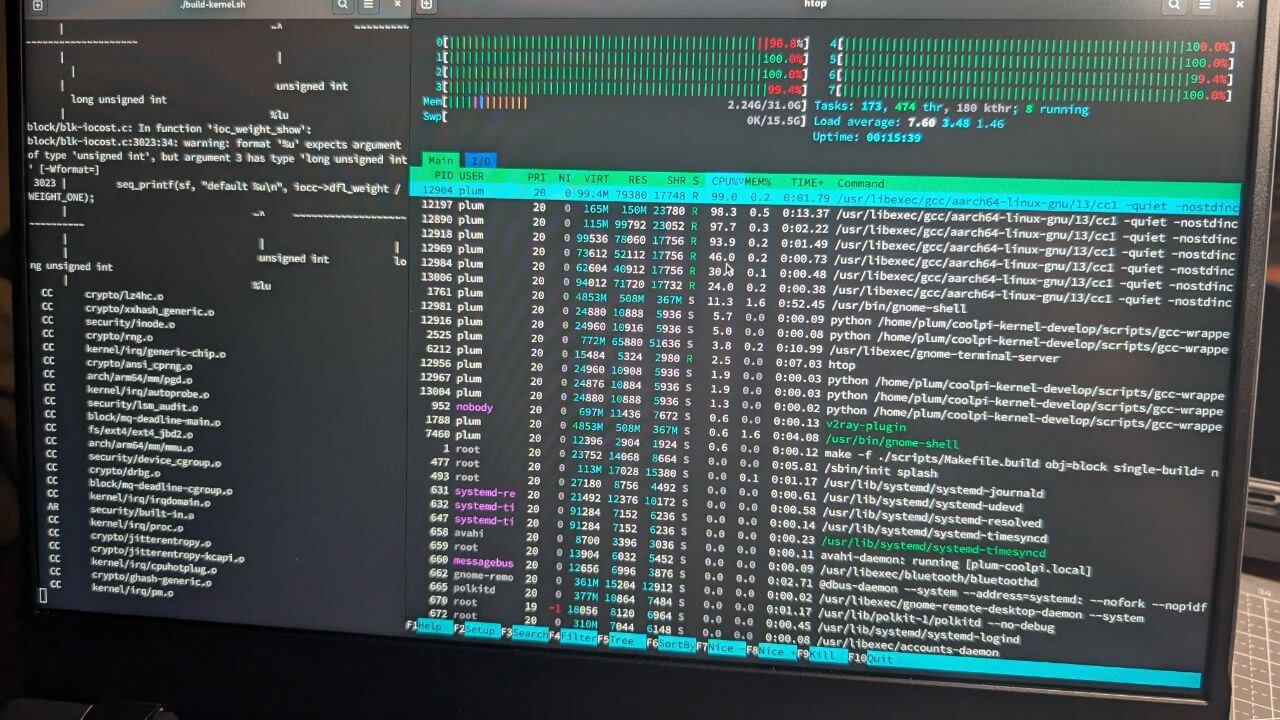
Just run it and pick the corresponding platform. Best to run it on this laptop itself, otherwise you’ll have to cross-compile.
4. Moving the system to NVMe
The built-in 64GB eMMC isn’t enough to run the system, so I added a 1TB NVMe drive. SPI doesn’t support booting from NVMe by default, and I didn’t want to flash the SPI, so I booted the boot partition from eMMC and pointed the rootfs path in boot at the NVMe drive, effectively booting the system from NVMe.
One thing here is a bit abstract: in the Cool Pi image, rootfs isn’t identified by UUID or anything like that, but by the partition’s name. The default partition name is WRITE. You have to change the root partitions on the different media to different names in the rootfs settings, and configure it properly, to make sure it boots correctly. This tripped me up for a long time.
You can try changing it to a UUID by hand, but I don’t know if that works.
5. Panfork and Panfrost
As I said, RK3588 supports GPU acceleration out of the box, and you can even enable Wayland. Worth mentioning here: if you’re using the default BSP kernel, that kernel is actually a modified Android kernel. Its GPU driver is called Panfork — I forget whether it’s semi-closed-source or what, but it performs well, is tightly bound to the official kernel, hasn’t been updated in years, and requires a patched Mesa version to drive it.
The other one is Panfrost, which is tied to the mainline kernel. It’s constantly updated but never quite complete, and works with standard Mesa.
For a normal user, Panfork is fine — you can even run games through Wine and such. The problem is that if you install software with Flatpak, the apps use the standard Mesa version, not the panfork-patched one. Every program you run through Flatpak gets no GPU acceleration, which leads to serious crashes, black screens, and slowdowns.
That problem doesn’t exist with panfrost, but panfrost isn’t usable right now.
So you’re stuck between a rock and a hard place: panfork for better performance but broken Flatpak apps, or panfrost for lousy performance but working Flatpak?
My advice: use panfork and forget Flathub exists. Try the Raspberry Pi’s Pi-app instead.
Summary:
I’ve been making do with this laptop for over half a year and have some strong feelings. It has plenty of problems, but it at least reaches the “usable” level — it’s even the best Arm Linux laptop I’ve used to date. Last time I used something similar, the Pinebook Pro, I couldn’t stand it; suspend and sleep were broken on that thing. In fact, all those “Raspberry Pi laptops” and “open-source Arm Linux laptops” never tell you the kernel doesn’t support suspend.
So support for long suspend/standby matters a lot, and the Cool Pi laptop does very well there.
The other thing is that Cool Pi’s community is decent. The official staff on the official forum are very active and responsive, and they seriously deal with problems and give you correct answers:
https://cool-pi.com/ (love you george)
On top of that, the official team provides after-sales service for what they sell, and they’re very lenient about it — as long as it’s not too outrageous, they’ll repair it or send replacement parts. That attitude deserves a thumbs up.
Thinking about it, my biggest complaint is still the keyboard ghosting when typing fast — that one genuinely affects the experience. The other problems — small battery, GPU drivers, etc. — never really became unbearable. It also sparked my interest in RK3588 products, and even directly led me to buy another similar product. But that’s a story for next time.
The Cool Pi CM5 Laptop is currently crowdfunding under the name Genbook RK3588, claiming the future “official version” will have higher-frequency memory and a bigger battery. For now, at least, it doesn’t.
https://www.crowdsupply.com/shenzhen-tianmao-technology-co-ltd/genbook-rk3588
If you’re in China, you can buy “unofficial versions” like mine on Pinduoduo or Taobao for a lot less. But judging by the crowdfunding numbers, I don’t know whether the so-called “official version” will ever actually arrive.
Comments are hosted on the Chinese main site. This mirror is read-only.