A Few Days with Ayn Loki Max
Chatter: Ayn Loki Max
I already had two x86 handhelds on hand, but there was still a reason to buy a third. At first I just wanted something to play PS2 on. My old device was a Retroid Pocket 4, an Android handheld with a MediaTek Dimensity 1100 — just barely enough for PS2, but some games still drop frames. What’s worse is that PS2 emulator on Android: it hasn’t been updated in ages and looks like it’s on its way to being completely dead. So I started looking for a replacement.
Then I came across all those high-end Android retro handhelds — Aya Neo, Ayn Odin, Retroid Pocket 5/6. The budget for these things has climbed to around 2,500 RMB. Honestly, I really don’t like Android handhelds. For one, the OS itself is bloated for a gaming device. For another, Android has input latency when playing emulated games. A lot of people probably can’t feel it, but if you compare side by side it’s obvious.
So isn’t there some slightly smaller handheld that runs Linux and can handle PS2 emulation?
That’s when I spotted a batch of brand-new AYN Loki Max units on Xianyu. After thinking it over, I went for it.
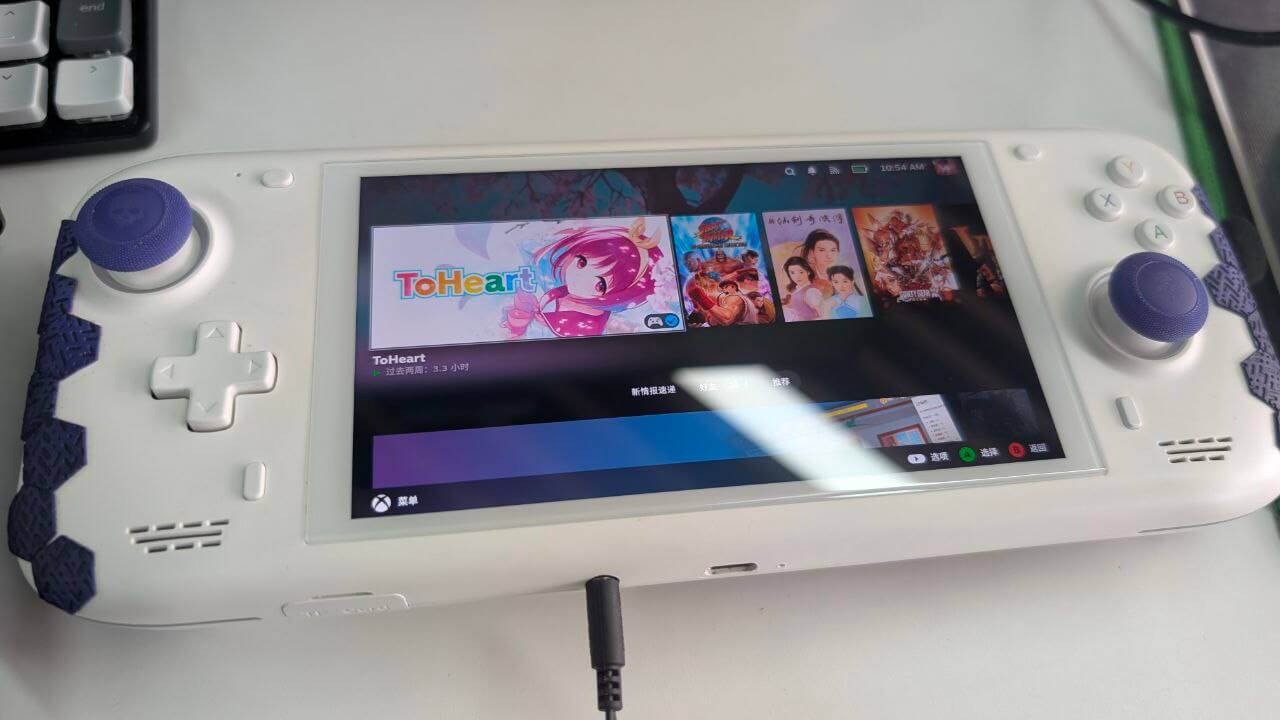
Here’s the main reasoning:
It’s got a 6800U, plenty powerful.
6-inch screen, not too big — at least smaller than a traditional Windows handheld.
Big Alps sticks. Just having proper sticks already puts it ahead of most Android handhelds still using Switch-style small sticks.
Membrane dome-switch d-pad. Super comfortable for retro games, and it can even feel like modern tactile switches.
2,500 RMB for a brand-new unit, sold officially. A new 6800U machine at this price is hard to find even in 2026.
Now I should explain why I’m so sure this thing on Xianyu is official stock, brand new.
First, I know this Ayn Loki Max. I was even in the pre-order group for it. Back when Ayn launched the Odin, they had a good reputation and wanted to move into the x86 handheld market, so they designed the Ayn Loki series — from the low-end Ayn Loki Zero up to the high-end Loki Max. Pricing was very competitive at the time. But because it was the company’s first x86 handheld, and had a lot of unique design choices, production got delayed over and over. By the time it shipped, 7840U machines were already out, so their 6800U unit’s sales just died. Basically, aside from the first wave of die-hard pre-order fans, almost nobody bought it.
So this repeatedly delayed batch naturally sat in the warehouse. The solution: Ayn quietly opened a small account on Xianyu and sold them off. You’ll be delighted to find that this “private seller offering brand-new Ayn Loki Max units” on Xianyu — whether you look at the address or the past sales records — just screams Ayn official. Ask them and they’ll even tell you it comes with warranty.
When mine arrived, I had a laugh: the shipping origin was literally Ayn’s address. They’re really just clearing inventory on Xianyu.
After spending half a day with the built-in Windows system, I could see why people call this machine a half-finished product:
First, the fan curve basically doesn’t exist. Get it slightly warm and it goes full blast, sounding like an airport runway.
Next, the power delivery seems buggy. You can only limit the CPU TDP — say from 18W to 20W — but GPU TDP is counted separately and can’t be limited. You often end up wanting to lock 18W but getting CPU 18W plus GPU 18W for an absurd 36W total.
Then there’s Ayn’s own management frontend, which is basically abandoned. It can only handle a few power settings and custom buttons, starts slowly, and crashes constantly. Considering the Ayn Loki itself has been officially dropped, this frontend is probably done for. Either use a third-party one or live with it.
And finally the most absurd problem: charging. The machine supports PD charging, but if you plug in a charger, the touchscreen stops working — or more precisely, partially stops. Tap the left half and the screen glitches. At first I thought it was a hardware fault. Then I found out… yeah, it is a hardware fault, just a common one.
The fix is to charge with “Ayn’s official 140W PD charger.” This clearance version doesn’t include a charger — they say it’s discontinued. Fortunately, you can use a Lenovo or any other brand’s PD 140W charger and the touchscreen won’t have issues. Below 140W and the touchscreen becomes unusable… though it’s not absolute. For example, I once used a 90W charger with no problems. What’s certain is that 45W–65W can only charge, not touch.
Of course, I didn’t buy this to use Windows. I planned to use it as an “aggressive Linux handheld that also plays emulators,” so naturally I had to kill Windows and install some “SteamOS-like” Linux distro.
Current options: Bazzite, ChimeraOS, CachyOS, NobaraOS, the nearly-dead ManjaroOS Handheld, and the already-dead HoloISO.
I’ve used HoloISO — the most authentic version — but it’s dead now. A shame. I used ManjaroOS before during the beta for that “Orange Pi handheld” and didn’t think much of it. Too aggressively immutable.
Right now the hottest is Bazzite. I used it for a while. It’s based on the Fedora Silverblue/Atom immutable base with a set of SteamOS components baked in, but the drawbacks are obvious: the system is way too goddamn bloated. It bundles almost every package even remotely related to “gaming,” whether you need it or not. It supports a lot of handhelds, but most of that relies on the open-source HHD kit, and I heard they recently fell out with HHD’s developer, so that’s going away. If you’re lazy and don’t mind the mess, Bazzite is worry-free — it has everything, does everything, and can even work as a desktop OS with an external monitor. But I can’t stand a system with a pile of background services. It even has a bit of a fanclub vibe. I use Linux for “lightweight,” and Bazzite ends up almost more bloated than Windows 11. Unbearable.
Next, CachyOS. It’s not a handheld system per se — it’s just a handheld-specific edition of the CachyOS distro. The difference is it boots straight into a SteamOS-like interface. Unlike Bazzite, it’s a traditional system, not immutable. Its big selling point is “extremely aggressive performance optimization” — any Linux performance patch, useful or not, well-tested or not, gets thrown in. It sits on Arch Linux, which every kid loves, and its fanclub ratio has already surpassed Manjaro. I figure it’s not far from being excommunicated from the Arch religion. The performance optimizations aren’t useless, but most come at a cost — the classic trade of battery life for performance, or stability for performance in specific cases. Handheld support is mediocre, relying entirely on the open-source inputplumber project. I wouldn’t recommend trying it unless you’re a hardcore zealot.
Then there’s NobaraOS, sort of between Bazzite and CachyOS in style. It’s spearheaded by the Proton-GE guy and is essentially a modded Fedora that boots into a SteamOS interface. It’s not immutable, with a little customization but not much. Sounds nice, but the downside is cross-distro upgrades are a pain, and even unsupported. Fedora is an aggressive distro that updates every six months — failing to keep up with upgrades is awkward. If you don’t track version updates for over a year, the repos might be dead before long. Considering this is close to a “personal project” (though they deny it), I don’t think it suits a lazy person like me.
So my choice is ChimeraOS. It’s essentially an “immutable Arch Linux” close to official SteamOS, with restrained system updates. Apart from bundled inputplumber support for handheld function buttons, there’s no extra fluff. Thanks to the immutable base, updates aren’t a problem. It’s currently the closest thing to the SteamOS experience, with a long-term character. And it focuses solely on handhelds, making it the best choice for a lazy person like me. Most importantly, RGB is off by default on this system — unlike others where you have to hunt through settings. I still don’t get why a bunch of idiots want RGB lights on a handheld. It does nothing but drain battery.
With the system decided, it was time to install. But here’s the absurd part: unlike Bazzite where you download an image and install, ChimeraOS’s download isn’t a traditional installer. The actual base image has to be downloaded online during installation, which is painful without a VPN. Considering the base image isn’t large, tethering from your phone is about enough. After installing and doing basic setup, it’s the traditional SteamOS experience. The kernel and Mesa versions may not be as new as Bazzite’s, so performance might favor Bazzite in some cases? But ChimeraOS’s clean experience is unmatched. After first boot into the desktop, install the Decky plugin, then casually install something like SimpleTDP for power control, and you’re done.
As for the PS2 emulator stuff mentioned earlier, ChimeraOS is an officially supported system for emuDeck, with one-click quick install and configuration. The experience is great — you can even add Artworks directly into the SteamOS interface. There’s basically nothing left to configure. The system also has first-party support for the Ayn Loki Max. Insert a TF card, download games, and you’re ready to play.
Now some other settings:
First, the fan: the Ayn Loki Max has no fan curve by default, but you can set it directly in the BIOS. Either copy a manual from online into the corresponding BIOS options, or — my recommendation — take a photo of the BIOS screen and ask ChatGPT for a fan curve to set.
Next, sleep issues. By default ChimeraOS uses S3 sleep, which actually works fine — at least 70% of the time. The other 30% is the “won’t wake up” case: after powering on, the RGB light stays on, the fan spins like crazy, the machine is unresponsive, and you can’t grab any logs. The system definitely didn’t boot. That’s a hardware-level S3 sleep death.
The fix is switching to S2idle sleep, at the cost of higher sleep power draw. But honestly, this machine’s S3 sleep power draw isn’t low either — about 1%–2% per hour, and the machine gets slightly warm. Clearly not a true power-off sleep. The hardware definitely has issues; it should be tunable via EC or similar. But given it’s discontinued, the official side won’t bother. I also tried some BIOS tuning — disabling unused channels, limiting memory power — and it made no difference.
The thorough solution is the Windows approach: sleep first, then hibernate. But with Windows, waking from hibernate also kills games… so I just live with it. Besides, AMD 6800U S3 sleep death is a notorious old problem. Even the best-selling GPD Win4 suffers from it. Since this is my third-string machine, I’d say just shut it down when not in use.
I bought this machine last summer and have used it as a third-string device. Under SteamOS, performance feels between the Steam Deck and the ROG Ally X — fitting for a 6800U. Setting an 18W or 20W TDP gets you performance beyond a typical 6800U. The screen is 1080p IPS, with decent color accuracy — probably the same panel as the Ayn Odin, screen protectors are interchangeable. Running games at 720p for AAA titles is fine, except battery life collapses. But I’m always plugged in anyway.
Many foreigners say the Ayn Loki Max’s battery wears out quickly, but you can just go on Taobao and ask Ayn’s customer service to buy a new battery. They say there’s still stock in the warehouse, though not much — once it’s gone, it’s gone. I bought a spare, and worried the sticks might die, I also bought a spare stick module. Oh right, big Alps sticks are the best — they crush any handheld still using Switch-style small sticks.
The machine doesn’t have decent accessories — just a screen protector, nothing else. I added some grip tape and stick caps. As a device for slacking off and playing games, it’s great. A brand-new 2,500 RMB unit, 6-inch size, accurate colors, big sticks, SteamOS support — it’s one of a kind. There was nothing like it before, and there won’t be again. Even though it died commercially from delays, it’s still far better than some machine that spent years in beta and never launched at all.
Comments are hosted on the Chinese main site. This mirror is read-only.