Enabling TRIM on Ubuntu 14.04
Advertisement
Today I found out I got played.
TRIM Enabled By Default For SSDs On Ubuntu 14.04 Trusty Tahr
Advertisement
I was pretty stoked when I saw that news, since it meant I wouldn’t have to tweak anything myself, so after moving to 14.04 I never bothered turning on TRIM manually.
Then today I noticed both my laptop and desktop had disk speed problems. The desktop was slow to boot, and the laptop would randomly hitch. Both machines had been running their installs for a while.
So I figured I’d check whether TRIM was even on…
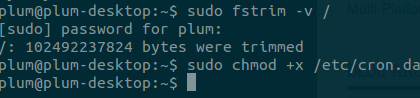
Nope, no TRIM!
So I went back to that news post and found the updated note:
Update: Only Intel and Samsung SSDs will have TRIM enabled by default in Ubuntu 14.04 because some cheap SSDs can even brick themselves when running TRIM. This doesn't mean TRIM should only be used with Samsung and Intel SSDs, but to avoid running into issues, this is the only option for now.
Can I swear now? So I had to turn it on manually.
gksu gedit /etc/cron.daily/trim
Add:
#!/bin/sh
LOG=/var/log/trim.log
echo "*** $(date -R) ***" >> $LOG
fstrim -v / >> $LOG
fstrim -v /home >> $LOG
Then make it executable
sudo chmod +x /etc/cron.daily/trim
I still want to swear… so anyone not running a Samsung or Intel SSD gets no rights?
Comments are hosted on the Chinese main site. This mirror is read-only.