Intel Arc B580
Using the Intel Arc B580 on Linux (for Gaming)
I used to have a desktop: E3 1230V2 + 16G DDR3 + GTX 1070. I forget when I put it together. Once I started using a laptop as my main machine I pretty much stopped upgrading it, and honestly the performance was enough for me — I could play through Ori 2, Doom Eternal, even Genshin without issues. Genshin 2.0 even ran at 4K with settings cranked, so I never bothered upgrading.
In the first half of last year someone gave me a bunch of spare parts they’d retired, and I pieced together an i7 12700 + 16G DDR5 + 512G NVMe setup. Then I grabbed a cheap motherboard off JD, swapped the whole thing into the case, and installed Fedora 43 as my main system.
Then I ran into problems, and the problems were all with that Nvidia GTX 1070. First, Nvidia drivers are all closed-source, and the akmod alone would break every other upgrade. Second, to avoid the 32-bit/64-bit mess with Steam, I used the flatpak version. flatpak + Steam + Nvidia is basically hell. If you want 3D acceleration to work, you have to make sure the host has one set of akmod drivers and mesa, and the flatpak has another set of NV drivers and mesa, and the two versions have to match exactly. Get them slightly out of sync and 3D acceleration just won’t turn on. In other words, you need rpmfusion, flathub and Steam to all agree on driver and package versions or things break. I put up with that for half a year and finally had enough — I decided to fix it at the root and get a GPU I don’t have to babysit drivers for.
The obvious best choice was an AMD card. The kernel drives those directly and performance is decent. Problem is the 9070 and 9060 are both too expensive, and the cheap ones still have 8G of VRAM. I already bought a mining card with 8G, and you’re still giving me 8G? So I set my sights on Intel. Everyone says Intel’s discrete GPUs are pretty weird, but I’m on Linux, and Intel GPUs are first-class citizens there — they never give you trouble. Even Linus himself uses an Intel GPU in his own build.
After a month of watching prices I picked up a Gunnir B580 for 1500 with interest-free installments, and sold my MSI reference 1070 while I was at it. Now I’m fully an Intel CPU + Intel GPU user.
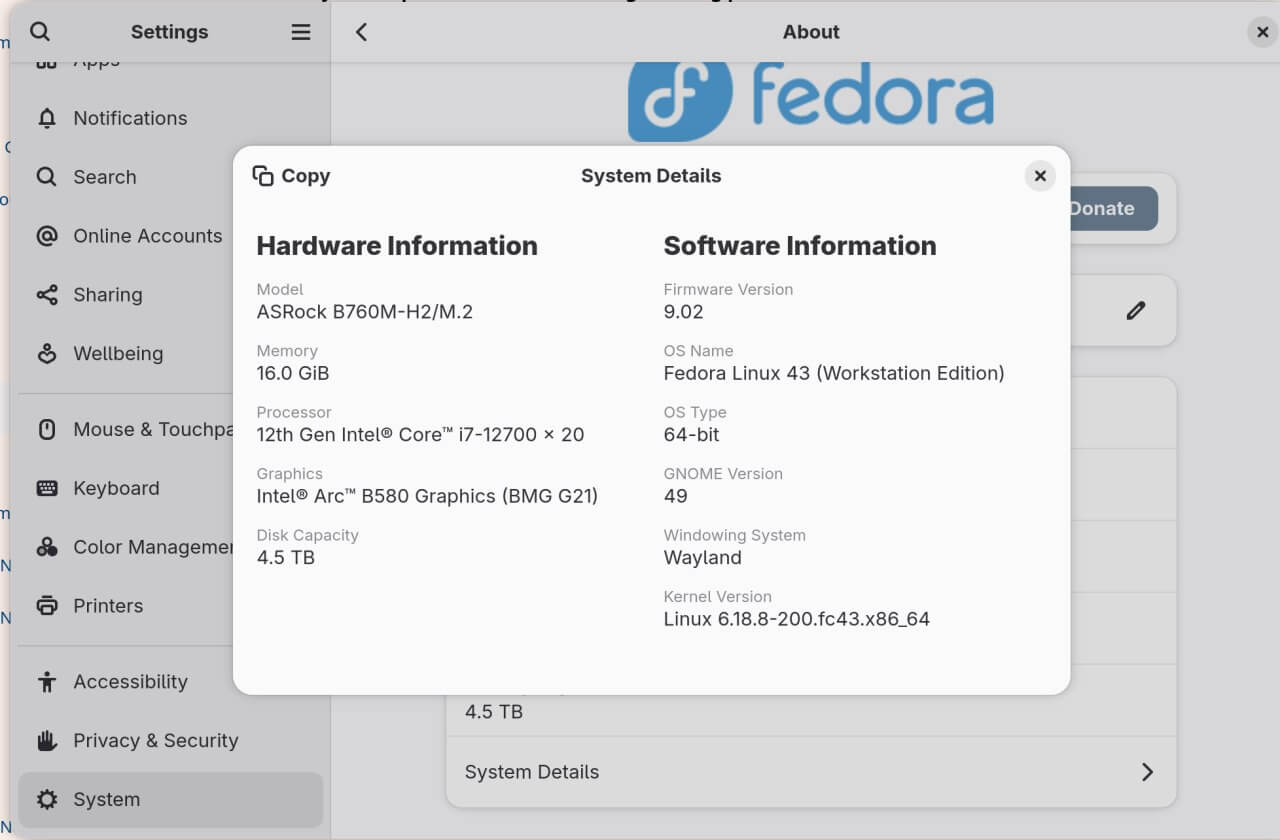
After the swap the B580 works perfectly on Linux. At first there was a screen corruption issue with GTK4’s Vulkan rendering and I had to manually switch to the ngl backend, but a later Mesa update fixed it. Now it’s completely fine, and flatpak Steam plays games without complaint.
Once it arrived I tested most of the games I had on hand. It basically meets my 1080p 45–60 fps needs. Yes, my bar is that low — I’m fine with this level of image quality.

Black Myth: Wukong: playable at 1080p with medium settings and some high, minimum 45fps, up to 60fps at the high end. Confusingly, XeSS 2 wouldn’t turn on — probably Mesa doesn’t support it.
Alloy Angel Falls into Eden (a Doom 2016-like): steady ~50fps at 1080p medium.
Ninja Gaiden 4: medium settings with some high, a solid 60fps, but it froze once; didn’t happen again after that.
Fatal Fury: City of the Wolves: 1080p ultra holds 60fps. Totally fine for a fighting game. 4K can actually do 60fps too, but FSR is clearly doing the work and image quality drops a lot.
Street Fighter 6: 1080p medium, and I didn’t get the black-screen texture bug I had with my Arc 140T iGPU. Stable 60fps. Older versions would freeze the screen during online matches; the new version seems to have fixed it, though some people report it came back after the latest update. Only way to know is to watch ProtonDB.
ToHeart remake: even at 1080p with GPU mode on it can’t hold 60fps. Incredible. This is the benchmark of galgames.
Doom: The Dark Ages: no matter what I set, whether 1080p or 720p or lower, it’s always 20fps. I looked into it and the game forces ray tracing on. Some people online say you can install the latest proton-GE and use a certain flag to translate DX12 ray tracing to Vulkan to fix the poor RT performance, but I didn’t try it. The Steam Deck runs it at 30–45fps, so a B580 running normally with XeSS should be completely fine.
That’s about all I tested. If a game doesn’t force ray tracing, you can basically get 1080p 45–60fps on Linux. 2K might be worth a shot. Forget 4K. Overall the B580 on Linux is fine for stable work, but performance optimization still isn’t as good as on Windows.
This desktop should last me a while. My only regret is that when I upgraded last year I didn’t max out the RAM and swap in a new drive while I was at it. I thought it was too expensive and not worth it. Who the hell knew prices would get this absurd?
Comments are hosted on the Chinese main site. This mirror is read-only.