ROG Ally X: First Thoughts
Chatter: ROG Ally X
Back in May last year, I noticed the ROG Ally X handheld was not only in stock on JD.com, but the price was back to normal, and it even qualified for the national subsidy. Basically, a machine that originally cost over 6000 RMB ended up discounted by a little over 1000, so I got it for under 5000. The reason JD.com gives you is the “national subsidy,” but in reality you don’t need to bind any qualification for this subsidy—you just need your delivery address to be in Shanghai. A victory for the “Shanghai lords,” you could say.
Naturally, I asked a fellow townsman bigshot in Shanghai to receive and buy it for me, and successfully got my hands on this handheld. A lot of people probably want to know: I’m a SteamDeck shill, so why did I buy ASUS’s handheld? How should you choose between it and the SteamDeck? I think I can explain it briefly with these points:
It’s a Windows handheld, so it can play Windows-exclusive games (Galgame)
It’s the only Windows handheld I know of that’s continuously optimizing power efficiency
It’s the best Windows handheld I know of when it comes to self-made power control software
At the time (2025), it had the largest battery capacity among Windows handhelds
Some might bring up the ROG Ally + big battery mod, which has basically the same performance, but the biggest difference with the ROG Ally X is its 24GB of native RAM. The change that big memory brings is that you can allocate a large amount of VRAM to games, especially those poorly optimized ones that all need lots of VRAM. And from my observation, the root cause of stuttering when the SteamDeck runs those badly optimized games is often insufficient memory, and the ROG Ally X can clearly improve that.
So buying the ROG Ally X solved the following problems for me:
It lets me play games the SteamDeck can’t, whether Windows-exclusive Galgame or some AAA titles with higher performance requirements
It’s not too heavy or too big; the ROG Ally X is a 7-inch handheld, and dimension-wise it’s even smaller than the SteamDeck
It’s a “hassle-free” Windows handheld, with a standard two-year warranty, excellent build quality, and continuous follow-up updates, so I don’t have to deal with the problems of those shady Chinese brands
There’s also one most important point: at that time it had the national subsidy, so the price could be even lower than the launch price, so I chose to buy it.
It’s been almost a year since I got the machine. How’s the experience? Simply put, it basically met expectations.
First, performance: with the ROG Ally X’s help, I’ve actually finished a lot of games that the SteamDeck couldn’t run. The most obvious one is Mingmo: Yuanxu zhi Yu—on the SteamDeck it’s basically unplayable, no matter how you lower the resolution or optimize, it’s stuck at around 30 fps. But on the ROG Ally X at 25W TDP it runs at 40–50 fps, and in some small scenes even 60 fps. I also specifically observed that the root cause of it not running is still too little memory, insufficient VRAM allocated. If the SteamDeck had 32GB of RAM, maybe it could run it too. So the big VRAM from big memory is really important, and it’s the main reason the ROG Ally X clearly beats the original ROG Ally.
But honestly, for many games I still prefer the SteamDeck, because its low-power battery life is just too advantageous, and it has the only exclusive advantage right now: HDR. Many people keep ignoring that the SteamDeck OLED is currently the only X86 handheld that can properly run HDR. Windows handhelds, whether shady Chinese machines or later Lenovo products, all have terrible HDR support—only the SteamDeck OLED can enable it without issues. For example, for DOOM: The Dark Ages and Stellar Blade, both the SteamDeck and ROG Ally X can run them, and the latter clearly has better frame rates, but I still choose the SteamDeck OLED for the HDR effect. Also thanks to power efficiency, the ROG Ally X at high TDP gets slightly higher frame rates but its battery life is even worse than the SteamDeck OLED’s, so it’s completely unable to fully crush and surpass it.
Now about Galgame: I have to say the ROG Ally X has an overwhelming battery advantage for playing Galgame. Most games can run at a 7W TDP, but in reality the whole machine’s TDP is around 8W, and combined with that 80Wh battery, you get a terrifying nearly 10 hours of battery life. For the Galgame machines I’ve used before, this is the longest battery life I’ve ever seen. And interestingly, ROG’s own Armoury Crate makes it easy to switch between mouse and gamepad controls, and you can easily customize and modify them. For example, I set RT to the Ctrl key that most Galgame use, making it easy to get a “PSP Style” story fast-forward. And I set LB and such to Backspace, corresponding to the Backlog display most Galgame have. Armoury Crate has a decent built-in screenshot function that lets you bind a hotkey, so you basically don’t need to install a separate screenshot tool. The only downsides might be that it’s a bit heavy overall and one-handed operation is a little difficult, but for me one-handed operation is meaningless now, so whatever. Considering the original ROG Ally’s price is very low right now, if you just want a handheld for Galgame, buying an original and modding it with a 75Wh battery is also a very good choice.
What I’m most satisfied with about the ROG Ally X… or rather the ROG Ally series, is ASUS’s official attitude: they’ve basically been continuously optimizing the handheld experience. After getting it, you can see they’ve been doing their utmost to fix some pain points of Windows handhelds, like adding the super standby, repeatedly optimizing to reduce Armoury Crate’s startup speed and memory usage, and continuously adjusting the overall battery life. It makes you feel this machine is already the best sample product for the Windows handheld gaming experience. Of course, for those abstract problems of the Windows system itself—like games freezing after waking from sleep, or too many background tasks at low power affecting performance—I feel ASUS can’t solve those either, and they’re not its problems to solve. At least it tried, instead of lying flat like other manufacturers, or even giving up outright like the Chinese shady brands. I feel it’s already done its best.
As for system-level problems, Microsoft has actually tried to solve them too, like launching an “Xbox front-end” Windows gaming mode, and even making it exclusive to the ROG Xbox Ally X for a while. Of course, I’ve used this mode too, and I can only say it’d be better if it didn’t exist. First, its biggest problem is Xbox-first: it prioritizes Xbox games, and treats Steam games like second-class citizens, completely ignoring actual market share. Another point is that this interface’s various power settings don’t work as well as Armoury Crate, and those multi-game switches don’t achieve the same level as Xbox’s “freeze” either. It’s basically just a front-end UI with simple power functions, and underneath it’s still Win11, with all the original problems intact. It feels like it’s better not to use it. I suggest if Microsoft really wants to make a Win11 handheld mode, they should just copy the Xbox system directly, at least bring over the killer features like game suspend, otherwise this skinned interface is completely meaningless.
Here’s a place where the ROG Ally X is better than the SteamDeck: extremely long standby advantage. I know many people will complain, like “Isn’t SteamOS’s biggest advantage standby?” But I mean something different from what you’re thinking. SteamOS’s standby is indeed good—you can often confidently press the power button while playing a game, and pick it up to continue. But the problem is SteamOS’s standby keeps draining battery, similar to the Switch: if you leave the handheld in standby for a long time without playing, the battery will run out. But the ROG Ally X’s super standby mode is different, a bit like Surface: for the first few hours it’s traditional standby, and after a certain time the machine switches to “hibernate,” entering a state where it barely uses power. So I can confidently leave the ROG Ally X sitting there gathering dust without worrying about the battery draining quickly, but the SteamDeck can’t do that (fortunately the official side released a “storage mode” for long periods of non-use).
As a star device, many accessories for the ROG Ally X are easy to buy. I’m still using a full set from Dbrand, though I think some cheap Chinese ones are fine too. As a buying recommendation, I can only say if you need a Windows handheld device, the ROG Ally series is your best choice, because they’re the most “serious” about making handhelds. Others, whether Lenovo or MSI, show no trace of treating users like humans in their after-sales service and optimization, and as for those Chinese shady brands, don’t even consider them. As for the ROG Ally XBox X, the Z2E processor’s performance isn’t actually that great—at low power it feels like reverse toothpasting. If you like that grip or you’re not short on money, you can consider it.
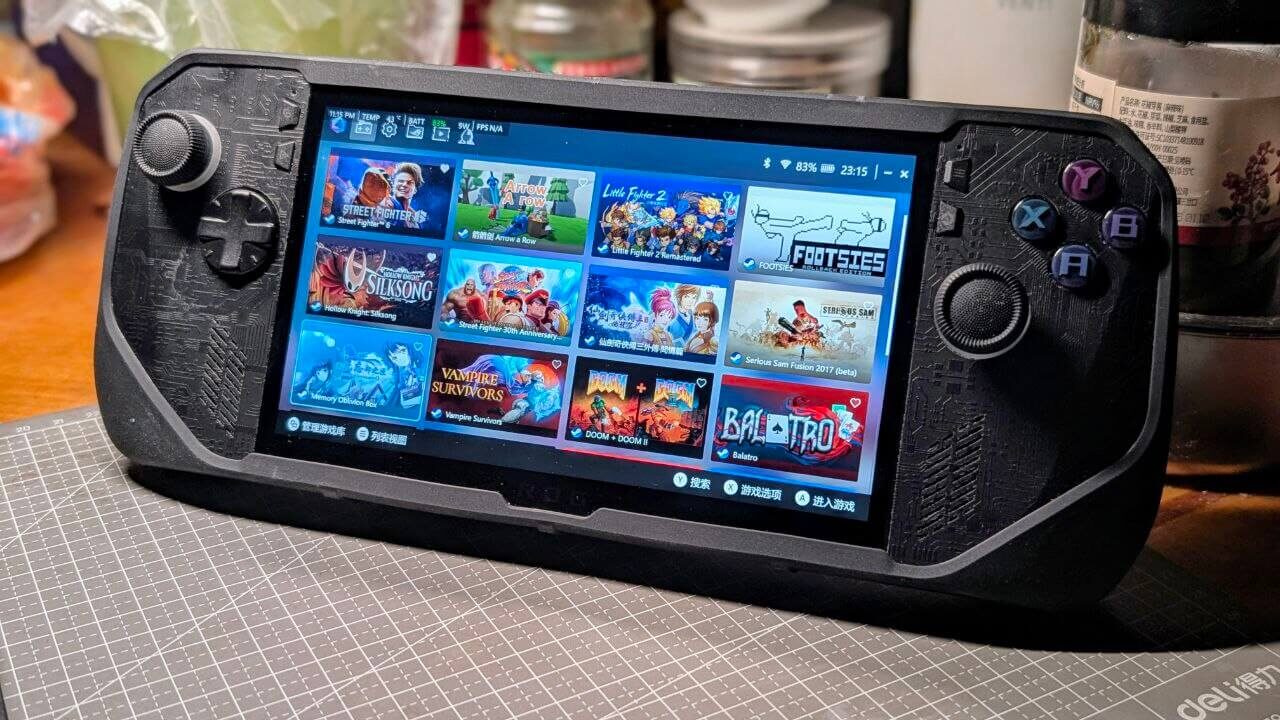
Some might bring up the AI MAX 395 that’s popular with Chinese shady brands recently, or the later Panther Lake GPU, to prove the ROG Ally X’s Z1E performance is insufficient. I can only say a handheld without a battery is worse than my external GPU dock. No matter how great Intel’s GPU is, I suggest you first ask people who’ve been gaming on Intel graphics cards for years how they feel. The optimal solution for X86 handhelds at this stage is still the Steamdeck, and the ROG Ally X series can serve as a differentiated filler for my different platforms and performance needs. Anyway, from purchase to now, I have no intention of selling it, and no dissatisfaction with playing Galgame and traditional AAA…
Oh right, the most dissatisfying thing is still the Windows system itself. If you really don’t need the Windows platform, the official SteamOS actually supports the ROG Ally series too, so you might as well try it.
Comments are hosted on the Chinese main site. This mirror is read-only.