Fedora 45 Setup Guide
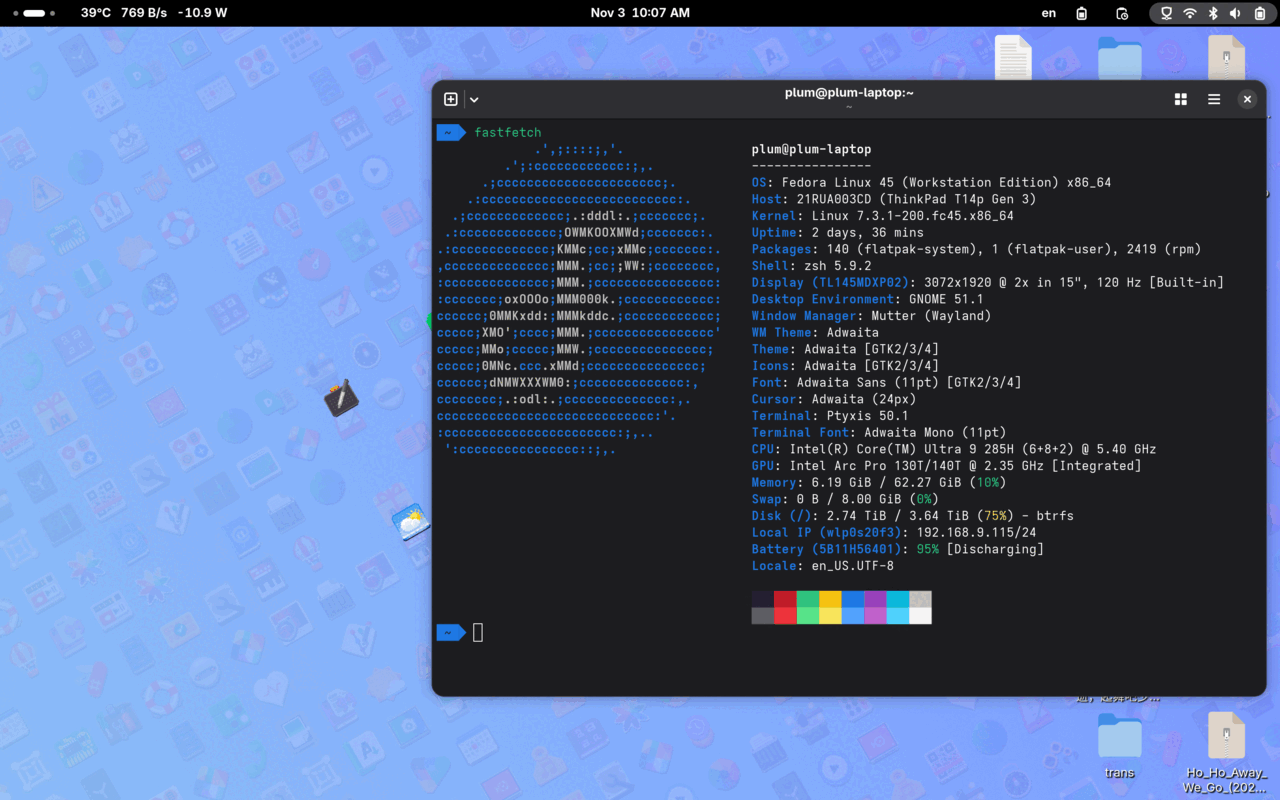
Fedora 45 is finally out, so it’s time for a new setup guide. And honestly, each new Fedora release with preinstalled GNOME feels more and more complete. Fewer extensions are needed afterwards, and the whole thing gets closer to being usable out of the box.
This time Fedora 45 ships with the GNOME 51 stack, which supposedly brings a big boost to smoothness and some reduction in memory usage. Definitely worth upgrading.
Of course, in GNOME 51 Fedora has completely disabled the Wayland toggle. If your GPU can only do X11, you probably won’t get hybrid graphics acceleration — time to upgrade that GPU.
Now onto the actual setup. Everything is based on “native,” “GNOME,” and “as little customization as possible.” I’ve written about the reasons before — go read it yourself.
System installation
Same as previous versions, the installer hasn’t changed much. I still recommend btrfs for all single-SSD users — snapshots are a huge benefit, and at modern NVMe speeds, performance is a non-issue.
By default you don’t need Swap, because Fedora enables Zram. Unless you have special requirements, Zram is the best optimization for mainstream machines right now.
One of Linux’s biggest weaknesses, in my view, is no hibernation — you can’t get that Windows-style “long idle then auto-hibernate” ultra-long standby. But we’re getting close. Valve and Google are both pushing this seriously, so maybe one day it’ll just happen.
Personally I use an English interface and locale. I actually recommend English locale for anyone in CS who’s comfortable with English. Not because I’m a foreign-worshipper — it’s the accumulated experience of years:
First, open-source localization often depends on the community, so translations lag. New features show up untranslated, and the UI becomes a bilingual ugly mess.
Second, a lot of GNOME’s UI design is built around how English looks. Crude translations just look bad. Traditional Chinese and Japanese especially — one has dense strokes in tiny fonts, the other is drowning in katakana with inconsistent widths. The English original just looks better. It’s only a few words — just read the English.
GNOME and Mutter settings
After installation, the first boot runs a short tutorial. Watch it if you want, skip it if you don’t. It’ll probably be gone next version anyway.
GNOME 51 in Fedora 45 is a fairly big update. Compared to GNOME 50 and 49, it improves performance and genuinely fixes Fractional Scaling — it’s now the default and part of the system.
Yes kids, Fractional Scaling has been in the works for at least 10 years, even had a whole hackathon, and only now is it actually stable.
You no longer need to enable any Mutter developer or experimental modes. You can just drag the non-integer scaling in the display settings. 125% is fine for most devices, and the special 166% and 133% options are worth trying too.
Of course you can still install dconf-editor and mess with experimental options, but what’s left is mostly inconsequential. In short, the old “experimental” stuff is finally integrated into the stable release. Starting with GNOME 51’s Wayland, you can use various scaling modes perfectly with low performance cost.
And with all the performance optimizations, GNOME as a desktop is a different beast now. But you still need to run Wayland — basic entry requirements still apply.
Basic repository setup
First, update your repos:
sudo dnf update
You can also manually enable the updates-testing channel:
sudo dnf update --enablerepo=updates-testing --refresh
I suggest enabling it occasionally, not permanently. Packages are new but buggy — not a huge risk, but it exists, maybe once every 2 months. Check bodhi comments regularly.
Next, enable rpmfusion. Honestly it matters less than it used to.
sudo dnf install https://mirrors.rpmfusion.org/free/fedora/rpmfusion-free-release-$(rpm -E %fedora).noarch.rpm https://mirrors.rpmfusion.org/nonfree/fedora/rpmfusion-nonfree-release-$(rpm -E %fedora).noarch.rpm
Then enable the flathub repo. If you didn’t enable “third-party apps” earlier, adding flathub manually is a good option.
flatpak remote-add --if-not-exists flathub https://dl.flathub.org/repo/flathub.flatpakrepo
Enable domestic mirrors:
https://mirrors.tuna.tsinghua.edu.cn/help/fedora/
From official repos to flathub, you can enable domestic mirrors. The recommended ones are the major education-network universities — their mirror pages have instructions. I use Tsinghua’s here; SJTU and UESTC are also good. But if you’re feeling激进 and want to stay close to upstream, you can skip this — official Fedora has automatic mirror detection anyway.
Install basic extensions
I don’t install many extensions. I want native behavior, so I mainly care whether an extension is truly necessary, unique, and maintained. Install a pile of extensions and one major version upgrade later half the devs vanish — that’s painful.
Open the GNOME Shell extensions site: https://extensions.gnome.org/
Here are the ones I consider essential:
Taskbar support — see icons for minimized apps like Telegram https://extensions.gnome.org/extension/615/appindicator-support/
Caffeine — temporarily prevent sleep https://extensions.gnome.org/extension/517/caffeine/
GTK4 desktop icons — show desktop icons (GNOME has none by default) https://extensions.gnome.org/extension/5263/gtk4-desktop-icons-ng-ding/
Auto switch between dark and light mode based on time (also supports wallpaper switching) https://extensions.gnome.org/extension/2236/night-theme-switcher/
Resource monitor (network speed, CPU usage, power draw, etc.) https://extensions.gnome.org/extension/1460/vitals/
Fcitx5 input method beautification — better integration with GNOME Shell https://extensions.gnome.org/extension/261/kimpanel/
Other extensions are up to you. I don’t recommend installing too many — high overhead, random memory leaks and bugs, and every major upgrade brings a pile of problems. Native first, official-backed extensions second. That’s the optimal choice.
Install Chinese/Japanese input method
GNOME’s native input method is supposed to be iBus. I tried it. It’s terrible. Three main problems:
Fast typing often freezes it. People keep reporting bugs, officials keep optimizing, and after all these years it still freezes.
Poor Qt support. Many Qt apps can’t enable the input method. Don’t ask — they’ll tell you to switch to GTK apps.
Fedora’s default package disables “cloud pinyin.” This is the most absurd. iBus pinyin supports cloud input, but Fedora disabled it at packaging time, citing “not open source, privacy concerns.” And they didn’t give users a choice — like offering an open version on rpmfusion. Want cloud input? Compile it yourself. Fucking stupid.
So weighing everything, I recommend all GNOME users use fcitx5. It’s currently the best input solution.
Installation is simple:
sudo dnf install fcitx5-chinese-addons fcitx5-autostart
For Japanese input:
sudo dnf install fcitx5-mozc
After installation, default logout/login should make the input method work, but the input window may look ugly. Install a GNOME extension to beautify it:
https://extensions.gnome.org/extension/261/kimpanel/
After logging back in, the input window matches GNOME’s default style — much more integrated.
Fcitx5 has plenty of settings and tricks — search online. Emoji input, importing large dictionaries, etc. Don’t forget to enable cloud input; you can use Baidu cloud.
Optimize font rendering
Fedora 45 uses the new Adwaita Sans and Adwaita Mono fonts, based on modified versions of other fonts. There are still minor issues, but most old display problems are fixed, so optimization is simpler.
Still using grayscale instead of RGB — reasons explained before, won’t repeat.
Create the config file directly:
mkdir ~/.config/fontconfig/
gnome-text-editor ~/.config/fontconfig/fonts.conf
Paste in this config:
<?xml version="1.0"?>
<!DOCTYPE fontconfig SYSTEM "urn:fontconfig:fonts.dtd">
<fontconfig>
    <!-- 设置字体渲染方式,使用灰度,不使用 rgb -->
  <match target="font">
    <edit mode="assign" name="rgba">
      <const>none</const>
    </edit>
  </match>
   <match target="font">
<edit name="autohint" mode="assign">
    <bool>false</bool>
    </edit>
 </match>
<match target="font">
<edit name="hinting" mode="assign">
    <bool>true</bool>
    </edit>
     </match>
         <!-- 设置字体渲染方式,可以使用 none,也可以使用 slight -->
  <match target="font">
    <edit mode="assign" name="hintstyle">
      <const>hintslight</const>
    </edit>
  </match>

  <match target="font">
    <edit mode="assign" name="antialias">
      <bool>true</bool>
    </edit>
  </match>

    <!-- 针对 Emoji 字体单独设置,防止无法显示的问题,emoji 字体不能使用 none 渲染 -->
  <match target="font">
    <test name="family" qual="any">
      <string>Noto Color Emoji</string>
    </test>
        <edit name="rgba" mode="assign">
      <const>none</const>
    </edit>
        <edit name="embolden" mode="assign">
      <bool>false</bool>
    </edit>
         <edit mode="assign" name="lcdfilter">
    <const>lcddefault</const>
  </edit>
    <edit name="scalable" mode="assign">
      <bool>true</bool>
    </edit>
    <edit name="embeddedbitmap" mode="assign">
      <bool>true</bool>
    </edit>
    <edit name="hinting" mode="assign">
      <bool>true</bool>
    </edit>
        <edit name="autohint" mode="assign">
      <bool>false</bool>
    </edit>
  <edit name="antialias" mode="assign">
      <bool>true</bool>
    </edit>
        <edit name="hintstyle" mode="assign">
      <const>hintslight</const>
    </edit>
  </match>

  <!-- Default system-ui fonts -->

   <match target="pattern">
    <test name="family">
      <string>system-ui</string>
    </test>
    <edit name="family" mode="prepend" binding="strong">
      <string>sans-serif</string>
    </edit>
  </match>

  <!-- 默认 emoji 字体。 -->
  <match target="pattern">
    <test name="family" qual="any">
      <string>emoji</string>
    </test>
    <edit name="family" mode="prepend" binding="same">
      <string>Noto Color Emoji</string>
    </edit>
  </match>

<!-- 替换 Apple Color Emoji 字体。 -->
    <match target="pattern">
    <test name="family" qual="any">
      <string>Apple Color Emoji</string>
    </test>
    <edit name="family" mode="assign" binding="same">
      <string>Noto Sans</string>
    </edit>
  </match>

    <match target="pattern">
    <test name="family" qual="any">
      <string>SF Pro Icons</string>
    </test>
    <edit name="family" mode="assign" binding="same">
      <string>Noto Color Emoji</string>
    </edit>
  </match>

 <!-- 替换 Apple 字体。 -->
    <match target="pattern">
    <test name="family" qual="any">
      <string>PingFang SC</string>
    </test>
    <edit name="family" mode="assign" binding="same">
      <string>Noto Sans CJK SC</string>
    </edit>
  </match>
    <match target="pattern">
    <test name="family" qual="any">
      <string>SF Pro Text</string>
    </test>
    <edit name="family" mode="assign" binding="same">
      <string>Noto Sans</string>
    </edit>
  </match>
    <match target="pattern">
    <test name="family" qual="any">
      <string>HanHei SC</string>
    </test>
    <edit name="family" mode="assign" binding="same">
      <string>Noto Sans CJK SC</string>
    </edit>
  </match>
  <match target="pattern">
    <test name="family" qual="any">
      <string>SF Pro SC</string>
    </test>
    <edit name="family" mode="assign" binding="same">
      <string>Noto Sans CJK SC</string>
    </edit>
  </match>
  <match target="pattern">
    <test name="family" qual="any">
      <string>SF Pro</string>
    </test>
    <edit name="family" mode="assign" binding="same">
      <string>Noto Sans</string>
    </edit>
  </match>

   <!-- 替换 Windows 字体。 -->
    <match target="pattern">
    <test name="family" qual="any">
      <string>Microsoft Yahei</string>
    </test>
    <edit name="family" mode="assign" binding="same">
      <string>Noto Sans CJK SC</string>
    </edit>
  </match>

   <!-- 替换 MS 字体。 -->
    <match target="pattern">
    <test name="family" qual="any">
      <string>arial</string>
    </test>
    <edit name="family" mode="assign" binding="same">
      <string>Noto Sans</string>
    </edit>
  </match>

  <!-- Map fonts that are commonly used by web pages to our preferred fonts -->
  <match target="pattern">
    <test qual="any" name="family"><string>Liberation Sans</string></test>
    <edit name="family" mode="assign" binding="same"><string>sans-serif</string></edit>
  </match>

  <match target="pattern">
    <test qual="any" name="family"><string>Tahoma</string></test>
    <edit name="family" mode="assign" binding="same"><string>sans-serif</string></edit>
  </match>

  <match target="pattern">
    <test qual="any" name="family"><string>Arial</string></test>
    <edit name="family" mode="assign" binding="same"><string>sans-serif</string></edit>
  </match>

  <match target="pattern">
    <test qual="any" name="family"><string>Liberation Mono</string></test>
    <edit name="family" mode="assign" binding="same"><string>monospace</string></edit>
  </match>

  <match target="pattern">
    <test qual="any" name="family"><string>Droid Sans Mono</string></test>
    <edit name="family" mode="assign" binding="same"><string>sans-serif</string></edit>
  </match>

  <!-- Default sans-serif fonts-->
  <match target="pattern">
    <test name="family">
      <string>sans-serif</string>
    </test>
    <edit name="family" mode="prepend" binding="strong">
      <string>Noto Sans</string>
      <string>Noto Sans CJK SC</string>
      <string>Noto Color Emoji</string>
    </edit>
  </match>

  <!-- Default serif fonts-->
  <match target="pattern">
  <test name="family">
    <string>serif</string>
  </test>
  <edit name="family" mode="prepend" binding="strong">
      <string>Noto Serif</string>
      <string>Noto Serif CJK SC</string>
      <string>Noto Color Emoji</string>
    </edit>
  </match>

  <!-- Default monospace fonts-->
  <match target="pattern">
    <test name="family">
      <string>monospace</string>
    </test>
    <edit name="family" mode="prepend" binding="strong">
      <string>Noto Sans Mono</string>
      <string>Noto Sans Mono CJK SC</string>
      <string>Noto Color Emoji</string>
    </edit>
  </match>

    <!-- Default font for the zh_CN locale (no fc-match pattern) -->

    <match target="pattern">
    <test name="lang" compare="contains">
      <string>en</string>
    </test>
    <test name="family" compare="contains">
      <string>Noto Sans CJK SC</string>
    </test>
    <edit name="family" mode="prepend" binding="strong">
    <!--      <string>HarmonyOS Sans SC</string>-->
      <string>Noto Sans</string>
      <string>Noto Sans CJK SC</string>
      <string>Noto Color Emoji</string>
    </edit>
  </match>

  <match target="pattern">
    <test name="lang" compare="contains">
      <string>en</string>
    </test>
    <test name="family" compare="contains">
      <string>Noto Serif CJK SC</string>
    </test>
    <edit name="family" mode="prepend" binding="strong">
      <string>Noto Serif</string>
      <string>Noto Serif CJK SC</string>
      <string>Noto Color Emoji</string>
    </edit>
  </match>

  <match target="pattern">
    <test name="lang">
      <string>zh-CN</string>
    </test>
    <test name="family">
      <string>Noto Sans CJK SC</string>
    </test>
  </match>

  <match target="pattern">
    <test name="lang">
      <string>zh-CN</string>
    </test>
    <test name="family">
      <string>Noto Serif CJK SC</string>
    </test>
  </match>

  <match target="pattern">
    <test name="lang">
      <string>zh-CN</string>
    </test>
    <test name="family">
      <string>Noto Sans Mono CJK SC</string>
    </test>
  </match>

  <match target="pattern">
    <test name="lang">
      <string>zh-HK</string>
    </test>
    <test name="family">
      <string>Noto Sans CJK SC</string>
    </test>
    <edit name="family" binding="strong">
      <string>Noto Sans CJK HK</string>
    </edit>
  </match>

  <match target="pattern">
    <test name="lang">
      <string>zh-HK</string>
    </test>
    <test name="family">
      <string>Noto Serif CJK SC</string>
    </test>
    <edit name="family" binding="strong">
      <!-- not have HK -->
      <string>Noto Serif CJK TC</string>
    </edit>
  </match>

  <match target="pattern">
    <test name="lang">
      <string>zh-HK</string>
    </test>
    <test name="family">
      <string>Noto Sans Mono CJK SC</string>
    </test>
    <edit name="family" binding="strong">
      <string>Noto Sans Mono CJK HK</string>
    </edit>
  </match>

  <match target="pattern">
    <test name="lang">
      <string>zh-TW</string>
    </test>
    <test name="family">
      <string>Noto Sans CJK SC</string>
    </test>
    <edit name="family" binding="strong">
      <string>Noto Sans CJK TC</string>
    </edit>
  </match>

  <match target="pattern">
    <test name="lang">
      <string>zh-TW</string>
    </test>
    <test name="family">
      <string>Noto Serif CJK SC</string>
    </test>
    <edit name="family" binding="strong">
      <string>Noto Serif CJK TC</string>
    </edit>
  </match>

  <match target="pattern">
    <test name="lang">
      <string>zh-TW</string>
    </test>
    <test name="family">
      <string>Noto Sans Mono CJK SC</string>
    </test>
    <edit name="family" binding="strong">
      <string>Noto Sans Mono CJK TC</string>
    </edit>
  </match>

  <match target="pattern">
    <test name="lang">
      <string>ja</string>
    </test>
    <test name="family">
      <string>Noto Sans CJK SC</string>
    </test>
    <edit name="family" binding="strong">
      <string>Noto Sans CJK JP</string>
    </edit>
  </match>

  <match target="pattern">
    <test name="lang">
      <string>ja</string>
    </test>
    <test name="family">
      <string>Noto Serif CJK SC</string>
    </test>
    <edit name="family" binding="strong">
      <string>Noto Serif CJK JP</string>
    </edit>
  </match>

  <match target="pattern">
    <test name="lang">
      <string>ja</string>
    </test>
    <test name="family">
      <string>Noto Sans Mono CJK SC</string>
    </test>
    <edit name="family" binding="strong">
      <string>Noto Sans Mono CJK JP</string>
    </edit>
  </match>

  <match target="pattern">
    <test name="lang">
      <string>ko</string>
    </test>
    <test name="family">
      <string>Noto Sans CJK SC</string>
    </test>
    <edit name="family" binding="strong">
      <string>Noto Sans CJK KR</string>
    </edit>
  </match>

  <match target="pattern">
    <test name="lang">
      <string>ko</string>
    </test>
    <test name="family">
      <string>Noto Serif CJK SC</string>
    </test>
    <edit name="family" binding="strong">
      <string>Noto Serif CJK KR</string>
    </edit>
  </match>

  <match target="pattern">
    <test name="lang">
      <string>ko</string>
    </test>
    <test name="family">
      <string>Noto Sans Mono CJK SC</string>
    </test>
    <edit name="family" binding="strong">
      <string>Noto Sans Mono CJK KR</string>
    </edit>
      </match>

<!-- Fallback fonts preference order -->
  <alias>
    <family>sans-serif</family>
    <prefer>
      <family>Noto Sans</family>
      <family>Noto Sans CJK SC</family>
      <family>Noto Sans CJK TC</family>
      <family>Noto Sans CJK JP</family>
      <family>Noto Sans CJK KR</family>
      <family>Noto Color Emoji</family>
      <family>Noto Emoji</family>
    </prefer>
  </alias>
  <alias>
    <family>serif</family>
    <prefer>
      <family>Noto Serif</family>
      <family>Noto Serif CJK SC</family>
      <family>Noto Serif CJK TC</family>
      <family>Noto Serif CJK JP</family>
      <family>Noto Serif CJK KR</family>
      <family>Noto Color Emoji</family>
      <family>Noto Emoji</family>
    </prefer>
  </alias>
  <alias>
    <family>monospace</family>
    <prefer>
      <family>Noto Sans Mono CJK SC</family>
      <family>Noto Sans Mono CJK HK</family>
      <family>Noto Sans Mono CJK JP</family>
      <family>Noto Sans Mono CJK KR</family>
      <family>Noto Color Emoji</family>
      <family>Noto Emoji</family>
    </prefer>
  </alias>

     <selectfont>
    <rejectfont>
      <pattern>
        <patelt name="family" >
          <!-- This font is causing problem with GitHub -->
          <string>Nimbus Sans</string>
        </patelt>
      </pattern>
    </rejectfont>
  </selectfont>
</fontconfig>
These settings are aimed primarily at Simplified Chinese users. If you use Japanese or Korean, switch the fontconfig lang and font families to ja/ko; Noto Sans CJK JP/KR is already included in the Noto CJK package, so no extra font install is needed.
You can also install Microsoft’s common fonts, since some sites still write CSS for them:
sudo dnf install curl cabextract xorg-x11-font-utils fontconfig -y
sudo rpm -i https://downloads.sourceforge.net/project/mscorefonts2/rpms/msttcore-fonts-installer-2.6-1.noarch.rpm
And the common Linux “WenQuanYi” font family — some sites have specific settings for it:
sudo dnf install "wqy-*"
Also, I strongly recommend copying “Microsoft YaHei” into the system — just open the ttf and install. My fontconfig includes substitution rules, but many webpages hardcode this font, and some apps force it (yes, WPS, I’m talking about you). Without it installed, you get boxes and mojibake.
Optimize font rendering for Flatpak apps
After configuring font rendering correctly, you’ll notice Flatpak apps still look ugly — they don’t seem to apply your rendering settings.
Try running
flatpak --user override --filesystem=~/.config/fontconfig:ro
to make Flatpak apps read your fontconfig.
If that doesn’t work, open the Flatpak app’s config path:
~/.var/app/[程序名字]/config
Create a fontconfig directory inside, copy your ~/.config/fontconfig/fonts.conf there, and restart the Flatpak app.
Install basic software
Time to install some basics. Very fundamental stuff via RPM, the rest via Flatpak. Using Flatpak as much as possible means fewer upgrade headaches.
Install Logitech mouse control software solaar (Logitech only; skip if you don’t use Logitech)
sudo dnf install solaar
Install Typora text editor
flatpak install flathub io.typora.Typora
If you don’t like Typora’s pricing, try Ghostwriter
flatpak install flathub org.kde.ghostwriter
Install common software
sudo dnf install vlc filezilla remmina easytag file-roller showtime
VLC player, FileZilla FTP, Remmina remote desktop, EasyTAG music ID3 editor, file-roller for archives, Showtime as the new GTK4 video player — pick what you need.
For browsers I recommend Firefox. For screenshots, GNOME’s own is powerful enough.
Some useful tools:
GPU Screen Recorder (streaming/recording tool that reads GPU info directly, low overhead)
flatpak install flathub com.dec05eba.gpu_screen_recorder
Rustdesk (decent remote tool, similar to Sunlogin or ToDesk; get the Flatpak)
https://github.com/rustdesk/rustdesk/releases
WeChat Flatpak
flatpak install flathub com.tencent.WeChat
Steam (RPMFusion has it too, but I prefer Flatpak)
flatpak install flathub com.valvesoftware.Steam
LinuxQQ
flatpak install flathub com.qq.Discord
Kdenlive video editor
flatpak install flathub org.kde.kdenlive
Buffer, a temporary notepad
flatpak install flathub org.gnome.gitlab.cheywood.Buffer
And Microsoft’s duo: Edge and VSCode
https://www.microsoft.com/en-us/edge/download
https://code.visualstudio.com/download
Plus Google Chrome
https://www.google.com/chrome/
All available as RPM downloads.
For special needs, install some settings-related apps:
sudo dnf install gnome-tweaks gnome-extensions-app dconf-editor
Install AV1 codec support
sudo dnf install libheif-tools
See: https://plumz.me/archives/13985/
Enable VA-API video acceleration
Honestly, if you’re not having video playback problems, I don’t recommend messing with this. For VA-API, Intel users have it built in. NVIDIA users can try enabling it. With acceleration you can also install decoders, but these days I just use VLC for everything.
Due to licensing, Fedora removed a lot of video acceleration support, but RPMFusion can add it back:
$ sudo dnf install mesa-va-drivers-freeworld mesa-vdpau-drivers-freeworld
$ sudo dnf swap mesa-va-drivers mesa-va-drivers-freeworld
$ sudo dnf swap mesa-vdpau-drivers mesa-vdpau-drivers-freeworld
Install other decoders
$ sudo dnf groupupdate multimedia --setop="install_weak_deps=False" --exclude=PackageKit-gstreamer-plugin
$ sudo dnf groupupdate sound-and-video
$ sudo dnf install @multimedia @sound-and-video ffmpeg-libs gstreamer1-plugins-{bad-\*,good-\*,base} gstreamer1-plugin-openh264 gstreamer1-libav lame\*
Reference: https://kcore.org/2022/12/01/fedora37-codecs/
One thing: every time mesa updates, the rpmfusion freeworld package lags behind and may cause dependency errors. Just wait a few days before updating.
Install BTRFS snapshot management
First install the tool:
sudo dnf install btrfs-assistant
Then you’ll see it in your apps.
Btrfs is COW (Copy on Write), so snapshots and backups are easy. This tool makes snapshot backups convenient.
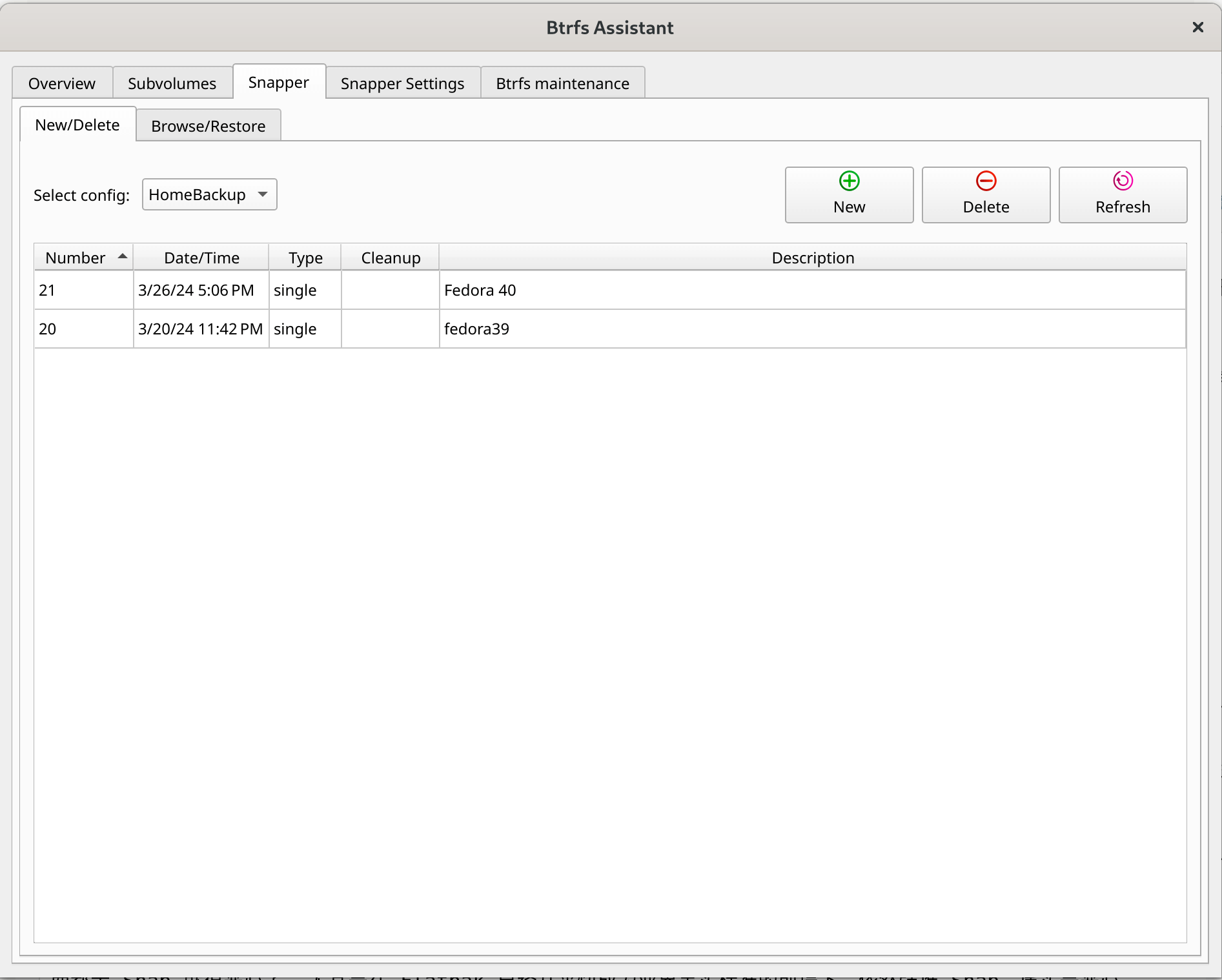
The default btrfs install mounts two volumes: root and home. Both can be snapshotted and restored independently — this tool makes it simple.
It even supports automatic backups and snapshots, but I don’t recommend it. Sometimes snapshots make Flatpak apps slow and require a reboot to recover.
Install GNOME Boxes for VM management
There are many VM options on Linux: VirtualBox, VMware, and GNOME’s own Boxes.
Why GNOME Boxes is my choice: with VirtualBox or VMware, you need to disable Secure Boot, otherwise kernel module compilation fails. Either manually sign every kernel update or don’t use it.
GNOME Boxes is KVM-based, so no such limitation.
If not installed:
sudo dnf install gnome-boxes
And KVM performance is theoretically better than VirtualBox, so KVM is the way. The biggest issue with KVM right now is mediocre Windows emulation. Not impossible, but graphics drivers can’t keep up. Use QXL or similar 2D acceleration for Windows. If you need high-end 3D, you’ll need GPU passthrough.
For Linux VMs, performance is great.
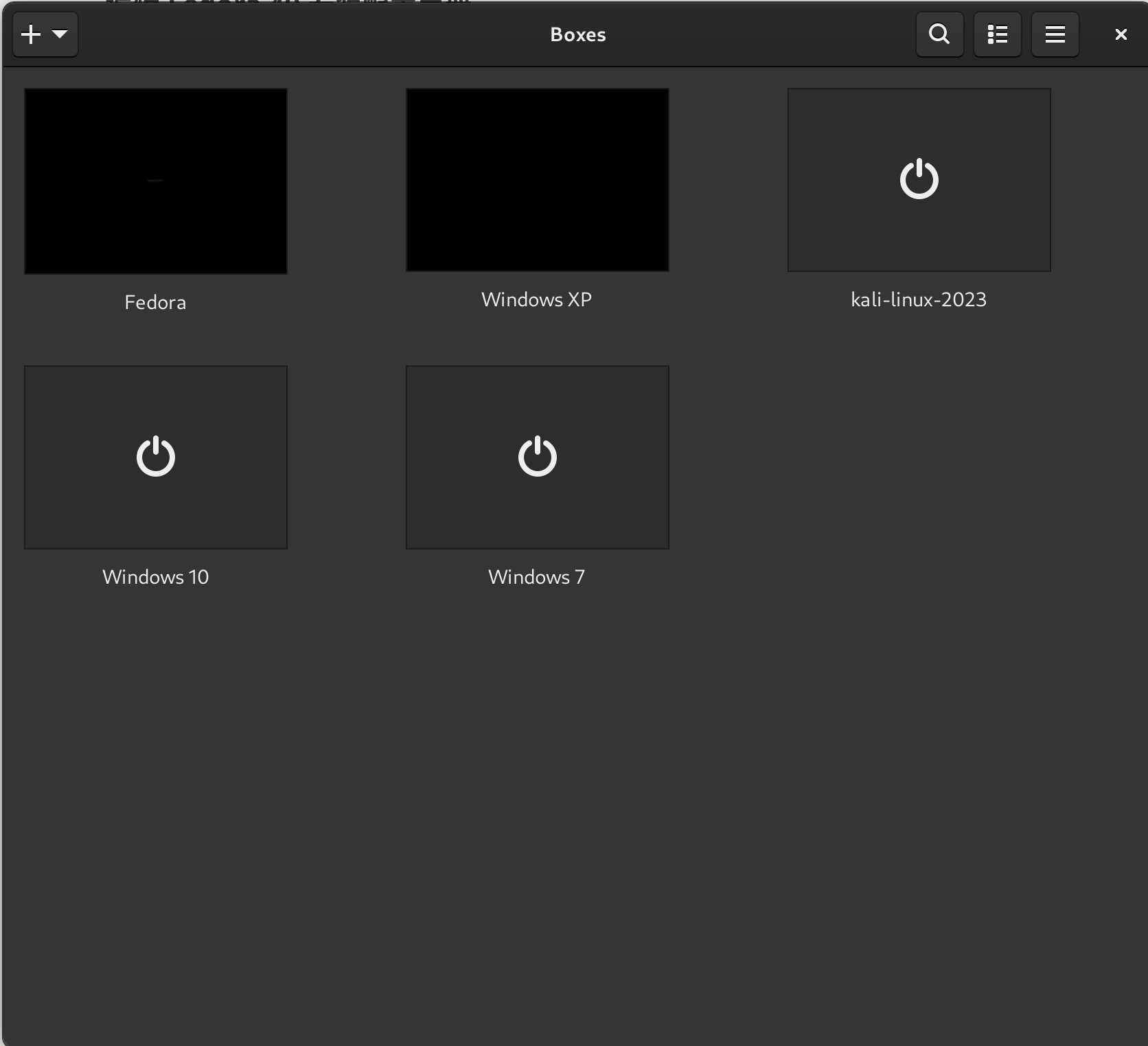
If GNOME Boxes’ interface is too minimal, install another GUI:
sudo dnf install virt-manager
That makes it clearer.
Install SSH management: SSH Pilot
If you manage multiple SSH servers, SSH Pilot is the best I’ve used. I know about RustConn — it updates constantly and supports RDP — but the experience doesn’t compare.
The upside: RustConn is Linux-first, while SSH Pilot seems multiplatform. RustConn updates very frequently and could surpass SSH Pilot someday. You can install both like I do.
Install clipboard manager: Gpaste
There are many clipboard managers on Linux — cross-platform CopyQ, various extensions — but I still recommend Gpaste.
Simple reason: it’s stable, runs as a background service rather than just an extension, and integrates deeply with GNOME. For GNOME users it’s the obvious choice.
Install:
sudo dnf install gpaste
sudo dnf install gnome-shell-extension-gpaste
Then enable the Gpaste extension in Extensions.
Three ways to install Telegram
Telegram on Fedora has three install methods:
- Via RPMFusion:
sudo dnf install telegram-desktop
This is a Fedora repackage — may lose some new features and can’t enable Beta.
- Via Flatpak:
flatpak install flathub org.telegram.desktop
- Direct from the official site:
https://desktop.telegram.org/
Download the Linux package and write your own shortcut. I use this method — enables Beta channel auto-updates. You need to put the binary in /opt and give it write permissions.
Install Oh-My-ZSH
sudo dnf install zsh
sh -c "$(curl -fsSL https://raw.githubusercontent.com/ohmyzsh/ohmyzsh/master/tools/install.sh)"
Things you no longer need to do
Previous Fedora articles had some so-called optimizations and tweaks. Some are meaningless in Fedora 45 and don’t need discussion.
No need to enable the Rust-based scheduler — no noticeable effect in my testing
No need to install TLP — the latest Tuned-pdd is enough, unless you have detailed custom needs
No need to switch Wi-Fi backend to iwd — Intel abandoned the project
No need to tweak dconf for fractional scaling — integrated into the new Mutter, no performance issues
Remove intel-lpmd
As mentioned before, Fedora ships an intel-lpmd service to optimize big.LITTLE scheduling. But the scheduling is abstract. It only supports certain platforms like Wildcat Lake and Arrow Lake, and hilariously, for Arrow Lake and MTL the official scheduling is inappropriate — it just disables big cores. Stupid.
I tried modifying the scheduling myself, but every change was either useless or directly limited performance. I recommend just removing it and using the default CPU scheduler.
sudo dnf remove intel-lpmd
Remove unnecessary components
I can’t understand why Fedora keeps a pile of Live CD stuff after installation, even a whole cockpit suite. Nobody uses this as a server.
sudo dnf remove "cockpit-*"
Feel free to Vibe-extend
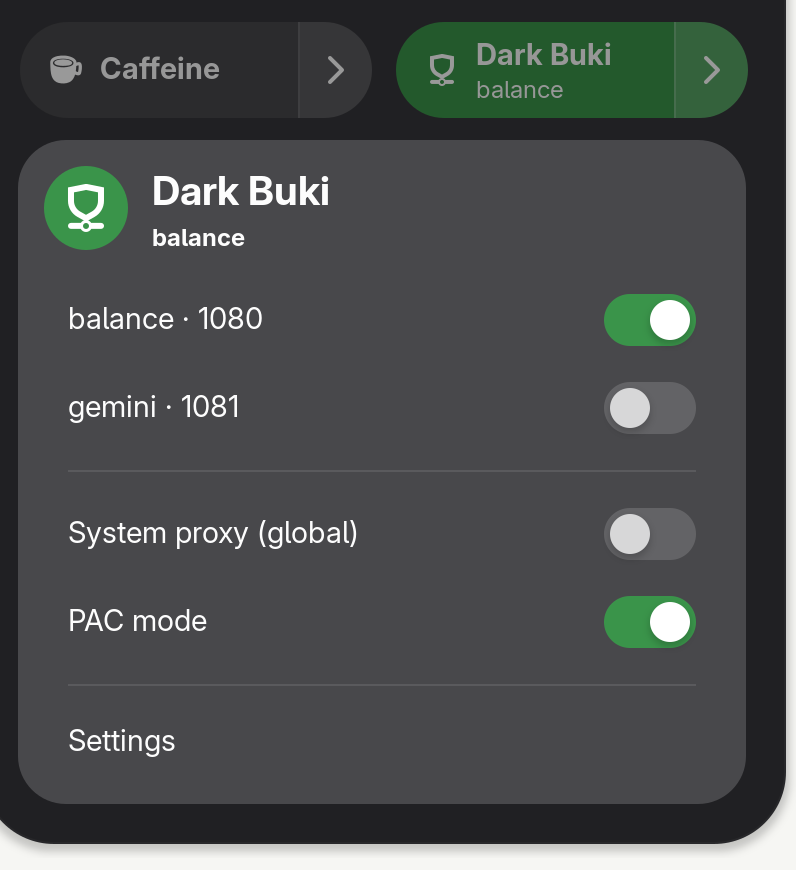
We’re in the AI era. Rapid development has turned AI into a wish-granting machine. If you have a GNOME need, I suggest using various Agent platforms to help develop your own extension. For example, I developed my own proxy-switching extension Dark Buki — very Deep Dark Fantasy.
Comments are hosted on the Chinese main site. This mirror is read-only.