Living with Newifi
Only Good Enough as a 5G AP
The internet situation at my workplace is pretty unusual…
Theoretically speaking — I mean theoretically, according to the leadership management regulations — every internet user in the entire institution should be rate-limited, with video and downloads throttled, and stock trading and remote connections prohibited. Not even our department is exempt.
Except most of those rules were written by me… so my own IP sits outside the rules. Yeah, that’s against the regulations, but I’m the type who doesn’t give a damn about the leadership, and a fair number of the institution’s higher-ups have their IPs in the unrestricted group too. But the other guys and girls in my department are total bootlickers. Every day they see the boss and look ready to kneel; the moment he’s gone they’re ready to tear him apart. One face in front, another behind. They want to secretly watch videos and trade stocks at work, but when I offered to move their IPs into the unrestricted group, they shook their heads and said they didn’t dare.
I usually work on a laptop though, so I set up a cheap secondhand router for myself — a Netgear WNDR3700, I think. Generally the whole department uses this router; everyone has a smartphone… and naturally this router’s IP isn’t restricted either. But soon I noticed a ton of desktop MAC addresses showing up on it. Turns out those people who didn’t dare ask for IP privileges had quietly bought wireless adapters to connect to my router and get around the restrictions…
In other words, on paper I’m the only one violating the restrictions. They get to enjoy it while looking innocent.
I don’t stoop to that kind of low-class behavior. A bunch of idiots — connect if you want… anyway, if I get annoyed I can just turn on QoS or whatever. Until last week, when I found my router had suddenly died…
Dead, no Wi-Fi, and suddenly getting my laptop online became a hassle. Those guys and girls were even more anxious than me…
So I got a TP-Link enterprise router, the WVR450G. It’s actually not bad, but I quickly discovered it has no 5G signal. Put simply, it’s not dual-band.
5G matters a lot to me, because I have a whole desk full of Bluetooth mice and keyboards, and that interference is unbearable.
First I used the ZTE portable router I take traveling. Small thing, but the features are passable, and it supports switching between 2.4G and 5G.

After two days I decided this wasn’t going to work — for one thing, stability isn’t guaranteed; for another, the speed was stuck at 75M the whole time, probably related to the encryption method. And the settings interface has pathetically few options; there’s nothing to configure, really, since it’s meant for travel.
So the only option was to get a dedicated secondary router to broadcast 5G. Thinking about it, the only cheap one worth using was Lenovo’s Newifi.

I remembered this thing. Earlier this year JD ran a router trial program, and I used it for a few days. My impression was one word — garbage.
The hardware itself seems okay, but the firmware ruins it. It has nothing you’d want, stability is worrying, and worst of all it can’t handle load: once 6 users connect, the 2.4G signal starts disappearing. Flashing OpenWRT didn’t save it either, so I returned it.
This time I bought it prepared. I’m only using it as a secondary router, only broadcasting 5G — should be fine… probably.
After testing, the firmware is still shit as always. It has Wi-Fi relay, but no LAN AP mode, so I had to manually write in a static IP. The result is actually decent — after all, every other feature is gone; it just broadcasts 5G and serves as an AP, nothing else.
Speed is impressive, though it’s basically useless, but it looks good. Stability is passable too — been running a week with no problems so far.
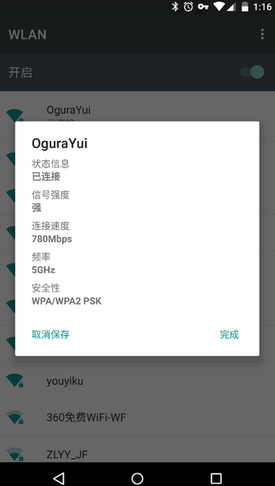
And my desk full of Bluetooth devices is saved. As for the Lenovo Newifi, I can only say that even so, it’s only fit to be a secondary 5G AP.
Comments are hosted on the Chinese main site. This mirror is read-only.