Replacing Ubuntu's Default Terminal with Terminator
Ubuntu’s default terminal is Gnome-Terminal, and it always feels a bit off.
Recently I tried Terminator, and I was thoroughly won over. Now this is a good terminal.
But after using it, a problem came up: Ubuntu’s Unity has a bunch of shortcuts, and C+A+T launches Gnome-Terminal. Is there a way to replace them all with Terminator?
I know that at first you, like me, probably thought of editing the shortcuts. Actually, there’s no need at all.
First, install Terminal:
sudo apt-get install terminator
Then use Debian’s reconfiguration command to choose the default terminal:
sudo update-alternatives --config x-terminal-emulator
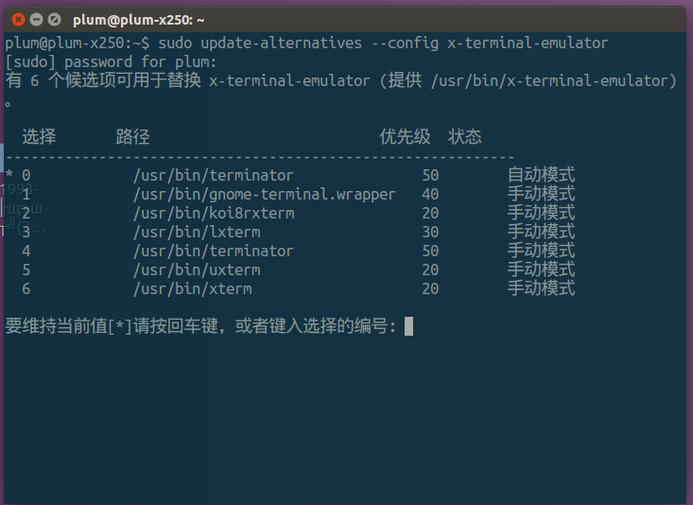
Enter the number to select it—simple, intuitive, and effective. Of course, if you’re on Unity, this still isn’t enough, because you’ll find that pressing C+A+T brings up Terminator with the red icon, which is unpleasant. You need one more command:
gsettings set org.gnome.desktop.default-applications.terminal exec 'terminator'
And then it’s fine.
Finally, Terminator is better than the default in every way, and after configuring it, you can basically keep its original look and built-in power.
Comments are hosted on the Chinese main site. This mirror is read-only.