Enabling Touchpad Palm Detection on Ubuntu Linux 14.04
Let me start with the verdict: this whole series of fiddling is basically pointless. If you’re a masochist, go ahead and try it.
Most laptop touchpads have an option called “palm detection.” As the name suggests, it means that when you’re hammering away at the keyboard with your fingers, your palm accidentally brushing the touchpad won’t send the cursor flying because the pad is too damn sensitive and drive you up the wall.
But on most Linux setups this feature is a bit broken. At least on Ubuntu Linux 14.04, it’s disabled by default.
First, try just turning it on directly and see if it does anything.
Open a terminal and run:
xinput list
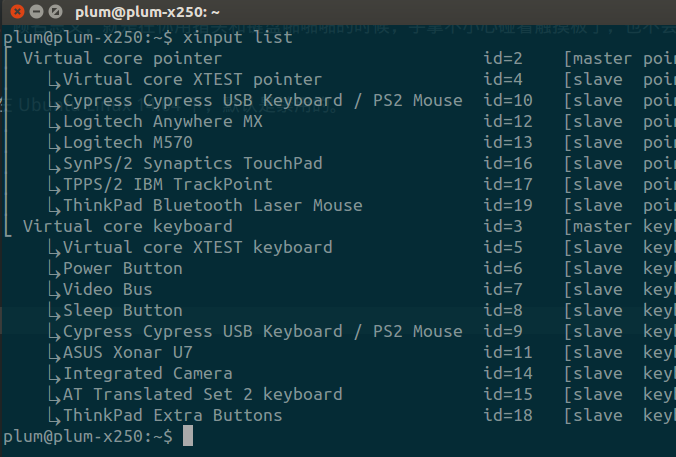
Note down your TouchPad’s id number. Mine is 16.
xinput list-props 16
You’ll see Palm Detect isn’t enabled. Just turn it on with a command.
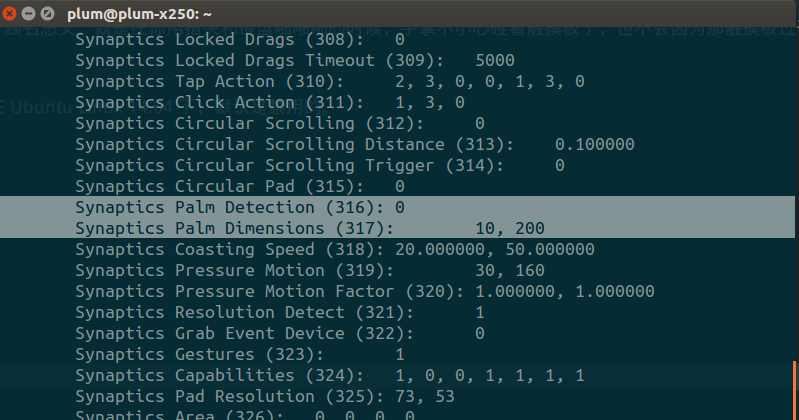
xinput set-prop 16 "Synaptics Palm Detection" 1
xinput set-prop "16" "Synaptics Palm Dimensions" 5, 10
Then try it out and see if it works. Word is ASUS laptops are fine, but Dell’s XPS 13 and the ThinkPad series won’t work.
Simply put, as a ThinkPad user you’ll have to find another way. Some say this is a bug from synaptics, and judging by the state of things in the bug report, there’s not much hope of it getting fixed.
So here’s a tutorial: patch it and compile, and good luck.
Another approach is to use the newer xf86-input-libinput.
There’s a build guide for that too.
http://askubuntu.com/questions/649103/proper-touch-pad-thumb-palm-detection-with-libinput
I tried both, and the result: it works, but not well. Pointless. Palms are fine, but the occasional brush still does whatever it wants.
So unless you really need it, don’t bother. Just disable the touchpad and use the TrackPoint like a good boy.
Comments are hosted on the Chinese main site. This mirror is read-only.