Fixing the "file list contains an empty filename" error on Ubuntu
Advertisement
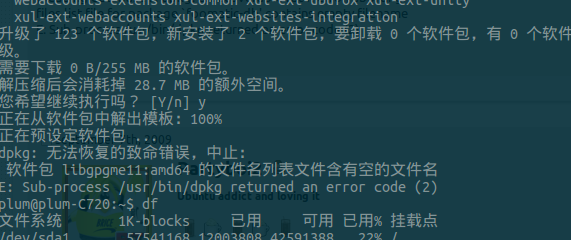
My Acer C720 running Ubuntu has never given me any trouble — it’s just been a terminal netbook for configuring switches and servers. But recently I figured it’d been a while since I updated, so I got the itch and ran an update. Which is when I hit this.
Advertisement
“The file list of package XXX contains an empty filename”
No idea why this happens. From poking around some Debian docs, it’s probably from a flaky connection pulling down an incomplete package or list and then force-installing it.
The fix is to grab the complete package and reinstall it. Pretty simple, really.
In my case it was the libgpgme11:amd64 package that went bad, so to be safe I renamed it first:
sudo mv /var/lib/dpkg/info/libgpgme11\:amd64.list /var/lib/dpkg/info/libgpgme11\:amd64.list.broke
Then reinstalled:
sudo apt-get --reinstall install libgpgme11:amd64
Problem solved.
Comments are hosted on the Chinese main site. This mirror is read-only.