Rescuing a Completely Dead Acer C720
My Acer C720 runs Ubuntu Linux, but every boot I have to manually pick SeaBIOS to start from the SSD.
So I usually just close the lid and let it sleep. But as the saying goes, if you keep doing dumb shit, dumb shit happens—and that’s exactly what happened. Opened it today and SeaBIOS was gone. Hit Ctrl + L after boot, the machine beeped twice and then nothing.
Looked it up: Chromebook BIOS settings are kept alive by battery power. Once the battery is completely dead, my SeaBIOS legacy boot option reverts to default, and I’m locked out.
Is there a fix? Yep. Reflash ChromeOS, reinstall Ubuntu Linux, and remember not to let the battery die again.
Want a permanent fix? Sure—you have to open the thing up and defeat the hardware write protection.
Thought about it and it’s too much hassle. Disassembly also hurts my chances of selling this thing later, so I’ll just set up normal boot for now and flash SeaBIOS when I have time.
First, go download the Chromebook recovery image. You’ll need a USB stick:
http://www.google.com/chromeos/recovery
There’s a script for making one under Linux too. It’s command-line, but it works well enough:
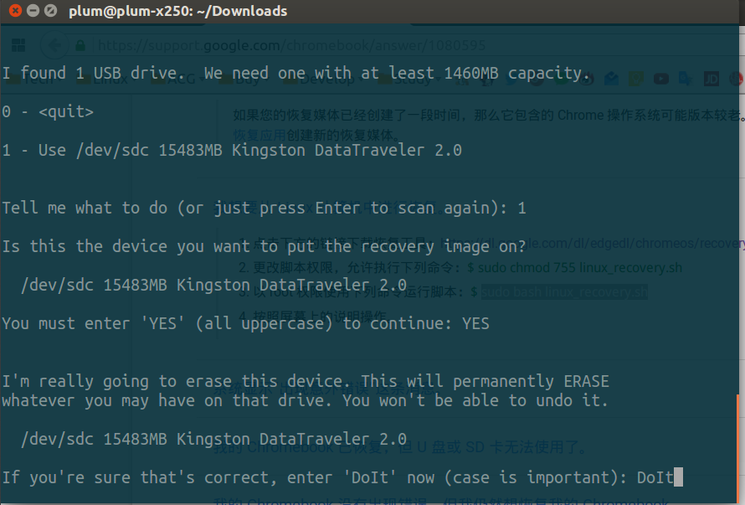
Once it’s done, plug it into the Chromebook and follow the wizard to restore the system. Then reinstall Ubuntu Linux.
And don’t forget to keep an eye on the battery so you don’t lose your settings again…
Comments are hosted on the Chinese main site. This mirror is read-only.