Installing GCC 5.2 on Linux Kernel 4.3 to Fix VMware
A while back I upgraded to kernel 4.2 because of a wireless issue. That got fixed, but then 4.2 brought new problems of its own.
First was the speaker popping on boot that’s specific to ThinkPad users. It showed up in early 4.2 kernels and was later patched.
Which is useless to me now, since we’re on 4.3 anyway. So I bumped the kernel to 4.3 via Ubuntu’s Mainline PPA, and after that VMware started telling me it couldn’t find GCC 5.2.
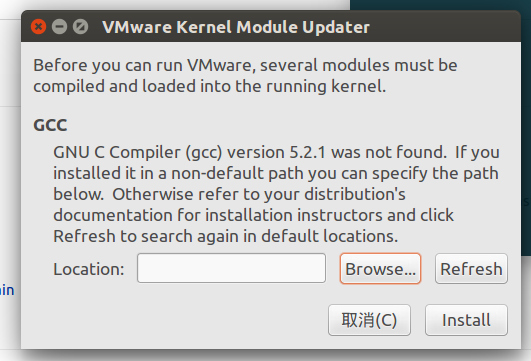
Side note: VMware China ran a 80% off promo for Singles’ Day, so I finally bought a legit license. And now you’re telling me it doesn’t work? Not acceptable.
Checked the VMware Workstation Pro 12.01 changelog — it mentions 4.3 kernel support. So all I need is GCC 5.2 installed and the problem goes away.
You don’t need to compile anything for this, just add the PPA:
sudo add-apt-repository ppa:ubuntu-toolchain-r/test
sudo apt-get update
sudo apt-get install g++-5
Went fine on Ubuntu 14.04.3 LTS. After installing, it asks you to point at the directory containing the GCC binaries — hit “Browse” and pick gcc-5.
Then VMware works again.
Comments are hosted on the Chinese main site. This mirror is read-only.