How I Transferred My US Dell Venue 8 Pro Warranty to China
I bought a Dell Venue 8 Pro tablet at the end of last year. Never really used it for anything productive — just playing Gal and watching videos. Still, it’s been useful enough that it hasn’t been gathering dust, at least.
Since I got it through an overseas proxy buyer, I never entertained any illusions about warranty. Figured if it broke, it broke. But then a while back, the one and only real-life big spender +Jia He clued me in: turns out there’s a way to transfer the thing’s warranty to China, via an owner transfer, and he’d already pulled it off.
Honestly I don’t care that much about warranty. But if there’s a path, may as well try it, right? So after three days of forms and emails, I got it done too. Here’s roughly how it went, for anyone else who wants to give it a shot.
First you need to file a transfer request on this Dell site, filling in the info about the US purchase and the info about the domestic purchase. One thing to watch: the US purchase info needs to be as accurate as possible. If you went through a proxy or a forwarding service, ask your middleman for the details. For the domestic info, pinyin or English both work.
A few fields to note:
Original owner - the machine’s original owner Service Tag - the machine’s ID number; every Dell machine has one, visible either on the back of the tablet or by running My Dell in the system. Service Level - the service tier. If you haven’t confirmed you’ve got CC Complete Cover, then just pick Next Business Day and behave.
Among the domestic owner fields, the important one is the last item, about what the machine is used for. Don’t be honest and pick Home — pick Office, because that makes the approval odds way higher.
After submitting, just wait for the email. Make sure the email is real, obviously (what, you’re gonna write a fake one? Are you TM kidding me?). If Dell replies the next day asking for more info — including the Express Service Code and the new domestic Company Name — you’re basically almost there. The email may also mention that the previous owner info you submitted doesn’t match or something; just ignore it.
Reply to Dell with what they asked for, then keep waiting. If you get something like the message below, you’ve passed.
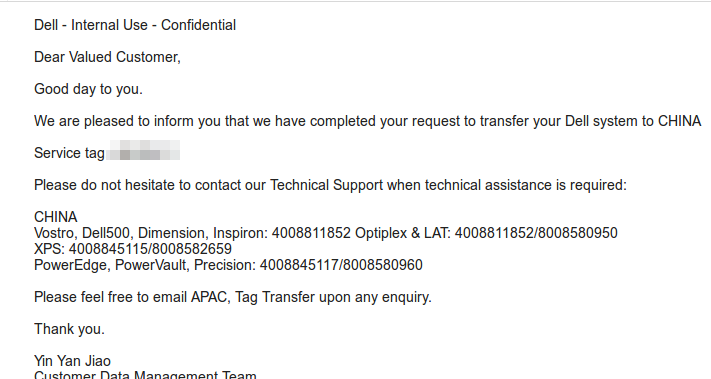
And just like that, your Dell tablet is transferred to domestic support. Whether that means warranty coverage I can’t confirm, since Dell always says “after-sales support” and never specifies warranty. Whatever — doesn’t matter. I wasn’t counting on warranty in the first place. If it’s there, pleasant surprise; if not, exactly what I expected.
Honestly, Bay Trail tablet performance is about to stop cutting it for me anyway. Firefox takes forever to open. IE11 looks silky smooth, but that’s clearly cheating — it’s cheating by sliding still images around. Looking forward to the Broadwell stuff later this year.
Comments are hosted on the Chinese main site. This mirror is read-only.