CD Ripping on Linux
JD had a sale recently, so I bought a pile of CDs that had been sitting in my cart. Obviously I’m not going to actually listen to the discs — I’ll rip them and throw the files onto my MP3 player. And since I might want to share them, I’ll rip to whole-disc WAV first, share the archive, then compress to FLAC for myself.
How to rip CDs on Linux as elegantly as EAC on Windows — I thought about this for a long time and looked up some software. The best-known one is rubyripper, and the moment I opened it I saw the official site, where the author says, “It’s the age of streaming music! Only an idiot rips CDs! So this project is done for!”
So I flipped through the Wiki and realized I really am an idiot — the command line is enough for ripping.
The software to use is abcde.
On Ubuntu just install it yourself with apt-get.
sudo apt-get install abcde
How do you rip? With a command… it’s stupidly simple. Me, thinking the command line was a hassle — what a fool.
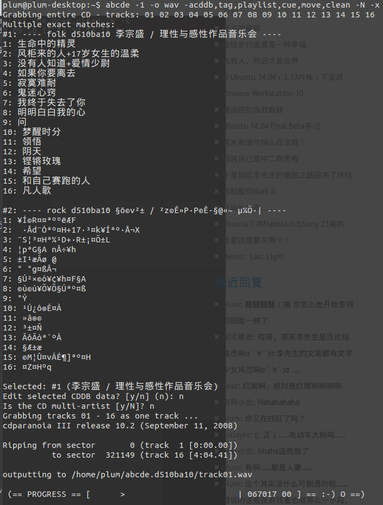
abcde -1 -o wav
-1 : means rip the whole disc as one file
-o wav : output! Do you understand “output”? Output in WAV format.
abcde supports quite a lot of formats — check –help yourself if you want to see them. It’ll also mercilessly auto-connect to the disc database to fetch album info, and it asks you whether the rip came out right. Pick according to your needs.
abcde -1 -o wav -acddb,tag,playlist,cue,move,clean
Honestly, I wrote this pointless post just to test the keyboard I just bought…
Comments are hosted on the Chinese main site. This mirror is read-only.