HP N40L, an HBA Card, and FreeNAS: A Postmortem
I dug out a few spare drives recently — four 1TB Seagates — so I figured it was time to kill off the fake NAS sitting on my HP N40L. That one was a Windows spanned volume stitched together from whatever junk was lying around: a 320GB, a 250GB, an 80GB, a whole mess. Now that I’ve got four identical drives, not running RAID would be a waste.
So, in the spirit of the almighty “just buy it” ethos, I grabbed an LSI 9211 8i. I skipped the fancy battery-backed RAID 5 cards because I’m broke, which drags down the average and I apologize for that. This is the cheapest HBA out there with documented, confirmed support for the HP N40L. Initial plan: RAID 1, 2TB, holding my FLAC library.
I used to download a ton of BDrips. Then I realized they just sat on the disk collecting dust while I watched stuff on Bilibili with my tablet like an idiot. So I’m done with that — music only from now on. 2TB should be plenty.
For off-the-shelf NAS systems there’s FreeNAS (BSD-based) and OpenMediaVault (Debian-based). Since I’m an Ubuntu user, I leaned toward OpenMediaVault.
So the plan was set: HBA card in, RAID 1, install OpenMediaVault. Perfect. Flawless.
…………That’s how it was supposed to go.
In practice I hit a mountain of problems, burned a lot of time digging through wikis and foreign forums.
HBA card compatibility with the HP N40L
First off, the HP N40L needs a BIOS update before it’ll play nice with the LSI 9211 8i. Otherwise there’s a decent chance it won’t see the drives at boot. Someone on a foreign forum brought this up. Fortunately the update isn’t painful: grab the BIOS package from HP’s site, make a bootable USB, boot it.
RAID mode vs. IT mode on the HBA
Like I said, I wanted RAID 1 at first. But the LSI card ships in IT mode by default, meaning no RAID — it’s pure passthrough expansion (though performance is actually pretty decent). So I went to LSI’s site for firmware. Newest was from 2014. Downloaded and flashed RAID mode. That ate a bunch of time. I hate this bullshit where flashing firmware forces you to run it under Windows. If this thing lives in a non-Windows storage box, does that mean the firmware can never be updated? I know Windows 8 supports booting VHDs like a Live CD, but I never tried it. Always some hassle.
So after much grief the firmware was updated, RAID 1 was enabled, and performance was… whatever. Time to install OpenMediaVault.
OpenMediaVault can go die
It’s 2014. I downloaded OpenMediaVault 0.5, the newest release put out in 2014, and I could not believe this thing was still on a Linux 2.6 kernel. And it doesn’t support the LSI RAID card either. Fine — there’s a driver on the official site. I’ll install to an external drive first, then load the driver later. Except after installation, even more obnoxious problems showed up.
The installer is the same wizard as Debian, but you can’t customize partitioning — you take their layout or nothing. Fine. The real problem: you can set the network interface and IPv4 address during install, but after it’s done… eth0 doesn’t come up on boot! I! Have! To! Bring! It! Up! Manually! And after I bring it up, it’ll just drop to down for no reason! Zero warning. You might be clicking around in the WebUI and suddenly you’re disconnected…
Anyway, OpenMediaVault’s stability is a mess. Total garbage. I see lots of people praising it, and looking closer, most of them are running old home PCs as NAS boxes — probably no array or network driver issues. But come on, phones are on 3.0 kernels now. Stop using 2.6. I don’t know if you’ve patched the hell out of it yourself.
Later I read that HBA passthrough + FreeNAS ZFS RAIDZ is the optimal setup. So, whatever, let’s try it. Flashed back to IT mode like it was nothing, and got ready for FreeNAS.
FreeNAS is the way
Sure enough, FreeNAS is the more mature product. The only annoyance: the boot drive you DD out won’t boot directly — you have to use ImageWrite under Windows. Everything else is idiot-proof, the UI is extremely friendly, sharing is easy. Still ran into problems though.
FreeNAS installs plugins — Transmission and the like — via virtual machines it calls Jails. Each Jail can only access its own directory, kind of like iOS. You have to manually mount or ln -s the directories you want into the Jail, which is how you set up the download folder.
FreeNAS’s RAIDZ setup feels pretty sensible. ZFS gives you a lot — snapshots, expanding storage, etc. — so adding drives later probably won’t be too painful. In the end I used the HBA in passthrough with four 1TB drives in RAID 5, and performance didn’t really suffer compared to the original plan.
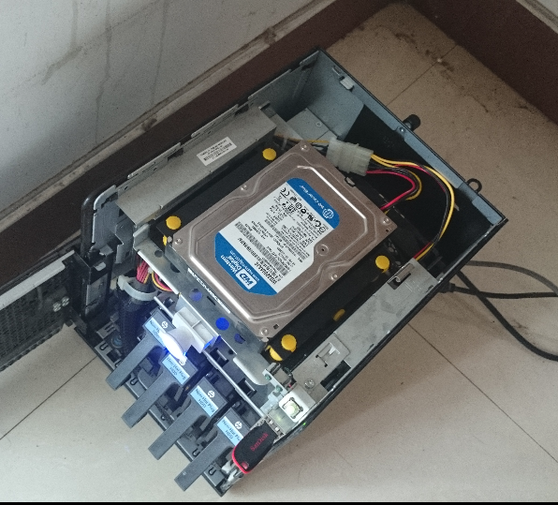
One more thing: FreeNAS officially recommends installing the system to a USB stick. The N40L’s case happens to have an internal USB port, so an internal stick is no problem at all. Meanwhile that clown-car OpenMediaVault wants you to install to a hard drive, and the truly absurd part is it won’t even let you assign mount permissions yourself. Hilarious. A 500GB drive for a 100MB NAS?
So in the end it’s done, but I wasted a whole loop of time. There’s still a hardware issue: every so often it hangs at the drive detection screen during boot. Turned on debug output and a four-character code shows up in the bottom right. Searched it — seems to be a memory-not-seated-properly issue on AMD boards. I’ll try reseating the RAM in a bit.
Apparently writing a post without pictures gets you yelled at. Above is the 500GB on the shock-absorbing drive mount, holding the FreeNAS Jail apps plus a partition for software and ISOs; below are the four 1TB bays.
That’s it.
Comments are hosted on the Chinese main site. This mirror is read-only.