Ubuntu 16.04 LTS Install and Setup Notes
Ubuntu 16.04 LTS is out. Lately I’ve been upgrading the VPS, laptop and desktop I actually use, to fit my own needs. Writing the process down here so future me can look it up.
Upgrade the system
sudo apt update
sudo apt dist-upgrade
The default Source Han Sans looks genuinely ugly to me, so install WenQuanYi and swap it out
sudo apt-get install wqy-*
sudo gedit /etc/fonts/conf.avail/69-language-selector-zh-cn.conf
Replace the contents with the following:
<?xml version="1.0"?>
<!DOCTYPE fontconfig SYSTEM "fonts.dtd">
<fontconfig>
  <match target="pattern">
    <test qual="any" name="family">
      <string>serif</string>
    </test>
    <edit name="family" mode="prepend" binding="strong">
      <string>Bitstream Vera Serif</string>
      <string>HYSong</string>
      <string>AR PL UMing CN</string>
      <string>AR PL UMing HK</string>
      <string>AR PL ShanHeiSun Uni</string>
      <string>AR PL New Sung</string>
      <string>WenQuanYi Bitmap Song</string>
      <string>AR PL UKai CN</string>
      <string>AR PL ZenKai Uni</string>
    </edit>
  </match>
  <match target="pattern">
    <test qual="any" name="family">
      <string>sans-serif</string>
    </test>
    <edit name="family" mode="prepend" binding="strong">
      <string>Bitstream Vera Sans</string>
      <string>WenQuanYi Micro Hei</string>
      <string>WenQuanYi Zen Hei</string>
      <string>Droid Sans Fallback</string>
      <string>HYSong</string>
      <string>AR PL UMing CN</string>
      <string>AR PL UMing HK</string>
      <string>AR PL ShanHeiSun Uni</string>
      <string>AR PL New Sung</string>
      <string>AR PL UKai CN</string>
      <string>AR PL ZenKai Uni</string>
    </edit>
  </match>
  <match target="pattern">
    <test qual="any" name="family">
      <string>monospace</string>
    </test>
    <edit name="family" mode="prepend" binding="strong">
      <string>Bitstream Vera Sans Mono</string>
      <string>WenQuanYi Micro Hei Mono</string>
      <string>WenQuanYi Zen Hei Mono</string>
      <string>Droid Sans Fallback</string>
      <string>HYSong</string>
      <string>AR PL UMing CN</string>
      <string>AR PL UMing HK</string>
      <string>AR PL ShanHeiSun Uni</string>
      <string>AR PL New Sung</string>
      <string>AR PL UKai CN</string>
      <string>AR PL ZenKai Uni</string>
    </edit>
  </match>
</fontconfig>
On the laptop, install TLP to cut power draw:
sudo apt-get install tlp tlp-rdw
sudo apt-get install tp-smapi-dkms acpi-call-dkms
sudo apt-get install thermald
sudo apt-get install powertop
Add some common PPAs:
# General tool collection PPAs
sudo add-apt-repository ppa:diesch/testing -y
sudo add-apt-repository ppa:atareao/atareao -y
sudo add-apt-repository ppa:nilarimogard/webupd8 -y
# VLC
sudo add-apt-repository ppa:videolan/master-daily -y
# Audio switch indicator PPA
sudo add-apt-repository ppa:yktooo/ppa -y
# Numix icon set PPA
sudo apt-add-repository ppa:numix/ppa -y
# JDK font rendering patch PPA
sudo add-apt-repository ppa:no1wantdthisname/openjdk-fontfix -y
# DNSCrypt PPA
sudo add-apt-repository ppa:anton+/dnscrypt -y
# noobslab icon PPA
sudo add-apt-repository ppa:noobslab/icons -y
# Screen recorder PPA
sudo add-apt-repository ppa:maarten-baert/simplescreenrecorder  -y
# Telegram PPA
sudo add-apt-repository ppa:atareao/telegram -y
# Uget PPA
sudo add-apt-repository ppa:plushuang-tw/uget-stable -y
# Emoji font PPA
sudo apt-add-repository ppa:eosrei/fonts
Update and install the usual software once that’s done
sudo apt update
sudo apt dist-upgrade
sudo apt-get install fcitx fcitx-sunpinyin fcitx-module-cloudpinyin gtk2-engines-murrine:i386 libudev1:i386 vlc i965-va-driver vainfo gimp inkscape openshot shutter filezilla audacity classicmenu-indicator numix-gtk-theme shimmer-themes numix-icon* caffeine leafpad git indicator-sound-switcher  unity-tweak-tool fcitx-mozc ibus-qt4 curl ctags vim-doc vim-scripts cscope fonts-dejavu indent vim vim-gnome exuberant-ctags indicator-keylock pidgin  psensor syspeek blueman libluajit-5.1-2 python3-pip dnscrypt-proxy unsettings ubuntu-make ppa-purge jayatana simplescreenrecorder compizconfig-settings-manager ultra-flat-icons-* ultra-flat-icons zsh uget telegram fonts-emojione-svginot -y
python
sudo pip3 install pep8
sudo pip3 install jedi
Basic support:
sudo apt-get install ttf-bitstream-vera
sudo apt-get install exfat-fuse exfat-utils
Configure DNScrypt
sudo vim /etc/default/dnscrypt-proxy
# Change the default config file inside to cisco, and remember the new listen address has changed to 127.0.2.1
sudo vim /usr/share/dnscrypt-proxy/dnscrypt-resolvers.csv
sudo vim /etc/default/dnscrypt-proxy
sudo service dnscrypt-proxy restart
Configure TLP
sudo vim /etc/default/tlp
sudo tlp start
Look and feel:
Since Ubuntu 16.04 uses the newer GTK, Arc-theme works now. Personally I think it’s the best theme around besides Numix at this point. There are modded builds floating around online for the “too white” problem.
sudo apt-get remove arc-theme* -y
sudo rm -rf /usr/share/themes/{Arc,Arc-Darker,Arc-Dark}
rm -rf ~/.local/share/themes/{Arc,Arc-Darker,Arc-Dark}
rm -rf ~/.themes/{Arc,Arc-Darker,Arc-Dark}
sudo apt-get install autoconf automake pkg-config libgtk-3-dev git -y
git clone https://github.com/horst3180/arc-theme --depth 1
cd arc-theme
./autogen.sh --prefix=/usr --disable-transparency
sudo make install
cd ..\
rm -rf arc-theme
For icons I’d go with Ultra-Flat-Icons. Worth noting that with Arc-theme the volume OSD icons aren’t supported, so swap in Numix’s. I just copied them over — symlinks would be cleaner, but first note the filenames down.
notification-audio-volume-high.svg
notification-audio-volume-low.svg
notification-audio-volume-medium.svg
notification-audio-volume-muted.svg
notification-audio-volume-off.svg

sudo ln -s /usr/share/icons/Numix/48/notifications/notification-audio-volume-high.svg /usr/share/icons/Ultra-Flat/status/scalable/
sudo ln -s /usr/share/icons/Numix/48/notifications/notification-audio-volume-low.svg /usr/share/icons/Ultra-Flat/status/scalable/
sudo ln -s /usr/share/icons/Numix/48/notifications/notification-audio-volume-medium.svg /usr/share/icons/Ultra-Flat/status/scalable/
sudo ln -s /usr/share/icons/Numix/48/notifications/notification-audio-volume-muted.svg /usr/share/icons/Ultra-Flat/status/scalable/
sudo ln -s /usr/share/icons/Numix/48/notifications/notification-audio-volume-off.svg /usr/share/icons/Ultra-Flat/status/scalable/

sudo ln -s /usr/share/icons/Numix/48/notifications/notification-audio-volume-high.svg /usr/share/icons/Ultra-Flat-Orange-Bright/status/scalable/
sudo ln -s /usr/share/icons/Numix/48/notifications/notification-audio-volume-low.svg /usr/share/icons/Ultra-Flat-Orange-Bright/status/scalable/
sudo ln -s /usr/share/icons/Numix/48/notifications/notification-audio-volume-medium.svg /usr/share/icons/Ultra-Flat-Orange-Bright/status/scalable/
sudo ln -s /usr/share/icons/Numix/48/notifications/notification-audio-volume-muted.svg /usr/share/icons/Ultra-Flat-Orange-Bright/status/scalable/
sudo ln -s /usr/share/icons/Numix/48/notifications/notification-audio-volume-off.svg /usr/share/icons/Ultra-Flat-Orange-Bright/status/scalable/

sudo ln -s /usr/share/icons/Numix/48/notifications/notification-audio-volume-high.svg /usr/share/icons/Ultra-Flat-Green/status/scalable/
sudo ln -s /usr/share/icons/Numix/48/notifications/notification-audio-volume-low.svg /usr/share/icons/Ultra-Flat-Green/status/scalable/
sudo ln -s /usr/share/icons/Numix/48/notifications/notification-audio-volume-medium.svg /usr/share/icons/Ultra-Flat-Green/status/scalable/
sudo ln -s /usr/share/icons/Numix/48/notifications/notification-audio-volume-muted.svg /usr/share/icons/Ultra-Flat-Green/status/scalable/
sudo ln -s /usr/share/icons/Numix/48/notifications/notification-audio-volume-off.svg /usr/share/icons/Ultra-Flat-Green/status/scalable/

sudo ln -s /usr/share/icons/Numix/48/notifications/notification-audio-volume-high.svg /usr/share/icons/Ultra-Flat/status/scalable/
sudo ln -s /usr/share/icons/Numix/48/notifications/notification-audio-volume-low.svg /usr/share/icons/Ultra-Flat/status/scalable/
sudo ln -s /usr/share/icons/Numix/48/notifications/notification-audio-volume-medium.svg /usr/share/icons/Ultra-Flat/status/scalable/
sudo ln -s /usr/share/icons/Numix/48/notifications/notification-audio-volume-muted.svg /usr/share/icons/Ultra-Flat/status/scalable/
sudo ln -s /usr/share/icons/Numix/48/notifications/notification-audio-volume-off.svg /usr/share/icons/Ultra-Flat/status/scalable/

sudo ln -s /usr/share/icons/Numix/48/notifications/notification-audio-volume-high.svg /usr/share/icons/Ultra-Flat-Orange/status/scalable/
sudo ln -s /usr/share/icons/Numix/48/notifications/notification-audio-volume-low.svg /usr/share/icons/Ultra-Flat-Orange/status/scalable/
sudo ln -s /usr/share/icons/Numix/48/notifications/notification-audio-volume-medium.svg /usr/share/icons/Ultra-Flat-Orange/status/scalable/
sudo ln -s /usr/share/icons/Numix/48/notifications/notification-audio-volume-muted.svg /usr/share/icons/Ultra-Flat-Orange/status/scalable/
sudo ln -s /usr/share/icons/Numix/48/notifications/notification-audio-volume-off.svg /usr/share/icons/Ultra-Flat-Orange/status/scalable/
Installing the Logitech Unifying manager
wget https://launchpad.net/~daniel.pavel/+archive/ubuntu/solaar/+files/solaar_0.9.2-1ppa1_all.deb
sudo dpkg -i solaar_0.9.2-1ppa1_all.deb
Getting rid of the white dots on the Ubuntu LightDM login screen
I used to use Ubuntu Tweak, but the author’s an Apple fanboy now, and Unity-Tweak-Tool can substitute, except it still doesn’t have this feature. You can do it with commands though.
gsettings set com.canonical.unity-greeter draw-grid false
sudo xhost +SI:localuser:lightdm
sudo su lightdm -s /bin/bash
gsettings set com.canonical.unity-greeter draw-grid false
quit
You run it twice because the users are different — the lock screen dots still belong to your own user.
Tweaking audio quality parsing: PulseAudio sound quality handling on Linux Automatic multi-soundcard sample rate handling on Linux
sudo vim /etc/pulse/daemon.conf
pulseaudio -k
pulseaudio --start
Using libinput instead of the default input control, including better touchpad and pointing stick support
sudo apt install xserver-xorg-input-libinput
sudo vim /usr/share/X11/xorg.conf.d/90-libinput.conf
The touchpad feels smoother afterward, but there are more other problems, so I disabled it in the end and used indicator-touchpad
sudo apt install indicator-touchpad
This thing has a bug: after disabling with the hotkey it won’t restore your three-finger middle click. I fixed the bug in an ugly way, because there are no comments and I couldn’t be bothered to read how its functions work.
sudo vim /opt/extras.ubuntu.com/touchpad-indicator/share/touchpad-indicator/touchpad.py
Add this under the enable function
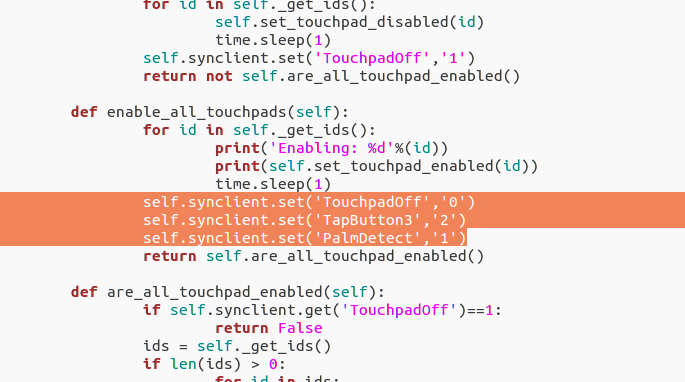
self.synclient.set('TouchpadOff','0')
self.synclient.set('TapButton3','2')
self.synclient.set('PalmDetect','1')
Replacing the default terminal with terminator
sudo apt-get install terminator
sudo update-alternatives --config x-terminal-emulator
gsettings set org.gnome.desktop.default-applications.terminal exec 'terminator'
sh -c "$(wget https://raw.github.com/robbyrussell/oh-my-zsh/master/tools/install.sh -O -)"
wget --no-check-certificate https://raw.githubusercontent.com/seebi/dircolors-solarized/master/dircolors.ansi-dark
mv dircolors.ansi-dark .dircolors
eval `dircolors ~/.dircolors`
git clone https://github.com/sigurdga/gnome-terminal-colors-solarized.git
cd gnome-terminal-colors-solarized
./set_dark.sh
Removing sensitive certificates:
sudo dpkg-reconfigure ca-certificates
Enabling Trim on SSDs (not recommended, Ubuntu 16.04.1 already has this built in)
sudo gedit /etc/cron.daily/trim
Contents:
#!/bin/sh
LOG=/var/log/trim.log
echo "*** $(date -R) ***" >> $LOG
fstrim -v / >> $LOG
fstrim -v /home >> $LOG
Run it and add the job
sudo fstrim -v /
sudo chmod +x /etc/cron.daily/trim
Adding kernel parameters to save battery on laptops
sudo vim /etc/default/grub

i915 enable_rc6=1 enable_fbc=1 lvds_downclock=1 semaphores=1

sudo update-grub
Fixing missing themes:
sudo apt-get install  gtk2-engines-pixbuf:i386
sudo apt-get install gtk2-engines-pixbuf gnome-themes-standard libcanberra-gtk3-module:i386 libcanberra-gtk3-module
Fixing the Wi-Fi icon turning into a local connection icon after resume from suspend on Ubuntu 16.04: (not recommended, the bug’s already fixed)
nmcli con down "CONNECTION NAME" && nmcli con up "CONNECTION NAME"
Renaming local folders to English
export LANG=en_US
xdg-user-dirs-gtk-update
export LANG=zh_CN
After reboot
ln -s /HDD/Documents/ ~/
ln -s /HDD/Downloads/ ~/
ln -s /HDD/Music/ ~/
ln -s /HDD/Pictures/ ~/
ln -s /HDD/Videos/ ~/
ln -s /HDD/Dropbox/ ~/
ln -s /HDD/Software/ ~/
Shadowsocks
git clone https://github.com/shadowsocks/shadowsocks-libev.git
cd shadowsocks-libev
sudo apt-get install --no-install-recommends build-essential autoconf libtool libssl-dev gawk debhelper dh-systemd init-system-helpers pkg-config asciidoc xmlto
dpkg-buildpackage -b -us -uc -i
cd ..
sudo dpkg -i shadowsocks-libev_*_amd64.deb
Change the start command to ss-local
sudo vim /lib/systemd/system/shadowsocks-libev.service
Config file
sudo vim /etc/shadowsocks-libev/config.json
Change the start parameters; if you use one-time auth remember to add -A here
sudo vim /etc/default/shadowsocks-libev
sudo systemctl daemon-reload
sudo service shadowsocks-libev restart
Ubuntu 16.04 uses the new network management, so your network name becomes enp2s0 instead of eth0, which causes some stability issues — you can change it back
sudo vim /etc/default/grub
Add the parameter:
GRUB_CMDLINE_LINUX_DEFAULT="net.ifnames=0"

sudo update-grub
The double “月” in Chinese month display on Ubuntu 16.04: (already fixed)
gsettings set com.canonical.indicator.datetime time-format 'custom'
gsettings set com.canonical.indicator.datetime custom-time-format 'FORMAT_VALUE_HERE'

Here's what the parameters mean:
%a = abbreviated weekday name
%A = full weekday name
%b = abbreviated month name
%B = full month name
%d = day of the month
%l = hour ( 1..12), %I = hour (01..12)
%k = hour ( 1..23), %H = hour (01..23)
%M = minute (00..59)
%p = AM or PM, %P = am or pm.
%S = second (00..59)
Switching the Fcitx input method back to the native indicator instead of that qim thing
sudo apt remove fcitx-ui-qimpanel
Installing Ubuntu Emoji support (not needed, there’s already a PPA)
wget https://github.com/eosrei/emojione-color-font/releases/download/v1.0-beta3/EmojiOneColor-SVGinOT-Linux-1.0-beta3.zip
unzip -o EmojiOneColor-SVGinOT-Linux-1.0-beta3.zip
./install.sh
That’s about it. By the way, Ubuntu 16.04 this time was dumb as hell — bugs exploded at release, DNS service kept dying, network connection icons got messed up, Gnome-Software Center doesn’t support third-party debs, and running Compiz normally uses twice the memory of 14.04 and is slower too.
So I don’t recommend using Ubuntu 16.04 at this point. Wait for Ubuntu 16.04.1 and see.
And finally, I’ve already rolled back to 14.04.
Ubuntu 16.04.1 is out, a lot of bugs have been fixed, and it’s basically stable enough to use. I’ve updated this post, and I’ve already upgraded.
Comments are hosted on the Chinese main site. This mirror is read-only.