Laptop Cooling Mod
Recently I hooked my ThinkPad up to a dock and ran dual monitors, and the thing kept spiking to 90°C at the drop of a hat. I couldn’t take it anymore, so I decided to do something about it.
The mod went two ways: repaste the thermal compound, and add external cooling.
Not much to buy when it comes to thermal paste — apart from liquid metal, this is basically the only option.
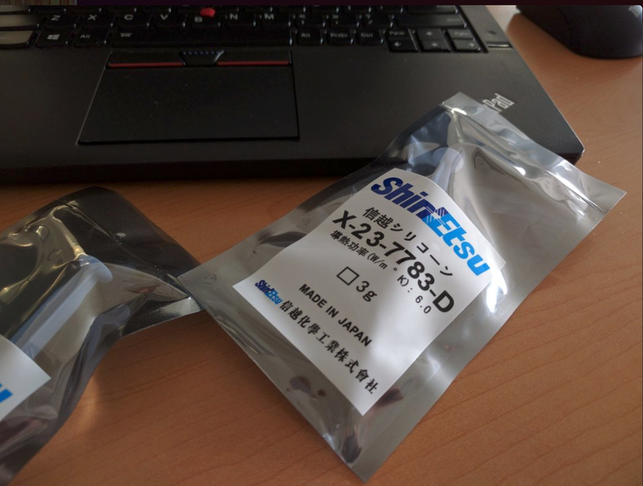
Thick and goopy as always, and a pain in the ass as always. Tearing the thing down and repasting is stupidly easy, nothing to write home about. After the swap, idle temps didn’t really change — but when load drops, it sheds heat like crazy.
So the two need to be used together. Time for a small blower fan.
Bought on eBay, cheap and cheerful, auto-adjusts RPM based on temperature, and comes with all sorts of accessories to help you mount it.
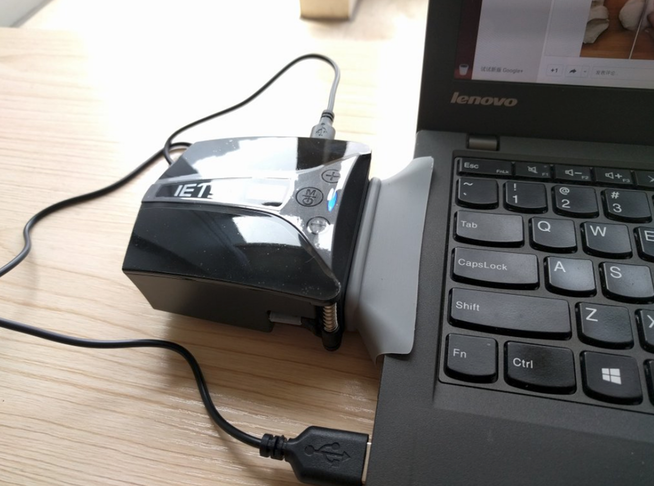
What matters isn’t how you mount the thing, though — it’s the cooling performance. Absolutely insane…
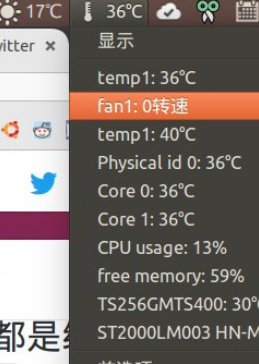
At medium load it actually got the built-in fan to stop spinning…
So I took it home, stuck the fan next to the dock with double-sided tape and a mounting plate, and it works pretty well. A single Flash stream holds steady around 70°C, way better than the old 98°C spikes.

Of course, if you feel like gambling and run two Flash streams at once, both fullscreen on the big monitors, your CPU is still going to cook. But with the fresh paste, the cooldown at medium load is obvious — the moment Flash goes away, temps plummet. So it does work. Besides, I don’t necessarily watch video on this thing anyway, right? The desktop handles that just fine.
Comments are hosted on the Chinese main site. This mirror is read-only.