Living with UGREEN DP Cable
Watch Out for UGREEN DP Cables
Bought a Dell P2715Q monitor during JD’s 618 sale. This thing only has DP and HDMI. With my current setup, HDMI caps out at 4K 30 Hz, and 30 Hz is basically unusable, so a DP cable was mandatory.
I had some UGREEN DP cables lying around from a previous JD order, so I plugged one in. Big mistake. The moment I connected it, the PC wouldn’t turn on.
At first I thought the monitor was faulty, or that my GPU (an iChill 770 4G) couldn’t handle 4K. Then I tried a hot-plug and it worked fine, no problem at all. But once the cable was connected, the machine refused to shut down properly, and after shutting down it wouldn’t boot again.
After a bunch of testing, I figured out that with this DP cable, the PC just won’t boot. And when it does come back, Gigabyte’s “Dual BIOS recovery” message pops up telling me one BIOS is dead and it restored from the backup.
So I started suspecting the UGREEN DP cable was the problem.
A quick search and I was stunned.
Installed it after work and it posted fine. But after dinner, I came back to a sleeping PC with no display output. Forced shutdown, then it wouldn’t boot. At that point I didn’t suspect the cable—I blamed the new GPU I’d bought last week.
So I swapped the new card out and put back the old MSI670PE I was planning to sell. It booted. But after watching one UFC match, the same thing happened again. Exactly the same: won’t wake from sleep, then won’t boot.
Then I noticed four of the eight warning LEDs on the motherboard were lit. Unplugged the DP cable and they went out. Swapped to DVI and it still wouldn’t boot—suspected the motherboard or GPU was fried. But after leaving it completely off for two hours, it booted again and ran all day without issue.
That’s when I remembered to check the JD reviews. This cable has a terrible reputation. Before I found the problem, there were tons of reports of fried motherboards, GPUs, CPUs—all the same symptoms, exactly like mine. And the craziest part? This has been going on for ages, and the cable is still a bestseller.
Stories about this UGREEN DP cable are everywhere—Reddit, CHH, all over. Lucky I had a cheap Gigabyte board with dual BIOS, otherwise it would’ve fried multiple times by now.
So here’s the warning: do not buy UGREEN DP cables.
Later, following a CHH recommendation, I bought a Taobao cable advertised as “Dell original DP cable.” It worked fine. I also picked up Belkin and CE-Link cables—none of them caused the motherboard issue, though none performed as well as that “original” one.
If you need a DP cable, consider buying from Taobao separately, but whatever you do, don’t buy UGREEN.
Now, a quick word on the Dell 4K monitor…
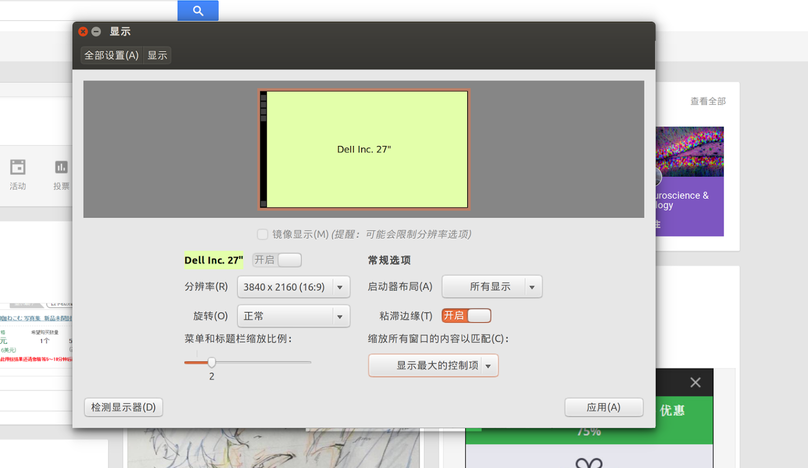
At 150% scaling it’s acceptable on both Ubuntu and Windows 10. 200% would be exactly 1080p, but on a 27-inch screen that feels like a waste.
The overall screen quality is fantastic… except whites are a bit yellowish. Turns out my old 2412M was a cool-toned panel, so I got used to it.
Sometimes there’s slight ghosting when dragging windows, but other times it’s gone. Not sure if it’s GPU-related.
The GTX 770 4G can run Overwatch at 4K on max settings, but it struggles to hit smooth max settings in Dota 2. The moment Sand King uses Sand Storm, the framerate tanks. Time to aim for a GTX 1070.
Bought from JD with installment payments. The panel is perfect, zero dead pixels. Guess I got lucky.
Bottom line: 4K is awesome. I even feel more confident playing Overwatch now.

Comments are hosted on the Chinese main site. This mirror is read-only.