Some Bluetooth 4.0 Mouse Issues on Ubuntu 16.04
I wrote a note about this before, but I ran into a new problem recently. The problem is simple: Bluetooth keeps dropping.
So I dug around and started trying to fix it, and saw this error message:
Unable to register GATT service with handle XXXX for device F2:F2:F2:F2:F2:F2
So first, remove the already-paired device info from the pairing list and pair it again. Before pairing, turn on Bluetooth’s experimental mode:
sudo vim /lib/systemd/system/bluetooth.service
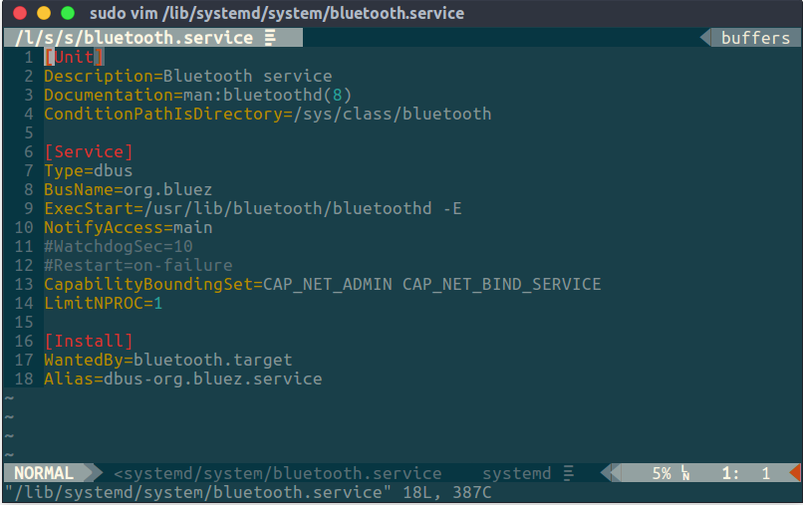
Add -E after the exec line, so it ends up as:
ExecStart=/usr/lib/bluetooth/bluetoothd -E
Restart the Bluetooth service:
sudo service bluetooth restart
Then re-pair the Bluetooth 4.0 mouse, using the command line:
bluetoothctl
And pair it:
[bluetooth]# power off
[bluetooth]# power on
[bluetooth]# scan on
[bluetooth]# connect XX:XX:XX:XX:XX:XX
[MX Anywhere 2]# trust
[MX Anywhere 2]# pair
[MX Anywhere 2]# unblock
[MX Anywhere 2]# power off
[bluetooth]# power on
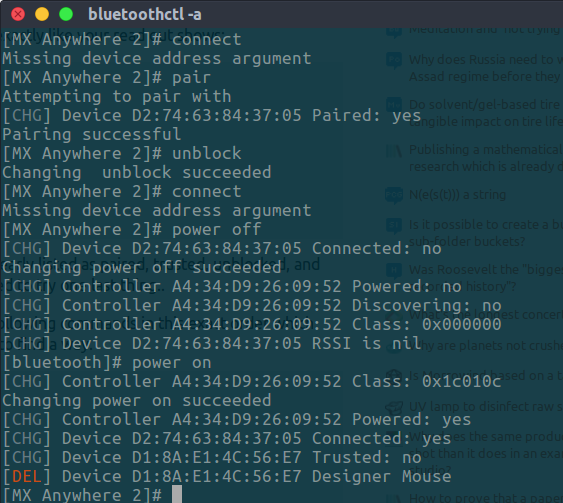
It should work after that. Oh, and if you’re on a ThinkPad, remember to disable the Ethernet port’s WAN as well — yeah, in the BIOS. That improves stability a bit.
References: Bluetooth mouse connects but doesn’t work How do I get Logitech MX Anywhere 2 to work in 16.04 (Bluetooth smart)
Comments are hosted on the Chinese main site. This mirror is read-only.