A Few Days with iPod Classic
iPod Classic / Linux / Rockbox
I do have a Sony ZX1, but it broke a few days ago… Okay, actually it got rained on and water got inside, so I played dumb and sent it to after-sales. They could tell it was water damage, but in the end they decided to honor the warranty anyway.
“The motherboard has to be ordered, no idea when it’ll be fixed. We’ll call you when it arrives.”
That’s what the repair center told me…
So I found a new excuse to spend money: I bought an iPod Classic 160G on Taobao (now eBay). No idea if it’s new or not, but it looks pretty new. I’m not asking much from this thing, cheap is good enough.
I’m not an Apple cultist, I hate iTunes, and all my music is FLAC, so I decided to flash the freshly-arrived iPod Classic with Rockbox for more freedom and format support.
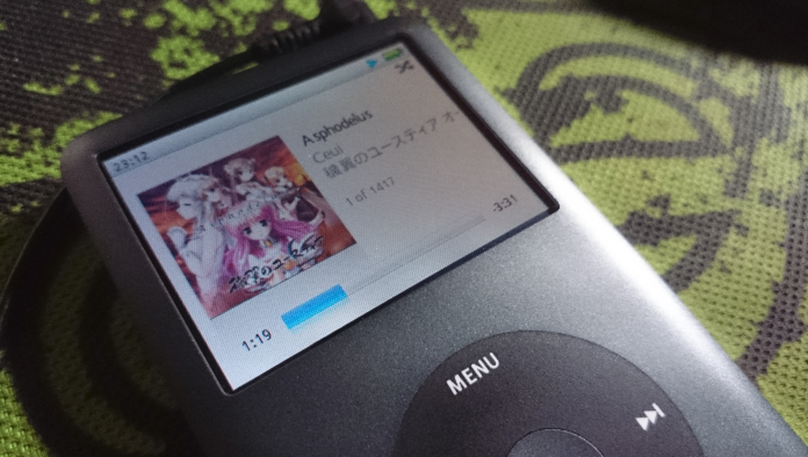
This is what it looks like after flashing.
First off, my iPC is the latest version, probably 6th gen, which has Rockbox support. The others should too. The flashing process is a bit more of a hassle than on older versions, but even so there’s a detailed walkthrough you can follow here.
Windows tutorials are everywhere, I didn’t look at the Mac ones, so I’ll just talk about the problems I hit flashing under Linux.
First, the flashing tool is written in Python, and you need pyUSB. Ubuntu’s store has a python-usb package, but do not install it, it’s useless, import usb.core just throws an error. Just pip install --pre pyusb yourself.
The tutorial mentions that after entering USMboot you need to manually mount the partition, and the mount can take a very very very long time, about 10 minutes (really 10 minutes). Don’t get impatient and yank the device out.
After Rockbox is flashed, the default UI is ugly as hell. Install a theme. The Rockbox utility runs fine on Windows/Mac/Linux and makes installing whatever you want easy.

Personally I recommend this iPC knockoff theme…
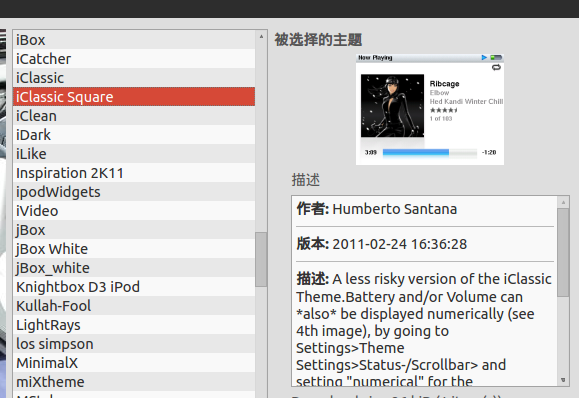
Installing and enabling a theme isn’t hard, picking a Chinese font (UNIFONT) and setting the default language (Simplified Chinese) aren’t hard either. The hard part is that with third-party themes some fonts always show up as tofu boxes!
Two solutions:
- Edit the font cfg file and change the specified font, but the theme layout tends to break.
- Replace the font files the theme uses by default with a Chinese font.
Obviously, any idiot can tell the second one is better.
Rockbox can’t just use any ttf font, you have to generate them yourself. The official font creation tutorial and tools don’t explain in detail how to generate anti-aliased fonts, because the latest Rockbox already supports anti-aliased font rendering, and still using bitmap fonts looks terrible… Here’s a lazy shortcut: someone already made Chinese font packs for the WenQuanYi series, just use those.
The iClassic theme uses these three font names
12-Adobe-Helvetica-Bold.fnt 14-Adobe-Helvetica-Bold.fnt 16-Adobe-Helvetica-Bold.fnt
Based on my testing, 12pt maps well to wqy 12, 14pt to wqy 15, and 16pt to wqy 19. Don’t ask me why, that’s the result of many attempts.
After replacing the fonts, remember to reselect the theme, then pick the main font, then reboot the whole device, and it just works.
One big advantage of Rockbox is perfect support for song transfer from lots of players; on Rhythmbox you can transfer FLAC directly! And the latest Rockbox on iPC doesn’t have the terrifying battery life people talked about early on: 15% drained over two and a half hours with some track skipping, so estimating roughly 15 hours of FLAC playback, which is actually about the same as the ZX1.
Comments are hosted on the Chinese main site. This mirror is read-only.