Compiling and Installing BlueZ 5.43 on Ubuntu 16.04.2
Advertisement
BlueZ 5.43 has better compatibility with BLE devices and fewer bugs. Ubuntu Mate for raspberry 16.04.2 backported it, but the official release didn’t. Fine, whatever, guess I’ll just compile it myself.
wget http://www.kernel.org/pub/linux/bluetooth/bluez-5.43.tar.xz
tar xvf bluez-5.43.tar.xz
cd bluezbluez
sudo apt-get install libusb-dev libdbus-1-dev libglib2.0-dev automake libudev-dev libical-dev libreadline-dev
./configure --prefix=/usr --mandir=/usr/share/man --sysconfdir=/etc --localstatedir=/var
make
sudo make install
That should do it.
Advertisement

If you’re using a Bluetooth 4.0 BLE mouse, you might also need to edit a few other files:
sudo gedit /etc/bluetooth/main.conf
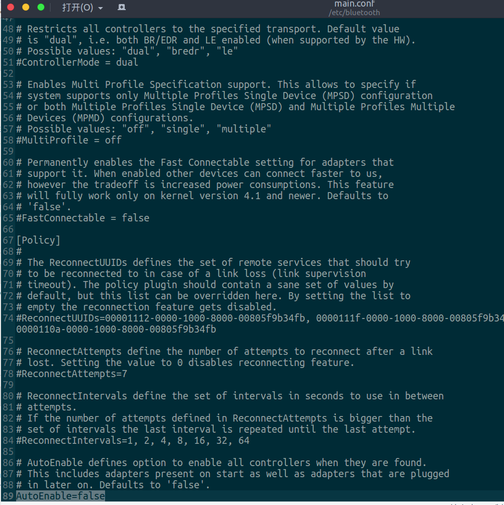
Uncomment [Policy] and the last line:
AutoEnable=true
and change it to true while you’re at it.
Also delete the useless udev rule:
sudo rm /lib/udev/rules.d/50-bluetooth-hci-auto-poweron.rules
Reboot, and the Bluetooth problems should be gone.
Comments are hosted on the Chinese main site. This mirror is read-only.