Fedora 25 quick setup notes
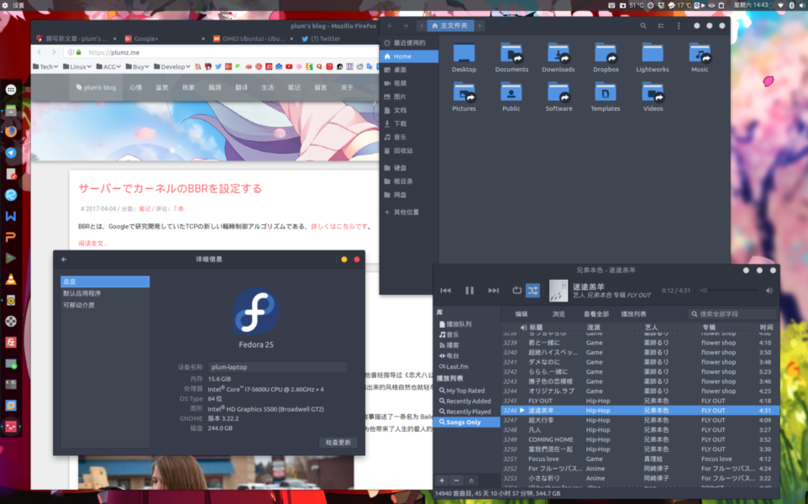
The Fedora 25 here is the Gnome-Shell-based Fedora 25 release.
Verdict first: after setup, Fedora 25 with Gnome-Shell is basically usable — and “basically” is doing a lot of work in that sentence.
Enable RPMFusion
sudo dnf install https://download1.rpmfusion.org/free/fedora/rpmfusion-free-release-$(rpm -E %fedora).noarch.rpm https://download1.rpmfusion.org/nonfree/fedora/rpmfusion-nonfree-release-$(rpm -E %fedora).noarch.rpm
Install gnome-tweak-tool
sudo dnf install gnome-tweak-tool
sudo dnf install dconf-editor
Install arc-theme
sudo dnf install arc-theme
Install vim
sudo dnf install vim
Install SS
sudo dnf copr enable librehat/shadowsocks
sudo dnf install shadowsocks-libev
sudo vim /usr/lib/systemd/system/shadowsocks-libev.service
sudo vim /etc/shadowsocks-libev/config.json
systemctl daemon-reload
systemctl restart  shadowsocks-libev.service
systemctl status  shadowsocks-libev.service
Give DNF a proxy
sudo vim /etc/dnf/dnf.conf
proxy=socks5://127.0.0.1:1080 fastestmirror=true
Install Fedy
curl https://www.folkswithhats.org/installer | sudo bash
Use Fedy to install msfonts, telegram, adobeflash, codecs and a few basic settings. Don’t touch the font tweaks.
cd /etc/yum.repos.d/
sudo rm fedora-multimedia.repo
Install arc-theme-solid
sudo dnf config-manager --add-repo http://download.opensuse.org/repositories/home:Horst3180/Fedora_25/home:Horst3180.repo
sudo dnf install arc-theme-solid
git clone https://github.com/andreisergiu98/arc-flatabulous-theme && cd arc-flatabulous-theme
sudo dnf install autoconf automake pkgconfig gtk3-devel git
./autogen.sh --prefix=/usr --disable-transparency
sudo make install
Install tilix
sudo dnf copr enable heikoada/terminix
sudo dnf install tilix
Install TLP
sudo dnf install kernel-devel
sudo dnf install tlp tlp-rdw
sudo dnf install http://repo.linrunner.de/fedora/tlp/repos/releases/tlp-release-1.0-0.noarch.rpm
sudo dnf --enablerepo=tlp-updates-testing install akmod-tp_smapi akmod-acpi_call kernel-devel
sudo vim /etc/default/tlp
sudo tlp start
sudo dnf copr enable mpmly/thermald
sudo dnf install thermald
sudo systemctl enable thermald
sudo systemctl start thermald
Fix Intel tearing
sudo vim /etc/X11/xorg.conf.d/20-intel.conf
Section "Device"
   Identifier  "Intel Graphics"
   Driver      "intel"
#  Option      "AccelMethod"  "sna"
   Option      "TearFree"    "true"
EndSection
Install freetype font rendering
sudo dnf install freetype-freeworld
Install Ubuntu Fonts
wget http://font.ubuntu.com/download/ubuntu-font-family-0.80.zip\
mkdir /tmp/ubuntu-font-family-0.80\
unzip -j ubuntu-font-family-0.80.zip -d /tmp/ubuntu-font-family-0.80\
rm -f ubuntu-font-family-0.80.zip\
sudo mkdir /usr/share/fonts/ubuntu\
sudo mv /tmp/ubuntu-font-family-0.80/*.ttf /usr/share/fonts/ubuntu\
rm -rf /tmp/ubuntu-font-family-0.80\
cd /usr/share/fonts/ubuntu\
ttmkfdir > fonts.dir\
fc-cache -fv
Install WenQuanYi
sudo dnf install wqy-microhei-fonts wqy-zenhei-fonts wqy-bitmap-fonts
Now tune font rendering, aiming for Ubuntu
sudo gedit /etc/fonts/conf.avail/69-language-selector-zh-cn.conf
<?xml version="1.0"?>
<!DOCTYPE fontconfig SYSTEM "fonts.dtd">
<fontconfig>
  <match target="pattern">
    <test qual="any" name="family">
      <string>serif</string>
    </test>
    <edit name="family" mode="prepend" binding="strong">
      <string>Bitstream Vera Serif</string>
      <string>HYSong</string>
      <string>AR PL UMing CN</string>
      <string>AR PL UMing HK</string>
      <string>AR PL ShanHeiSun Uni</string>
      <string>AR PL New Sung</string>
      <string>WenQuanYi Bitmap Song</string>
      <string>AR PL UKai CN</string>
      <string>AR PL ZenKai Uni</string>
    </edit>
  </match>
  <match target="pattern">
    <test qual="any" name="family">
      <string>sans-serif</string>
    </test>
    <edit name="family" mode="prepend" binding="strong">
      <string>Bitstream Vera Sans</string>
      <string>WenQuanYi Micro Hei</string>
      <string>WenQuanYi Zen Hei</string>
      <string>Droid Sans Fallback</string>
      <string>HYSong</string>
      <string>AR PL UMing CN</string>
      <string>AR PL UMing HK</string>
      <string>AR PL ShanHeiSun Uni</string>
      <string>AR PL New Sung</string>
      <string>AR PL UKai CN</string>
      <string>AR PL ZenKai Uni</string>
    </edit>
  </match>
  <match target="pattern">
    <test qual="any" name="family">
      <string>monospace</string>
    </test>
    <edit name="family" mode="prepend" binding="strong">
      <string>Bitstream Vera Sans Mono</string>
      <string>WenQuanYi Micro Hei Mono</string>
      <string>WenQuanYi Zen Hei Mono</string>
      <string>Droid Sans Fallback</string>
      <string>HYSong</string>
      <string>AR PL UMing CN</string>
      <string>AR PL UMing HK</string>
      <string>AR PL ShanHeiSun Uni</string>
      <string>AR PL New Sung</string>
      <string>AR PL UKai CN</string>
      <string>AR PL ZenKai Uni</string>
    </edit>
  </match>
</fontconfig>
sudo vim /etc/fonts/local.conf
<?xml version='1.0'?>
<!DOCTYPE fontconfig SYSTEM 'fonts.dtd'>
<fontconfig>
    <match target="font">
        <edit name="antialias" mode="assign">
            <bool>true</bool>
        </edit>
        <edit name="autohint" mode="assign">
            <bool>false</bool>
        </edit>
        <edit name="embeddedbitmap" mode="assign">
            <bool>false</bool>
        </edit>
        <edit name="hinting" mode="assign">
            <bool>true</bool>
        </edit>
        <edit name="hintstyle" mode="assign">
            <const>hintslight</const>
        </edit>
        <edit name="lcdfilter" mode="assign">
            <const>lcdlight</const>
        </edit>
        <edit name="rgba" mode="assign">
            <const>rgb</const>
        </edit>
        <edit name="embeddedbitmap" mode="assign">
            <bool>false</bool>
        </edit>
    </match>
</fontconfig>
echo "Xft.lcdfilter: lcddefault" > ~/.Xresources

sudo vim /etc/fonts/conf.d/65-0-nonlatin-custom.conf
<?xml version="1.0" encoding="UTF-8"?>
<!DOCTYPE fontconfig SYSTEM "fonts.dtd">
<fontconfig>
    <match>
        <test name="lang" compare="contains">
            <string>zh-cn</string>
        </test>
        <test name="family">
            <string>monospace</string>
        </test>
        <edit name="family" mode="prepend">
            <string>Noto Sans Mono CJK SC</string>
        </edit>
    </match>

    <match>
        <test name="lang" compare="contains">
            <string>zh-tw</string>
        </test>
        <test name="family">
            <string>monospace</string>
        </test>
        <edit name="family" mode="prepend">
            <string>Noto Sans Mono CJK TC</string>
        </edit>
    </match>

    <match>
        <test name="lang" compare="contains">
            <string>jp</string>
        </test>
        <test name="family">
            <string>monospace</string>
        </test>
        <edit name="family" mode="prepend">
            <string>Noto Sans Mono CJK JP</string>
        </edit>
    </match>

    <match>
        <test name="lang" compare="contains">
            <string>zh-cn</string>
        </test>
        <test name="family">
            <string>serif</string>
        </test>
        <edit name="family" mode="prepend">
            <string>Noto Sans CJK SC</string>
        </edit>
    </match>

    <match>
        <test name="lang" compare="contains">
            <string>zh-tw</string>
        </test>
        <test name="family">
            <string>serif</string>
        </test>
        <edit name="family" mode="prepend">
            <string>Noto Sans CJK TC</string>
        </edit>
    </match>

    <match>
        <test name="lang" compare="contains">
            <string>jp</string>
        </test>
        <test name="family">
            <string>serif</string>
        </test>
        <edit name="family" mode="prepend">
            <string>Noto Sans CJK JP</string>
        </edit>
    </match>

    <match>
        <test name="lang" compare="contains">
            <string>zh-cn</string>
        </test>
        <test name="family">
            <string>sans-serif</string>
        </test>
        <edit name="family" mode="prepend">
            <string>Noto Sans CJK SC</string>
        </edit>
    </match>

    <match>
        <test name="lang" compare="contains">
            <string>zh-tw</string>
        </test>
        <test name="family">
            <string>sans-serif</string>
        </test>
        <edit name="family" mode="prepend">
            <string>Noto Sans CJK TC</string>
        </edit>
    </match>

    <match>
        <test name="lang" compare="contains">
            <string>jp</string>
        </test>
        <test name="family">
            <string>sans-serif</string>
        </test>
        <edit name="family" mode="prepend">
            <string>Noto Sans CJK JP</string>
        </edit>
    </match>
</fontconfig>
sudo gedit ~/.fonts.conf
<?xml version='1.0'?>
<!DOCTYPE fontconfig SYSTEM 'fonts.dtd'>
<fontconfig>
 <match target="font">
  <edit mode="assign" name="rgba">
   <const>rgb</const>
  </edit>
 </match>
 <match target="font">
  <edit mode="assign" name="hinting">
   <bool>true</bool>
  </edit>
 </match>
 <match target="font">
  <edit mode="assign" name="autohint">
   <bool>true</bool>
  </edit>
 </match>
 <match target="font">
  <edit mode="assign" name="hintstyle">
   <const>hintfull</const>
  </edit>
 </match>
 <match target="font">
  <edit mode="assign" name="lcdfilter">
   <const>lcddefault</const>
  </edit>
 </match>
 <match target="font">
  <edit mode="assign" name="antialias">
   <bool>true</bool>
  </edit>
 </match>
  <match target="pattern">
    <test qual="any" name="family">
      <string>serif</string>
    </test>
    <edit name="family" mode="prepend" binding="strong">
      <string>Bitstream Vera Serif</string>
      <string>HYSong</string>
      <string>AR PL UMing CN</string>
      <string>AR PL UMing HK</string>
      <string>AR PL ShanHeiSun Uni</string>
      <string>AR PL New Sung</string>
      <string>WenQuanYi Bitmap Song</string>
      <string>AR PL UKai CN</string>
      <string>AR PL ZenKai Uni</string>
    </edit>
  </match>
  <match target="pattern">
    <test qual="any" name="family">
      <string>sans-serif</string>
    </test>
    <edit name="family" mode="prepend" binding="strong">
      <string>Bitstream Vera Sans</string>
      <string>WenQuanYi Micro Hei</string>
      <string>WenQuanYi Zen Hei</string>
      <string>Droid Sans Fallback</string>
      <string>HYSong</string>
      <string>AR PL UMing CN</string>
      <string>AR PL UMing HK</string>
      <string>AR PL ShanHeiSun Uni</string>
      <string>AR PL New Sung</string>
      <string>AR PL UKai CN</string>
      <string>AR PL ZenKai Uni</string>
    </edit>
  </match>
  <match target="pattern">
    <test qual="any" name="family">
      <string>monospace</string>
    </test>
    <edit name="family" mode="prepend" binding="strong">
      <string>Bitstream Vera Sans Mono</string>
      <string>WenQuanYi Micro Hei Mono</string>
      <string>WenQuanYi Zen Hei Mono</string>
      <string>Droid Sans Fallback</string>
      <string>HYSong</string>
      <string>AR PL UMing CN</string>
      <string>AR PL UMing HK</string>
      <string>AR PL ShanHeiSun Uni</string>
      <string>AR PL New Sung</string>
      <string>AR PL UKai CN</string>
      <string>AR PL ZenKai Uni</string>
    </edit>
  </match>
</fontconfig>
Set the fonts to
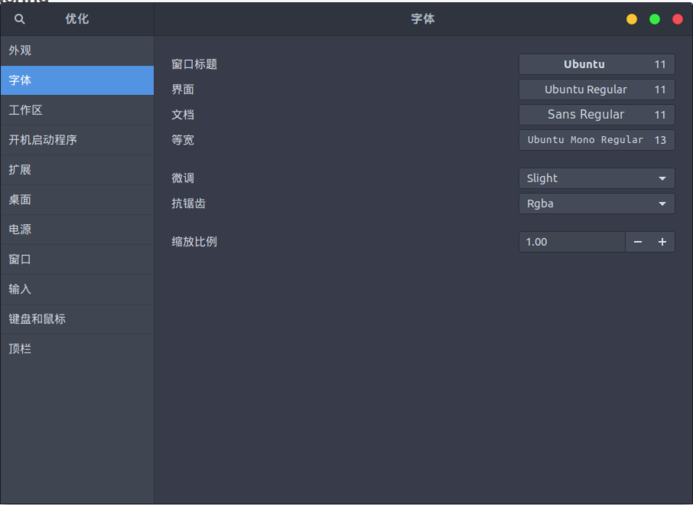
To install the extension
sudo dnf copr enable region51/chrome-gnome-shell
sudo dnf install chrome-gnome-shell
Install misc software
sudo dnf install leafpad vlc smplayer filezilla remmina easytag terminator
Mount drives
export LANG=en_US
xdg-user-dirs-gtk-update
export LANG=zh_CN
ln -s /HDD/Documents/ ~/\
ln -s /HDD/Downloads/ ~/\
ln -s /HDD/Music/ ~/\
ln -s /HDD/Pictures/ ~/\
ln -s /HDD/Videos/ ~/\
ln -s /HDD/Dropbox/ ~/\
ln -s /HDD/Software/ ~/
Enable HiRes support
sudo vim /etc/pulse/daemon.conf
pulseaudio -k
pulseaudio --start
default-sample-format = s24le
default-sample-rate = 192000
alternate-sample-rate = 96000
Install BT-SYNC
sudo vim /etc/yum.repos.d/resilio-sync.repo
[resilio-sync]
name=Resilio Sync $basearch
baseurl=http://linux-packages.resilio.com/resilio-sync/rpm/$basearch
enabled=1
gpgcheck=1
sudo rpm --import https://linux-packages.resilio.com/resilio-sync/key.asc
sudo yum install resilio-sync
sudo systemctl enable resilio-sync
sudo vim /usr/lib/systemd/user/resilio-sync.service
WantedBy=multi-user.target” to “WantedBy=default.target”.
systemctl --user enable resilio-sync
systemctl --user start resilio-sync
Install icon theme
sudo dnf copr enable dirkdavidis/papirus-icon-theme
sudo dnf install papirus-icon-theme
Install Emoji theme
sudo dnf copr enable heffer/emojione
sudo dnf install emojione-color-fonts
Beef up Firefox cache
1. open up about:config (type it into the url bar)
2. type browser.cache into the filter bar at the top.
3. Find browser.cache.disk.enable and set it to false (by double clicking on it).
4. set browser.cache.memory.enable to true
5. create a new preference by right clicking anywhere, hit New, and choose Integer.
6. Call the new preference browser.cache.memory.capacity and hit OK.
7. In the next window, where it asks for the number of kilobytes you want to assign to the cache, just enter -1 to tell Firefox to dynamically determine the cache size.
Install the “囧 face” input method
sudo dnf install fcitx fcitx-cloudpinyin fcitx-libpinyin fcitx-configtool
gsettings set org.gnome.settings-daemon.plugins.keyboard active false
sudo vim /etc/environment
Add Wayland support
export GTK_IM_MODULE=fcitx
export QT_IM_MODULE=fcitx
export XMODIFIERS=@im=fcitx
Add the FZUG repo for the occasional Deadbeef install
sudo dnf config-manager --add-repo=http://repo.fdzh.org/FZUG/FZUG.repo
sudo dng install deadbeef
Install ZSH
sudo dnf install zsh
sh -c "$(wget https://raw.github.com/robbyrussell/oh-my-zsh/master/tools/install.sh -O -)"
wget --no-check-certificate https://raw.githubusercontent.com/seebi/dircolors-solarized/master/dircolors.ansi-dark
mv dircolors.ansi-dark .dircolors
eval `dircolors ~/.dircolors`
DEFAULT_USER="plum"
ZSH_THEME="agnoster"
COMPLETION_WAITING_DOTS="true"
alias lsa="ls -A"
eval `dircolors ~/.dircolors`
Install add-ons
Firefox add-ons: https://addons.mozilla.org/zh-CN/firefox/addon/gnome-shell-integration/reviews/?src=api
Install https://extensions.gnome.org/extension/595/autohide-battery/ https://extensions.gnome.org/extension/759/better-volume-indicator/ https://extensions.gnome.org/extension/779/clipboard-indicator/ https://extensions.gnome.org/extension/307/dash-to-dock/ https://extensions.gnome.org/extension/1011/dynamic-panel-transparency/ https://extensions.gnome.org/extension/2/move-clock/ https://extensions.gnome.org/extension/1128/hide-activities-button/ https://extensions.gnome.org/extension/261/kimpanel/ https://extensions.gnome.org/extension/1097/keep-awake/ https://extensions.gnome.org/extension/36/lock-keys/ https://extensions.gnome.org/extension/55/media-player-indicator/ https://extensions.gnome.org/extension/750/openweather/ https://extensions.gnome.org/extension/708/panel-osd/ https://extensions.gnome.org/extension/723/pixel-saver/ https://extensions.gnome.org/extension/72/recent-items/ https://extensions.gnome.org/extension/800/remove-dropdown-arrows/ https://extensions.gnome.org/extension/1112/screenshot-tool/ https://extensions.gnome.org/extension/1145/sensory-perception/ https://extensions.gnome.org/extension/906/sound-output-device-chooser/ https://extensions.gnome.org/extension/355/status-area-horizontal-spacing/ https://extensions.gnome.org/extension/1031/topicons/ https://extensions.gnome.org/extension/131/touchpad-indicator/ https://extensions.gnome.org/extension/19/user-themes/
Absolutely do not install: https://extensions.gnome.org/extension/517/caffeine/ Use this instead: https://github.com/jenspfahl/KeepAwake
Some Firefox tweaks
about:config
gfx.font_rendering.fontconfig.fontlist.enabled   -> false
rowser.tabs.remote.autostart   -> true
layers.offmainthreadcomposition.testing.enabled  -> true
dom.ipc.processCount   -> 16
browser.tabs.remote.force-enable -> true
Other
- Wayland is slower than Xorg
- Gnome-shell themes will slow you down — use the stock ones if you can
- Fedora’s DNF isn’t as fast as Ubuntu’s
- Go fullscreen whenever possible; for multiple programs, make yourself extra workspaces, drag them in, then switch between them — that’s the whole Gnome-shell design philosophy
- With Dock to dash’s smart auto-hide, keep the dock collapsed outside of fullscreen desktop or it’ll still slow you down
- Just bend over and take Gnome-shell’s design philosophy, don’t fight it
- Don’t get it? I didn’t write this for you, I just need to be able to read it
- If you copy-paste this article onto your own site, fuck you and your whole family, thanks
Comments are hosted on the Chinese main site. This mirror is read-only.