Tweaking PulseAudio Sound Quality on Linux
I’ve got a Sony PHA-1 portable amp, and the thing doubles as an external sound card. Most of the time it’s hooked up to my laptop so I don’t have to put up with the nasty electrical noise coming out of the laptop’s own output. It does that job well, and in DAC mode Linux picks it up as a separate sound card without any fuss, so I never bothered looking into it. Today I was bored and flipped through the manual, and found an explanation of how the PHA-1 is used under Mac OSX.
It’s in Japanese but I could follow it — turns out after it’s recognized you still need to set the frequency to 96Hz. I knew where that option was back when I was using the PHA-1 with a Surface Pro 3, so… does Linux have one?
Checked the manual, and sure enough it does. I haven’t touched ALSA much lately; these days it’s mostly PulseAudio.
pacmd list-sinks | grep sample
This shows the current sample rate of the sound device. Most of them default to sample spec: s16le 2ch 41000Hz, so you need to change it.
sudo vim /etc/pulse/daemon.conf
First, comment out the existing lines like resample-method = speex-float-1, then add these by hand:
resample-method = src-sinc-medium-quality
default-sample-format = s24le
default-sample-rate = 96000
s24le means 24-bit, and 96000 is of course 96Hz. The exact values depend on your card — the Sony PHA-1 supports 24-bit 96Hz so this works, while my Asus Xonar Essence STX at home does 24-bit 192Hz, so you’d change the second one to 192000.
pulseaudio -k
pulseaudio --start
Restart PulseAudio and it takes effect.
Worth mentioning: src-sinc-medium-quality isn’t the highest setting. That’s src-sinc-best-quality. But if you enable it you’ll find the CPU usage spikes:
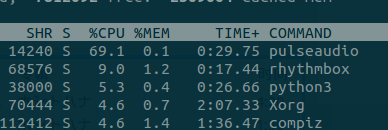
And you get distortion on top of that. According to the relevant wiki for Archlinux and the PulseAudio docs, src-sinc-best-quality still has plenty of problems, so just stick with src-sinc-medium-quality…
So did the sound change? I’ve been grinding PSV lately and barely listening to anything… and of course this only really pays off with HiRes audio sources anyway…
And if you run into trouble with this setup, you can always just revert the config…
The key thing is the resample-method. If medium distorts on certain sounds, switch to speex-float-5. The 0–10 scale goes from bad to good audio quality; I’m confident your machine can’t handle level 10.
The config I ended up using:
resample-method = speex-float-5
default-sample-format = s24le
default-sample-rate = 96000
One last note: if you’re getting distortion with Bluetooth headphones, it’s probably related to this config. Try swapping Speex-float-5 for soxr-vhq and the problem should go away.
Comments are hosted on the Chinese main site. This mirror is read-only.