Fixing Excessive Cell Standby Battery Drain on Android 5.0
No idea if this still works. If it doesn’t, or if you’re on Android 7.1.1, check here: https://plumz.me/archives/5167/
Don’t know if the Great Firewall was putting on a show lately or what, but yesterday I noticed my Nexus 6 was just sitting at home and Cell network alone was eating 60% of my battery, way more than Shadowsocks and the screen. Took a closer look and there was always an exclamation mark on the network signal — exclamation mark with Wi-Fi, exclamation mark without Wi-Fi. Everyone knows why the exclamation mark shows up, and I was running Shadowsocks too, even tried connecting straight to a router with a proxy, and it was still there.
Searched Reddit, and the foreigners said excessive cell network drain is related to poor signal quality — which is obviously not normal here. China Unicom’s signal can be shit, but not this shit. The only possibility is that the exclamation mark makes Android unilaterally decide my signal is bad. So the only option was to get rid of that exclamation mark.
After digging around, I found some folk remedy. No idea how it works, but it cured the problem outright.
First, tap your profile picture in the top right and choose Add User.
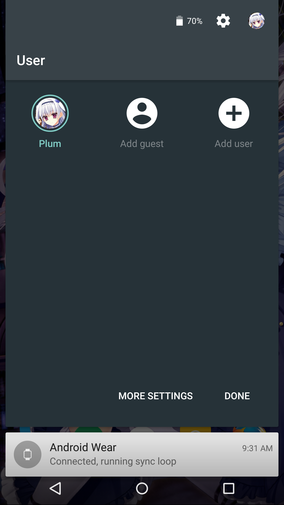
You’ll switch to the new user, get asked to sign in, and it’ll try to connect to the internet to set up a Google account. So right when it says “Connecting,” long-press the power button and choose to shut down.
Boot it back up and the exclamation mark is gone… gone… g-o-n-e.
Finally go into Settings → Users, tap the gear next to the new user you created, and delete it.
Problem solved. No idea why, but it’s solved…

The method above has unknown principles. Here’s a more reliable one:
Enable USB debugging, connect to your PC, install the adb drivers, and run:
adb devices
Make sure it’s connected, then run:
adb shell settings put global captive_portal_detection_enabled 0
Reboot the phone. No root required.
Comments are hosted on the Chinese main site. This mirror is read-only.