Fixing the Windows 10 Update Error
I’ve been using Windows 10 a lot lately. Personally I’m looking forward to Red Stone 4 and hope it ships soon.
Why Windows 10? Because Linux still doesn’t handle fractional scaling well, and Windows 10 does it best. The one with the best shot at supporting it is obviously GNOME Shell.
But using GNOME Shell feels like this:

That doesn’t mean Windows 10 is problem-free—there are bugs, sure, but compared to the pile of crap that is GNOME Shell it’s way better.
Today I ran into a particularly stupid bug: when updating, it told me I had no permission…
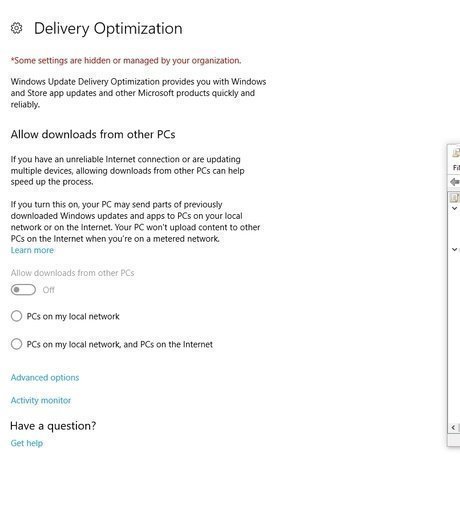
“Some settings are hidden or managed by your organization”
I don’t know what this error is called in Chinese, but it’s basically some settings being hidden by your organization or workgroup or whatever…
The fix is via Group Policy.
Start - Run - gpedit.msc
Computer configuration > Administrative Templates > Windows Components > Windows Update > Configure Automatic Updates.
Set this to disabled, then log out and log back in.
The cause is probably some optimizer software I used, including shutup10. From now on I’ll stick to dism+.
Source: Easily Fix Some Settings are Hidden or Managed by Your Organization
Comments are hosted on the Chinese main site. This mirror is read-only.