Install and Set Nemo as the Default Desktop Manager on Ubuntu 18.04
Advertisement
I installed Unity as the default DE on Ubuntu 18.04, but Nautilus really sucks at desktop management. So I decided to make a change.

Advertisement
First, install the Nemo file manager.
sudo add-apt-repository ppa:webupd8team/nemo3
Even though this PPA doesn’t support Ubuntu 18.04 yet, you can still use it by changing it to “artful”.
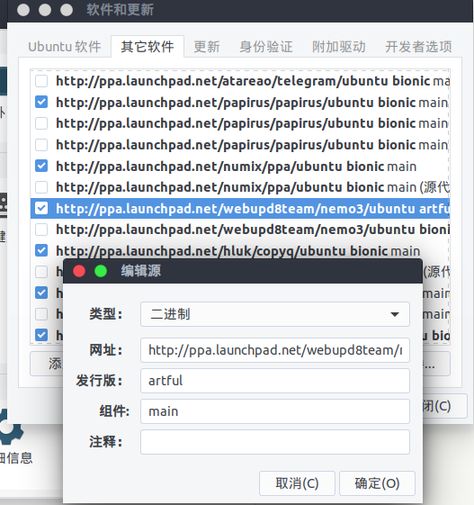
then:
sudo apt update
sudo apt install nemo
Next thing to do is set Nemo as the default file manager and desktop manager.
gsettings set org.gnome.desktop.background show-desktop-icons false
xdg-mime default nemo.desktop inode/directory application/x-gnome-saved-search
Add “nemo-desktop” to the system autostart and reboot.
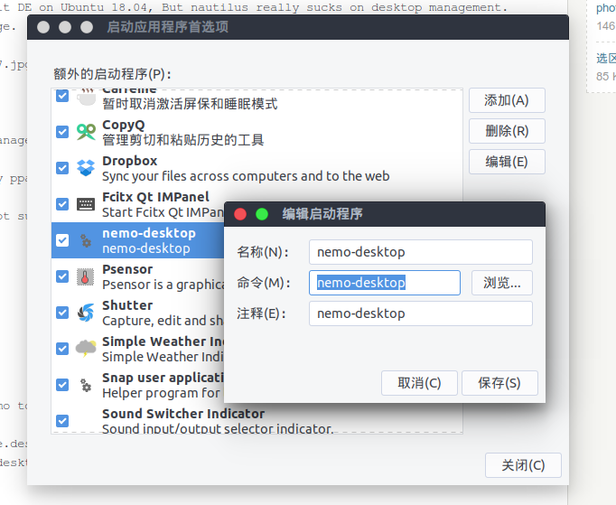
Then the future is in your hands.

Comments are hosted on the Chinese main site. This mirror is read-only.