Enabling Hardware-Accelerated Video in Chrome on Linux
Advertisement
Firefox doesn’t seem to support acceleration yet, so Chrome it is. At least it uses less battery after acceleration?

Advertisement
First, update your Chrome version:
sudo add-apt-repository ppa:saiarcot895/chromium-dev
sudo apt-get update
sudo apt install chromium-browser
Then make sure the relevant packages are installed:
sudo apt install i965-va-driver
sudo apt install vdpau-va-driver
Next, open your freshly updated Chrome and turn on the following flags:
chrome://flags/#enable-accelerated-video
While you’re at it, you can also enable Picture-in-Picture:
chrome://flags/#enable-picture-in-picture
chrome://flags/#enable-surfaces-for-videos
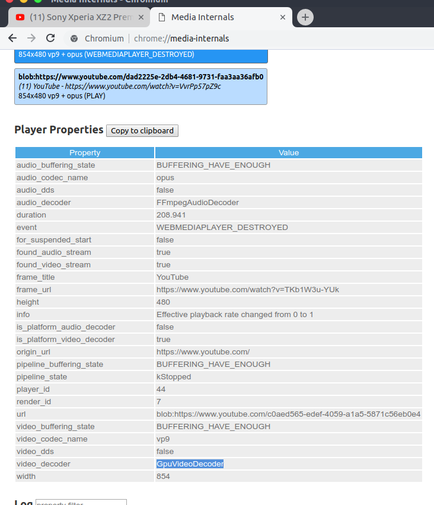
Restart Chrome and check whether hardware acceleration is supported:
chrome://media-internals
Picture-in-Picture works too — double right-click on the video and pick “Picture in picture”.

Links: https://www.omgubuntu.co.uk/2018/07/enable-google-chrome-picture-in-picture https://www.linuxuprising.com/2018/08/how-to-enable-hardware-accelerated.html
Comments are hosted on the Chinese main site. This mirror is read-only.