Fixing the Baidu Translate Engine in VNR
VNR: Visual Novel Reader, a hooking tool that grabs text from visual novels and immediately translates and displays it.
Granted, I haven’t touched it in ages, but VNR is still my go-to recommendation for anyone who wants to learn Japanese and play visual novels in the original language.
Recently someone told me the thing doesn’t work anymore.
VNR hasn’t been updated in years, but it always kept working. And the only translation engine in it that actually works is Baidu Translate — its Japanese output is the most reliable; the rest of the features don’t matter. Problem is, the Baidu Translate engine is dead now.
Looked around online, and apparently the reason is:
Baidu Translate’s API switched from an http URL to https!
Holy shit, Baidu actually uses https now.
The fix is simple enough: just change the URL. And VNR itself is written in Python.
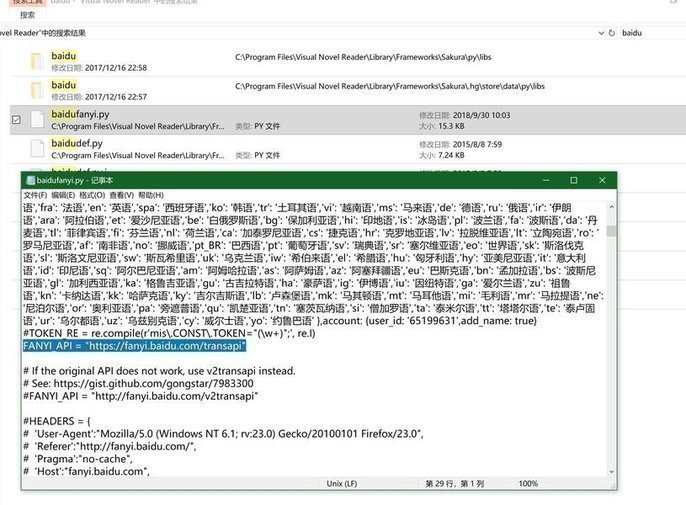
Open your VNR folder, search for baidu. Find baidufanyi.py, open it in Notepad or whatever big-shot editor you use, and you’ll see:
FANYI_API = "http://fanyi.baidu.com/transapi"
Just change the address to the https one.
And you can go back to happily hooking machine translation. At least it’s more reliable than Mosaic, right?
So I opened a game to test it…
And it doesn’t work!
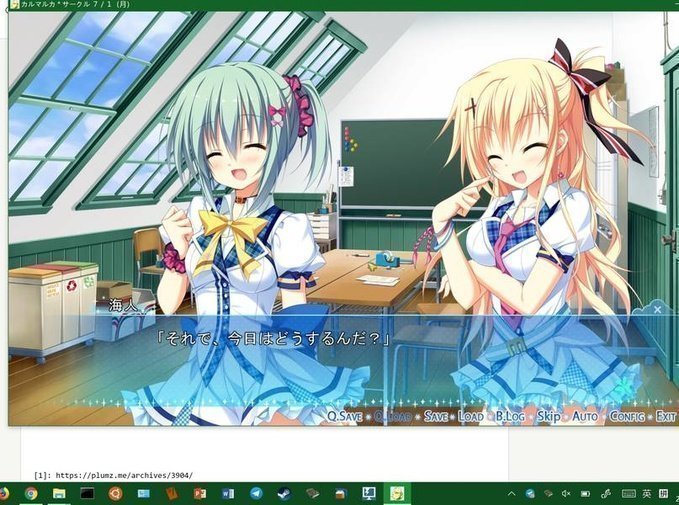
Right, let me do the math here — it’s probably the stupid Windows 10 1809 upgrade’s fault again. Whatever, if you want it working, reinstall. The problem’s solved anyway; I can’t be bothered with VNR anymore.
Comments are hosted on the Chinese main site. This mirror is read-only.