Recalibrating Your ThinkPad Battery on Linux with TLP
ThinkPad batteries are lithium-ion, so capacity loss over time is normal.
But my brand-new replacement battery dropped to 97% in a month, and it won’t charge past 99%. That’s definitely fucked up.
I remember there used to be a ThinkPad Windows tool for recalibrating the battery — drain it completely, charge it back up, let it re-estimate capacity. Except I’m on Linux. And after I dug up a Windows To Go drive and booted into Windows, that ThinkPad tool was gone anyway, so I had no idea how to calibrate.
Good thing TLP exists on Linux and can recalibrate the battery. One command, that’s it.

First install TLP. There are plenty of ways, look it up yourself.
Then plug in the laptop, open a terminal, and type
sudo tlp recalibrate
TLP will now force the battery to discharge. Do whatever you want meanwhile, just keep it plugged in and don’t close that terminal — let the battery drain all the way down to 0%, completely dead. Once it’s empty, a new charge cycle starts; just wait for it to fill up.
This actually works in practice, and it’s more thorough than draining the battery yourself, because when you do it manually the computer keeps a little reserve as a safeguard.
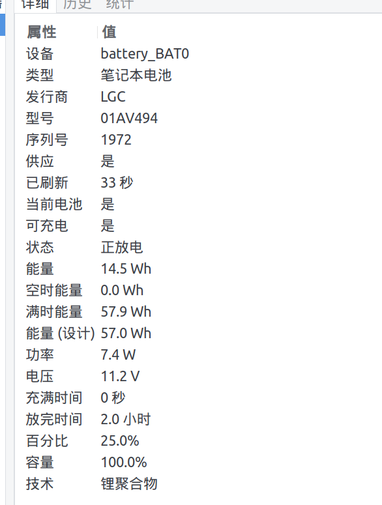
After recalibrating, the battery was back to normal and even showed slightly more than its rated capacity. That’s how a new battery should look.
Comments are hosted on the Chinese main site. This mirror is read-only.