Enabling TLS 1.3 on Your Site
Enabling TLS 1.3 support on your site gets you better security. A while back, if you wanted TLS 1.3, you had to compile the latest OpenSSL yourself and then build nginx with the corresponding support turned on. These days you don’t have to do any of that.

On Ubuntu Server, you just add the PPA.
sudo add-apt-repository ppa:ondrej/nginx
sudo apt-get update
sudp apt-get upgrade
Then your nginx and OpenSSL packages are updated to versions that support TLS 1.3.
That’s not enough on its own, though — you need to add this line to your site’s nginx config:
ssl_protocols TLSv1.1 TLSv1.2 TLSv1.3;
Assuming your site is on https, of course. See the earlier method for that.
Restart the service once you’ve added it.
Then you’ll see TLS 1.3 in your site’s connection info.
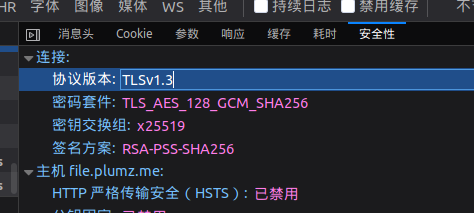
This blog has TLS 1.3 enabled too. No idea what good it actually does, but better than not having it, right?
This blog now runs a limited-time temporary file storage service:
Go ahead and try it out. Speeds are fast on China Telecom, average on China Unicom.
Comments are hosted on the Chinese main site. This mirror is read-only.